Flew a couple of GA flights in the 172 today with the Aero. I was quite pleased and the sim was gorgeous. One advantage the Aero has is like the Reverb G2, it too can be set as the default Open XR runtime. I did one flight without and one flight with using Open XR. Performed definitely better with the Open XR runtime. Still need Steam VR running for the tracking. The cockpit was just gorgeous. Aero will definitely be my only VR driver now.
Hi…are you accomplishing setting OpenXR as default, by unticking “OpenVR” in the Varjo Base software? If yes, and if OpenVR is left enabled, will MSFS 2020 choose the Steam OpenVR vs. OpenXR, and therefore perform less optimally?
I came from a Quest 2, and noticed that when I launched MSFS 2020, the Oculus app would launch. There is a setting in the Oculus app to employ its own version of OpenXR, but is not set as active, in citing the Varjo OpenXR version. I have since just disabled the Oculus app to avoid any issues.
Thank you in advance for any advice.
No all I did was put a tick mark in the Open XR tab, and Steam VR then gave me a message that is was no longer the default runtime for Open XR and offered me to set it back or to dismiss the message which I dismissed. Then I flew the same flight again and it was apparent fairly quickly I was getting better performance so I am sure the sim was using Open XR. But also of course as I mentioned Steam VR is still required to be running as the Aero uses it for tracking.
MSFS uses OpenXR regardless. Its just a case of which OpenXR.. Steams or the Varjo one. Looks like the Varjo one suits the Aero better (not completely surprising).
1 Like
Indeed,
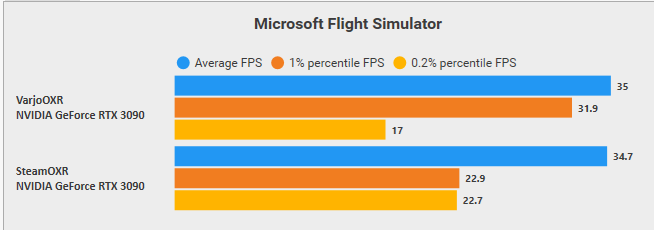
The Aero, since the first time I put it on, has seemed far, far smoother at the same frame rate than any of the previous iterations of drivers and settings and tweaks that I have tested with my G2. 35 FPS compared to the same with the G2 seems almost like motion reprojection is turned on.
Then last night I ran a CapFrameX test and I see now why. I don’t know how, but the %1 lows are crazy good compared to anything I have ever seen out of the G2 with either WMR or Steam runtimes when using the Aero with the Varjo OXR runtime. When I tested with the Steam OXR runtime, the frame rate was the same, but it “felt” more like what I was used to in the G2.
The Aero just feels so smooth, even at 30-35FPS.
1 Like
I emailed them and all they said is that since i ordered 10/29/21, i should get mine between Feb to March timeframe.
where do you actually put your steam VR base station ? and do you need the steam VR app to set it up or now ? Can the Steam VR base station go on one side of my desktop rather than mounted somewhere on a corner wall ?
I disagree. Steam is needed if you bought the game from Steam, but you don’t have to launch SteamVR to use MSFS. In fact, if I manually launch SteamVR along with Varjo Base (VB), I’m getting an error message. However, VB appears to launch some SteamVR libraries in the background to do the tracking.
My startup procedure for my MSFS bought via Steam is: connect the Aero, launch VB, then open Steam (not SteamVR) to launch MSFS. Then I close both the Steam window and the VB window, which will send VB to the status bar. In VB, I have both OpenVR and OpenXR checked.
1 Like
Was the scenery also gorgeous? Much shimmering on buildings/tress/airports?
I did not say it required Steam, only Steam VR. Varjo Base launches Steam VR in the background. How else would you get tracking in the Aero?
I have mine diagonal, one on left front and one on right rear. Probably around 15ftn apart. Some get by for just flight sims with only one base station.
Varjo users - we have a gift for you just in time for the week-end! The OpenXR Toolkit now supports the Varjo Aero!

A new version, 0.9.6 is available for download.
8 Likes
Very nice thank you!!
Awesome work!
How do you think a 3080ti would fair? The 3090 is just not available. Even if it were, folks are asking $3000 for them. Just not going to happen.
I can probably get a (fairly) decent price for my 6900XTXH water-cooled Aorus.
Sure, 3080TI is within 5% same performance as 3090. Only your wallet will see the difference between a 3090 and a 3080TI 
I feel I have the duty to say “beware” to potential buyers of the Aero. First, I acknowledge that everyone’s head shapes are different, and eyesights vary. This is probably why the Aero wasn’t great for me.
Sadly, I returned mine, as it didn’t meet the high expectations created by the YouTubers and Varjo themselves. Certain YouTuber influencers rave about it (not surprisingly, since they’re biased for several reasons). And Varjo talk about “edge to edge clarity”. This was certainly NOT reality for me.
I returned mine not due to the widely discussed distortion (which however for me is a bit annoying in the middle, when you move you head), but mainly due to the severe lack of the claimed edge to edge clarity, and the poor vertical AND horizontal field of view. The poor horizontal FOV around my nose creates a prominent visible dark area, which is a serious distraction for me.
The clarity was not as advertised. It’s good, but there IS a very noticeable reduction in sharpness from about 40% outwards. Don’t imagine it’s the same as a monitor. And don’t be lured by the “you can’t even see the pixels!” lines. The reason you can’t see the pixels is because of a lack of sharpness! Very near the edges the picture quality becomes a poor splodge of light, close to where the edge distortion occurs.
Clearly its subjective, but these factors on top of the poor comfort level, lack of sound, chromatic aberration, the fan drying my eyes out, and the lack of motion smoothing, meant a refund was appropriate.
In the meantime my G2 has a better FOV, motion smoothing, comparable sharpness in the centre, no distortion, no chromatic aberration, built in sound, is proven to be able to use lens inserts, is lighter, and for me, is much more comfortable.
BTW, I did try adjusting the headset in all ways, and I did follow the Discord channel for recommendations. I wanted it to work out. I even created a survey to find out if the distortion and chromatic aberration people were reporting was related to IPD (it appears not!).
To balance the above, I do think the Aero has much better colour and contrast (you can for example see details in the clouds that are hidden with a G2), and for me the black level actually is slightly better than the G2’s. And of course the sharpness is higher for more of the display. I’m not an Aero hater at all, I just feel I have to counter the hype going on and say that for some, it’s not that great compared to the price. And I can afford the Aero, it’s not about money at all.
I may reconsider the device if they manage to get motion smoothing working in MSFS, and the chromatic aberration improved, but I doubt the distracting nose area can be fixed.
To those who love their Aero (and they appear to be the majority) - I’m pleased for you (but a little envious!).
6 Likes
Did you try using OpenXR with the Aero in MSFS 2020?
Did you try using OpenXR with the Aero in MSFS 2020?
You mean the OpenXR Toolkit? No, it wasn’t Aero compatible at the time. It wouldn’t have changed much though.
No not the toolkit, just toggling the Aero to use Open XR in the Aero software. I found performance to be better in MSFS 2020 by doing this.