Please use this thread to discuss the NVIDIA GeForce Game Ready Driver version 576.28.
Release Highlights
This new Game Ready Driver resolves several issues which were found in the previous release.
Fixed Gaming Bugs
- [RTX 50 series] [Black Myth]: The game will randomly crash when Wukong transforms [5231902]
- [RTX 50 series] [Red Dead Redemption 2]: The game crashes shortly after starting in DX12 mode. No issue in Vulkan mode [5137042]
- [RTX 50 series] [Horizon Forbidden West]: The game freezes after loading a save game [5227554]
- [RTX 50 series] Grey screen crashes with multiple monitors [5239138]
- [RTX 50 series] [Dead Island 2]: The game crash after updating to GRD 576.02 [5238676]
- [RTX 50 series] [Resident Evil 4 Remake]: Flickering background textures [5227655]
- [RTX 50 series] Some games may display shadow flicker/corruption after updating to GRD 576.02 [5231537]
- [RTX 50 series] Some games may crash while compiling shaders after updating to GRD 576.02 [5230492]
- [Forza Horizon 5]: Lights flicker at nighttime [5038335]
- [Forza Motorsport]: Track corruption occurs in benchmark or night races. [5201811]
Fixed General Bugs
- [RTX 50 series] Lower idle GPU clock speeds after updating to GRD 576.02 [5232414]
- [RTX 50 series] Momentary display flicker occurs when running in DisplayPort2.1 mode with a high refresh rate [5009200]
- Lumion 2024 crashes on GeForce RTX 50 series graphics card when entering render mode [5232345]
- GPU monitoring utilities may stop reporting the GPU temperature after PC wakes from sleep [5231307]
- [RTX 50 series] [LG 27GX790A/45GX950A/32GX870A/40WT95UF/27G850A]: Display blank screens when running in DisplayPort 2.1 mode with HDR [5080789]
- [RTX 50 series notebook] Resume from Modern Standy can result in black screen [5204385]
- [RTX 50 series] SteamVR may display random V-SYNC micro-stutters when using multiple displays [5152246]
- [RTX 50 series] Lower idle GPU clock speeds after updating to GRD 576.02 [5232414]
Open Issues
- [RTX 50 series] Cyberpunk 2077 will crash when using Photo Mode to take a screenshot with path tracing enabled [5076545]
- [RTX 50 series] Flickering/corruption around light sources in Ghost of Tsushima Directors Cut [5138067]
- [Monster Hunter Wilds] Random stability issues [5204023]
- [RTX 50 series] Dragons Dogma 2 displays shadow flicker [5252205]
- [RTX 50 series] Dead Space Remake displays shadow flicker [5241013]
Nvidia filters are still not working in this driver.
Did you try uninstalling and reinstalling the Nvidia app? Sometimes it fixes this issue.
Thanks, yes I’ve tried that, and a fresh install of the driver and app after uninstalling with DDU.
Yep, just tried it, still the same 2 filters as before.
OK, I updated from 576.02 to 576.28 today. All seems to be working very well with msfs2020 (2024 still uninstalled) flying PCVR with my QPro/rtx4090 using the official link cable. I used DDU in safe mode beforehand and avoided downloading/installing the nvidia app. Just used nvidia control panel to set my global and per app 3d settings, followed by using nvidia profile inspector to enable dlss overrides and presets to latest available.
After ~2hrs flight time, I can’t say I’ve noticed any significant performance differences. All continues to run smooth and stable. Cheers.
It’s for the better i think, FG + filters will freeze the game, at least for me and for many others according to what i’ve read.
Only DLSS FG + filters were freezing the sim, FSR3 FG + filters were not.
Well its certainly not for the better for me. As Tranquillity said, filters were working ok with AMD FSR 3 in previous drivers and i can’t really fly the sim without the filters.
Currently running on a driver from December 2024 that lets me use the filters. Tried reshsde but so far i can’t find any shaders that give me usable results.
I’m getting the following after this update on an FE 5080, even on stock clocks and good temps…
cannot load the game ffs
Yes, me too. The same issue as with the previous version. Going back to 572.83. mfs2020.
EDIT: When you reinstall 572.83, you’ll need to uninstall NVIDIA-app in system settings, and download/reinstall NVIDIA-app. After that you’ll need to restore settings and enable automatic tuning again. A real hassle, but at least 572.83 is trouble-free.
What driver version are you using that allows you to use filters? Also I assume that driver is stable for you? Just updated to the latest driver but my filters are still only limited to the RTX ones. No crashes so far so fingers crossed.
I found the same problem today with a friend and his rtx3090 with msfs2020. The solution I found was to enable dx12, then restart, and all worked fine with 576.28 again. I’m not sure if dx12 was the fix because sometimes just restarting the sim fixes these issues, lol!
Not near my PC at the moment but i think im on 566.36. There was a 57x.xx driver that allowed me to use the filters but i get better performance from the 566 driver.
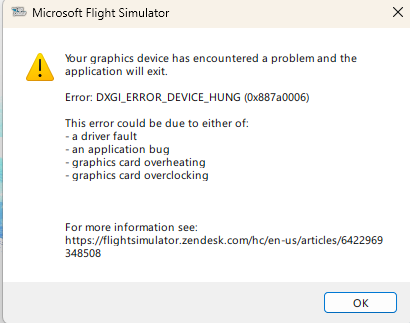
After DDU uninstall and installation of 576.28, I am also getting this error for the first time ever in MSFS 2020:
One thing to note: If I go back and reset the Nvidia ProfileInspector (version 2.4.0.19) to use the defaults, it works fine with NO error. But, as soon as I try to apply the standard DLSS overrides in Nvidia ProfileInspector to use latest preset (or even trying to force preset K), I get the error.
System is i9-14900k and 4090. No overclocks at all on CPU or GPU.
Couple of questions:
Is use of the NVPI required with this driver? Are there different settings I should be using?
And: Do I need to keep using the DLSS Swapper? Right now, I have it set to use DLSS version 310.2.1.0.
Thanks in advance to anyone who has any ideas here! Cheers!
Quick update to the previous post - if I enable DX12, looks like everything works fine with preset K and the latest driver. DX11 crashes with the error referenced above. Strange… guess I’ll try things with DX 12 for a while?
@relawx @Deelee6800
With Nvidia driver 572.16/572.42/47/60/70/75/83,576.28, Nvidia app and DX12 selected in MSFS 2020 a CTD won’t occur.
However, with DX11 selected in MSFS 2020, using the same latest Nvidia driver and Nvidia app, a CTD will occur.
Until Nvidia fixes the application and Asobo MSFS 2020/2024, please check what happens if you select DX12 instead of DX11 by manually editing cfg file.
To do this, you need to edit usercfg.opt file and modify the line
PreferD3D12 0
Change the number 0 to 1
and save the changes.
OR
If you need Nvidia app, make sure to select DX12 instead of DX11 in Nvidia app and the profile for MSFS 2020.
Nvidia app > graphics > program settings tab
Then select msfs 2020 and click optimize button.
OR
If Nvidia app installed go to:
c:\ProgramData\NVIDIA
delete folder named NGX
Source https://forums.flightsimulator.com/t/ctd-fresh-install-no-addons-new-build-ctd-on-load-up-everytime-code-0xc0000005/709606/11?u=tenpatrol
Great info, thanks!!
This is probably a silly question, but: Why do I need to manually edit the usercfg.opt? Can’t I just select DX12 in the MSFS 2020 graphics settings?
(I never use the NVIDIA App, by the way. Had issues with it before with MSFS and some other games and just don’t trust it / need it).
Follow up: Anybody have reports of DX12 working well in VR?  I haven’t used it in a long time and I’m a bit nervous about it even with my 4090. (Can’t test right now… have work stuff going on lol)
Thanks again!
So far driver version 576.28 is working very well on DX 11 using a 5080, no Nvidia app and TAA. Fly VR exclusively.
Works great with my RTX 4090.
EDIT: Worth clearing the shader cache. Removed stutters and extreme drop in FPS during the flare for landing that started to happen after driver install. This is something I am going to do with each driver install now.
C:\Users\xxxxx\AppData\Local\NVIDIA\DXCache <-Delete the contents inside this. <-Delete the contents inside this.