Vision Jet cockpit is very sharp. I can read the far right top “LDG” on the Garmin without leaning. I can almost read the flap speed below the flap %. That is extremely tiny text and I can almost read it without leaning.
Ghosting is gone for me. I can be in the outside view while flying and pan around the plane and get zero ghosting. Ghosting gone from the center pillar as well. Speed tapes way better, but that never bothered me to begin with.
This is not meant to be argumentative. I just have a completely different experience. Not sure what headset you are using, but imo there is no substitute for raw PPD and a native Display Port connection. My 5080 doesn’t melt. Lol
Do you use foveated rendering? I’m getting black artifacts popping all over the screen and blurry black outlines around the aircraft using DLSS 4.5 Preset M performance mode. DLSS 4 provided much sharper outlines of objects. 4090 / 7800x3d, PCL native resolution. If I turn off foveated rendering the issues go away but I need that extra performance boost or I can’t get over 37 fps to do smart smoothing.
So am I. If you are using the latest Nvidia App, and you are using the 591.74 driver then set Recommended in the app rather an individual preset then you will use the preset defined by the DLSS mode and not what you have set manually.
Now I know this shows up in the DLSS Indicator, because it is how I noticed this first before any posts on this. The key thing is that you must be using DLSS lib 310.5.2 or you are not using dynamic presets.
If you say that you have proof that you are using 310.5.2 then i would suggest that something is corrupted somewhere and that you should use DDU to completely clear everything out and reinstall 591.74 again, this should install the latest Nvidia App again.
You will need to add the DLSS Indicator reg entry again.
Finally, I only fly in VR. I am using Performance mode and this shows preset M.
Also if you have moved from a Transformer 1 driver to a Transformer 2 driver and you should have cleared everything driver related out first using DDU. A lot of people have issues if they don’t.
I do not know what your settings are but you are seriously under-performing, unless you are talking about performance in VR.
I fly in VR exclusively. I turn off foveated rendering due to the performance hit of having it on. I used to have thick black lines around static aircraft until I switched off Contact Shadows. Try lowering that setting to see an improvement that you can live with.
I tried smart smoothing which worked well but is not used on VR and neither is FG. Now if your 37 fps is what you see in VR then yes I am not surprised and you have to switch on ASW/SSW to improve your fps.
If you can’t get 37 fps in 2D mode then you have something set seriously wrong. To give you an idea I have an RTX4080 Super and get over 100 fps with FG and Smooth Motion off. Obviously this is not all places but at KEDW, LCRA and EGYP (my main test bases).
It works now for me. It seems I need to start the MSFS from the nvidia app. If I do so, the display of the preset in the nvidia overlay is correct. And as I would expect, regardless of what DLSS setting is configured in MSFS it uses the preset. Only disabling DLSS at all will show no preset/SR off, since DLSS is not active, this is also as I would expect this should work.
My current problem is that the improvements in clarity are not that much, I expected more. But this could very easily has to do with my streaming app (VD). When I have time I’ll increase the video stream bit width. I also need to check if my VD setting is on the highest resolution setting. I have played around with the setting some time ago, and I am now not sure if I reset them to the correct settings .
I need to check this when I have time to look into it.
I am glad that it is showing what you need it to show you although I don’t know why you choose to persist with the Nvidia overlay. I never use that and have it disabled, but it is your choice.
I try to avoid manual regedits, even if they are simple as this one.
And for just a quick check if the config was correct the overlay is sufficent and works well.
I usually do not use the overlay either and it is deactivetd per default.
Anyway, thanks for the inputs (also to all other contributors in this thread) and hints to get there in the end.
Yes, I use FFR in game set to default 50. I don’t use smart smoothing. I notice some black outlines around people sometimes depending on the light, but it doesn’t bother me and it is not constant. I get some weird triangles on the edges of the plane sometimes. Again, doesn’t bother me. I can spin around the plane and the ghosting is completely gone. Speed tape also much better, but again, never bothered me to begin with.
The only settings I use in Pimax Play are hidden mask and lock to half framerate. FPS set to 120. Locked to 60 in sin. No in sim dynamic resolution.
I also use an app that is probably not the one you are thinking, but is based on AI and it is absolutely incredible for me personally. That’s all I can say. We are not allowed to talk about that here and I am not trying to break the rules. That’s why I am being vague.
I am not saying you or others are, but I just try to see the overall picture and not focus on minor things that might not be exactly perfect. I would say in the Vision Jet, the entire cockpit is perfect. There is nothing I would fix. Any issues I have stated are outside of the cockpit and always on the ground. In the air everything is great.
Obviously black artifacts all over the screen is not a minor thing and nothing I have experienced.
I would just like to make a general statement in regards to clarity, the MQ3 and the PCL.
The PCL has a native resolution of 2880x2880 per eye. The PCL has 35 PPD. The PCL uses a native Display Port connection that is uncompressed.
The MQ3 has a native resolution of 2064x2208 per eye. The MQ3 has 25 PPD. The MQ3 can not use an uncompressed native Display Port connection.
IMO comparing clarity issues between the MQ3 and the PCL is pointless. The PCL has the ability to be multiple levels of clarity above an MQ3.
I am in no way knocking the MQ3. It’s just that the MQ3 is not ever going to be able to produce as crisp or clear graphics as a PCL.
The PCL will also have far less SDE by physical design, 35 PPD vs 25 PPD. SDE also leads to some blurriness as the pixels are farther spaced and the black lines in between become more apparent. The PCL basically has no apparent SDE.
The Transformer 2 architecture is DLSS 4.5. Transformer 1 is DLSS 4.0.
When there is a big change in driver architecture you really need to ensure that you clear everything out and do a clean install to ensure that everything is working as it should be with nothing of the old architecture left around.
Quite often when people don’t clear out after a driver architecture change you read a lot of posts about glitches, dumps and crashes.
It is a simple question as to whether you have done this or not because your memory issue COULD be down to that. After all nobody else is reporting this and you have 64GB of memory.
I have installed the latest NVIDIA driver and MSFS 2020 still does not work properly with DX11. Specifically, sim continues to experience CTD during loading when using DX11 with drivers newer than version 566.36.
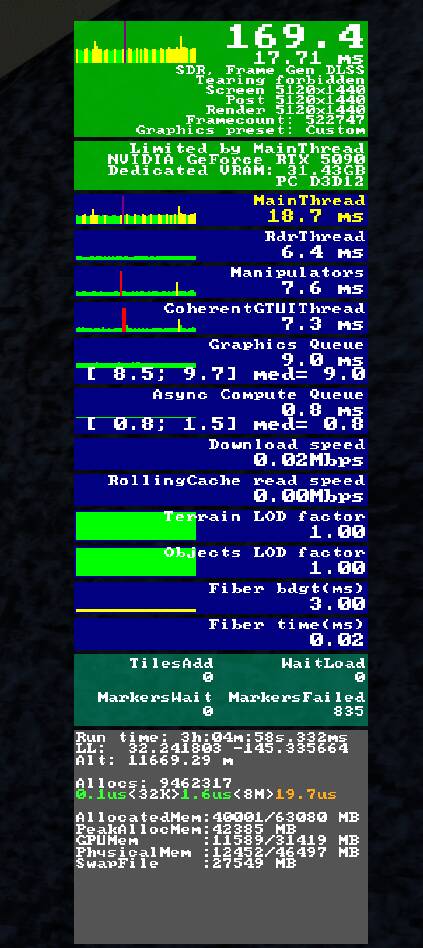
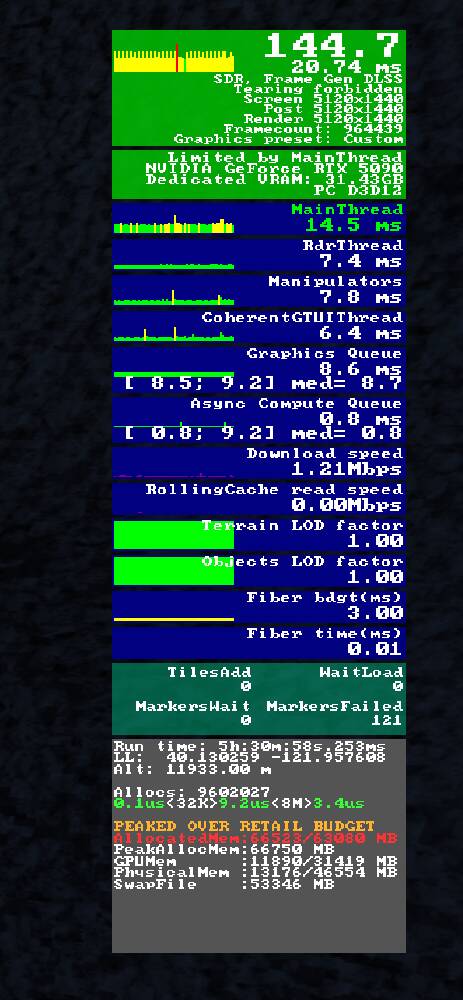
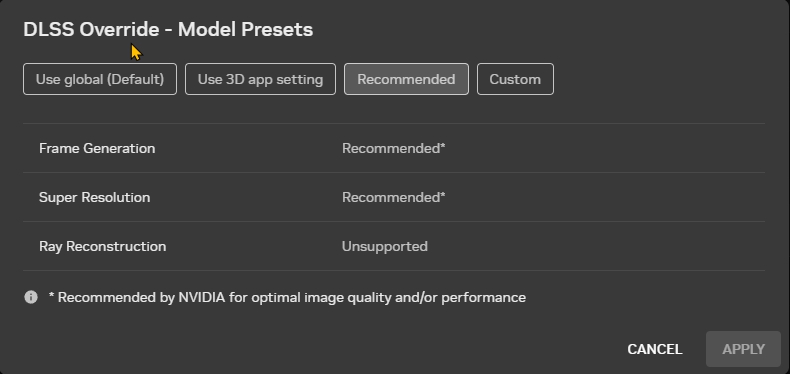
 .
.