Yes, from cold and dark as well as ready for take off. I’ve tried turning every button in the cockpit. On the GPS’s there are no brightness buttons. The radios are analog and also no brightness buttons that I can see. Do you mean the two dials on either side of the landing lights and pitot heat? If yes, then yes I have turned those dial up and down to no effect. I have had this happen many times on the Bell copter as well. I think its a GNS530. I could try it in night mode to see if that changes anything?
Gtn 750 working fine here. Screens are dark until you turn up the light for them though…
I just posted about this in the Just Flight forums… my plane rolled on a sloped ramp with chocks and tie-downs on lol…
I actually had this happen in the F28 when it first released for 2024, as well.
I’ve just checked here and couldn’t reproduce the issue.
The brightness control that I’m referring to is the one highlighted in the bottom left of this screenshot. The GNS/GTN might appear black if that isn’t turned up.

If you’re still seeing blank screen despite that being set to 100% then we’ll need to investigate further. It’d also be worth submitting a support ticket here: Support : The Spirit of Flight Simulation
Thanks,
Martyn - Just Flight
Can you also check if you have any controls assigned to the navigation lights as that might be forcing the combined navigation/radio light rocker switch back to the first ‘notch’.
Martyn - Just Flight
Just took the turbo arrow for a spin - never flew the real life version, but it seems to be kind of a perpetuum motion machine - idle power, maintaining level flight ----> no speed bleeding at all.
Normal version works as expected.
Apart from that, i like the aircraft - good to see it in 2024
I also have the problem with the screen brightness (or lack thereof) on the 430/530 units. I turn the brightness up and can see the effect on the buttons, but the screen stays black. The GPS 100 unit seems to work though.
Additionally, I have the PMS 750 installed in my Community folder and it doesn’t appear as an option in the EFB.
I purchased the PA-28 and installed it for the first time today. I redownloaded and reinstalled in case there was some issue of corruption. I also reinstalled the current version of the 750, and tried it with only the PA-28 in my Community folder.
I also ran the 2020 installer, and I have the same issue in 2020.
Despite the GPS issues I’m having, I’ve enjoyed the two flights I’ve done so far.
Same issue here Martyn. None of the GPS options seem to work. Screens are black. No controls bound to any brightness controls, turning the nav/radio brightness up has no effect. GPS works fine in other aitcraft, GNS 530 and GTNXI 750 function normally.
Please someone make new black interiors, it improves this plane a lot.
Regarding the PMS GTN 750. I Flew the turbo in 2020 then in 2024. In 2020 it worked fine. In 2024 black screen. Other gps units in 2024 worked fine and I did have to turn up the brightness.
I discovered another problem with the Arrow in MSFS 2020. When I go into the settings page in the EFB, I can’t return to the menu with a short push of the home button on the tablet. It doesn’t respond to it, even if I turn the tablet off and on again. In the warrior, this works correctly.
I also have a problem with the PMS GTN not showing up if I cycle through the GPS options. This is in all the Arrows, but in the Warrior, it does show up.
By settings page, do you mean the aircraft page which allows you to toggle the chocks, doors, panel states etc?
Martyn - Just Flight
No, I mean the page where you can change the clock settings, theme, brightness etc.
If you are using sim standard NAV lights bindings, it looks like GTN750/650 displays are linked to LIGHT NAV state. But toggling LIGHT NAV set their brightness level only to 0 or 1 (LVAR:CENTRE_LOWER_nav_light awaited brightness scale is from 0 to 10).
At 1 value, GTNs displays are still full black. They start becoming visible at 1.1 level.
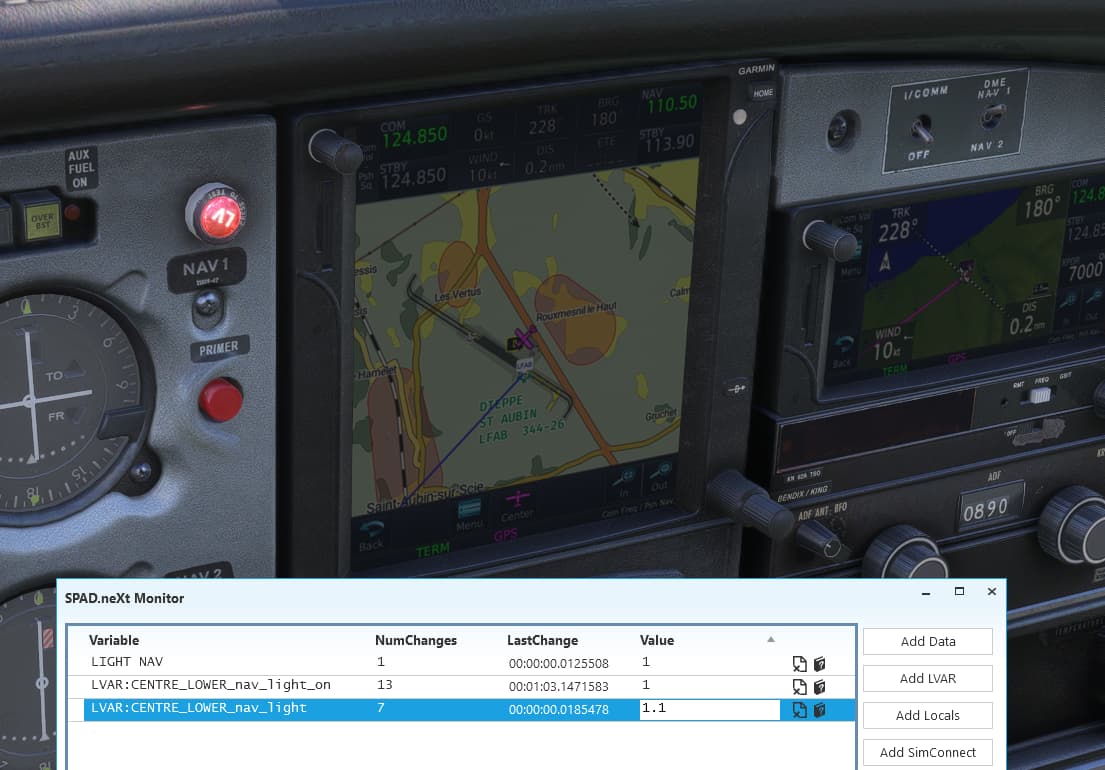
You may try to turn radio lights knobs to increase this level.
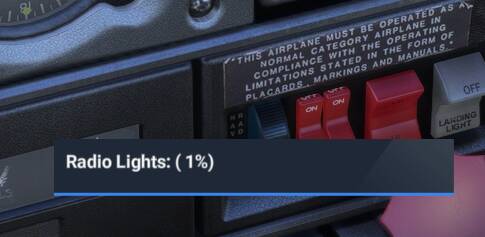
Also check your “LIGHT NAV” bindings and try to disable them if any.
(MSFS 2024 SU1 version)
Could my PMS50/tablet problems have something to do with the bundle edition? In the console, I see this error: “[Coherent GT] Failed to locate file vfs:///html_UI/pages/vcockpit/instruments/navsystems/justflight-aircraft-pa28-arrow-iii/pms50_gtn750_int/gtn750_int.html” I don’t have that directory as it is called “justflight-aircraft-pa28-arrow-bundle”
Are the flaps behaving realistically on the Turbo arrow III (not tried the other variants yet)?
It may just be my lack of knowledge on the real life way these planes react to flap extension, but I was expecting to see a slight balooning upwards effect before a drop in airspeed etc…
When I extend the flaps I just seem to get a slight downward dip followed by reduced airspeed.
Thx for providing the free 2024 update!
Are there any plans to upgrade textures? It isn’t really up to standards right now.
That’s typical of low wing aircraft I believe.
I’m getting miserable download speeds of like 5 kbs/sec. on a 1 gb internet service trying to download the 6a installers. Have justflight’s server(s) crashed or something?
I just tried downloading it again and it took about 10 seconds on my connetion. Nominally 350Mbps down for my ISP.