Nothing spectacular:
Ryzen 5 3600XT, 16GB 3000Mhz RAM, RTX 2080 8GB OC, SN750 NVMe m.2.
Not sure about the other settings you mention, don’t think they really matter.
I’m connected via LAN to my 50Mbps DSL.
Nvidia control panel is set to quality, no vsync, cap at 144fps. Driver is still the 457.30
Yup. I’m not sure what his feed connection is. I am currently running a low end CPU, I7-3770K, 32GB RAM and a RTX2060S, but my feed is a 1.2 GB LAN. Not in dense traffic or complex scenery, but rarely get significant stutters. I’ll try this approach and see what happens. Upgrading to I9011900K and faster RAM, 32GB. Just need to find cheaper RAM where ya don’t have to mortgage the house 
Appreciate all the positive feedback guys. It’s a bit of a mystery as my setting are as they were for many months and I hadn’t experienced this stutter before. I’ve landed at many big airports in planes up to the CJ4 and had no issues whatsoever. I’m just disappointed that any sizable airport now gives me trouble. I tested a number of airports I’d previously visited and they all have the same issue. I might roll back my video driver just to see what happens. I also had an update to Windows, which brought it up to the latest version. I appreciate that there is a lot to load on approach to some of these airports but as I said, previously my experience was stutter free and that’s with everything turned up to full ULTRA (paid a lot of money for this experience, so I’m enjoying it). Oh, also I checked the quality of my broadband connection to ensure it was performing at it’s best, which for me is around 30mbs.
Thanks again for all your input.
And just to rule out any issue with the Garmins, can you verify it happens with the C152 as well?
As for bandwith, London City used up all my 50Mbps when flying low trough the city. But I guess you tried already an airport that has no photogrammetry in proximity?
Do you see the bad performance on bigger non-handcrafted airports as well?
More testing today. I’ll report back.
I don’t use the Multiplyer at all, and been getting the same ''3 seconds blind spots", not only on KJFK , but in some empty airport aproches.
Just rolled back the Nvidia driver to last stable and no difference. So not a driver issue.
Just tried flying into NZCH - Christchurch in NZ, in the CJ4. Harsh stutters again at 3.5nm from the touchdown point, clearing up by 2.5nm. This airport isn’t hand crafted by Asobo - Generic version.
-
While it may not be a handcrafted airport, you didn’t answer Copper’s question about whether or not you’re flying through photogrammetry.
-
30 mbs is your best broadband download connection? I get 300 mbs at medium level from my IP (I’m thinking of upgrading to GB). 30 mbs is pretty slow these days.
If the airport you are approaching is in a photogrammetric area, that would cause a ton of downloading going on, and could easily cause stutters with such a slow broadband connection. Can you upgrade in your area? Do you see the little circle thing going on in the bottom right corner?
It’s easier to use the built-in DevMode FPS counter so that we can tell the relationship between the CPU and GPU and their bottlenecks.
But judging from your initial screenshots, your CPU seems to be underutilised, and I’m guessing it would be a bottleneck or limited by CPU mainthread, which can explain the performance drop when you get closer to the airport where the CPU should be doing a lot more work trying to calculate the instruments as well as the AI traffic and ground services.
No photogrametry in NZ yet. So no. Not flying through a photogrammetric area. No I didn’t see the wait symbol that you often see while loading in the background. I will look for it though in my testing today. I’m testing a variety of airports in different areas. I don’t have much 3rd party airports so I’m only testing stock airports. Thanks for your feedback.
Agreed. I put myself in Dev mode and displayed the framecounter throughout the exercise. I held over 30fps until I hit the issue area where it dropped to below 20fps and fluctuated around 20fps before moving back up once the 2.5nm distance was reached. My issue, is that I never noticed the problem flying into airports before last Friday. Now I’m noticing it in so many places. My settings are documented, so I can return to them very quickly as a base point. These settings have served me very well for a few months now.
I had same issue as you, try setting traffic variety to high. Had mine on ultra, this helped a lot. Still get get weird frame drops sometimes in mid flight, but this helped. I’m also locking fps at 30 instead of using Gsync .
Higher up in the post, I disabled all traffic - sliders back to 0%, turned off both Live Traffic and AI Traffic, confirmed no traffic in Little NavMap and still the stutters occured 3.5nm from the runway. Not convinced it’s a traffic issue.
AI Traffic has been changed recently…100% traffic will be a problem…try 50%
I think he stated he tried with all traffic turned off 
@CinnamonInk8010
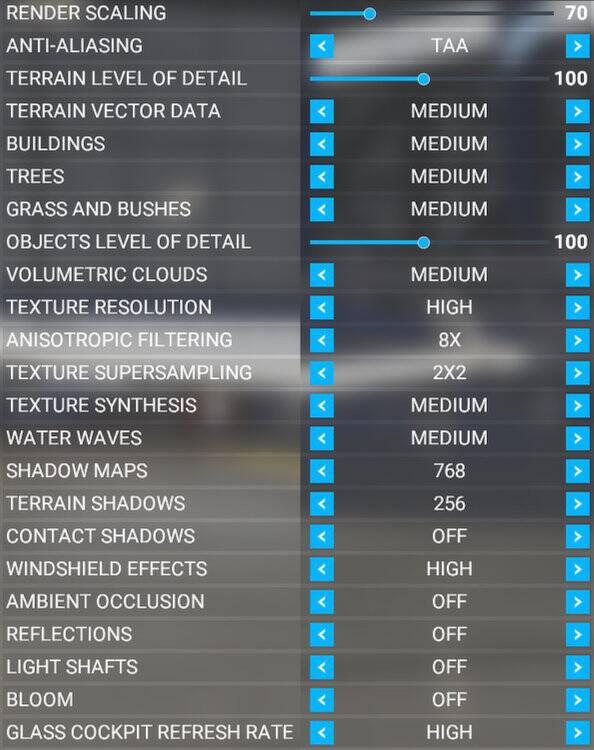
You might want to compare when changing your texture super sampling setting to 0.
I’d suggest if you do to also compensate as much as possible in pushing Anisotropic Filtering to 16x.
NB: This is the one you can see being set to 2x2 in this screenshot:
People will never learn.
IT IS NOT HARDWARE RELATED ! IT IS THE SIM !
I have a Ryzen 7 (8 core) unutilised
I have a 6800xt Nitro Plus S.E
Nvme 1 tera
100mbs connection
4k monitor etc etc
No matter the settings,i choose,even the lowest…stutters occur.
Let’s just wait for DX12
I found this post which helps my stuttering and CPU utilisation significantly. Maybe it could solve your problem too..
but if it is the sim , many others would have it too, and i sure dont, only at the
heaviest places there is some stutter, certainly not at christchurch.
and i run a very mediocre system, amasingly smooth on low/medium settings,
photogrammetry off.