EDIT: Posted in wrong Thread.
when is Asobo gonna release a fix for this stutter fest. the sim was perfect after SU4. and they had to mess it up.
I have a I9 14900k, Gigabyte Z790 auros elite motherboard, RTX3090 gpu, 64 gig Corsair dominator ddr5 6600mhz ram.
My stuttering since SU5 is so bad I can’t stand going on the sim anymore, it was running great on SU4.
Tlods both at 150, flying in VR on pimax Crystal light, headset resolution is at 73%
Hello everyone. Got this problems with stuttering too. Mainly in cruise flight. But only when using terrain precaching ultra. Reducing this to medium solves it but leads to stutters when changing views.
My System:
-
9800X3D
-
64gb Ram 6000Mhz
-
RTX 5080 16gb
-
MSFS 2024 on 2 TB NVME
- All tested with or without backgound programs running.
- With or without rolling cache
- With or without Rebar
- High or low LOD levels
- MSFS 2024 reinstalled
- Windows 11 reinstalled
- HAGS on or off
- Cabin and no Cabin versions
Anyone found a Solution for this ?
Below pictures with the normal Mainthread, and with the stuttering in cruise.
Its happening with all aircraft.
Best regards


On 5.1 and still had a period of 7fps after landing, never had these stutters before SU5. Not sure what’s changed, when I launch at the same airport I’m getting 60 fps. Looks like it affects a select few, making commercial flights essentially impossible, would be great to get some clarification if these issues have even been noted, had same problems for months
Yep…stutters on mainthread spikes on curtain airports introduced with su5 are still present on su5.1 …
I think it might have something to do with this
Can confirm this Is still happening to me as well.
9850x3d + 5090 64gb Ram
Had amazing performance in SU4 not one single issue , SU5 defiantly degraded performance. Tried all the usual advice and things but same issue happening.
It seems to not be affecting everyone only high end PC’s.
What have you done to the sim Asobo and when you email In support all you are told is to go back to vanilla state, well how many people actually use no add on’s at all. They don’t because the default a/c are awful and scenery is not the best.
It’s reassuring, in a rather unfortunate way, to see that I’m not the only one experiencing this.
I’m encountering constant micro-stutters, erratic frame pacing, increased latency, and an RDR thread that now spends more time in the stratosphere than the aircraft itself on a 9700XTX. Under SU4, my simulator was exemplary. I had a locked frame rate, impeccable smoothness, and completed multiple rotations without a single performance-related concern.
Then SU5 arrived. Nothing changed on my end. No hardware modifications, no driver updates, no software alterations, nothing whatsoever. In fact, the update was deployed while I was midway through a rotation. The outbound leg under SU4 was virtually flawless; the return leg under SU5 was, by comparison, an exercise in frustration. The degradation in performance was immediate, substantial, and impossible to ignore.
Since then, I’ve exhausted every reasonable troubleshooting avenue. I’ve worked through the issue alongside members of the community on Discord, cleared every conceivable cache multiple times, performed complete reinstalls, eliminated variables one by one, and still arrived at precisely the same result. The conclusion becomes increasingly difficult to avoid: the problem appears to have been introduced with SU5.
What is arguably more disappointing than the performance regression itself is the apparent reluctance to meaningfully acknowledge it. Mandatory updates remove the option to remain on a stable version, yet when those updates demonstrably degrade the experience for a significant portion of the user base, the response too often defaults to the familiar script: strip your simulator back to vanilla, assume it’s user error, or continue troubleshooting indefinitely in the hope that reality eventually conforms to the diagnosis.
We’ve seen this cycle before in MSFS 2020. A mandatory update introduces widespread performance regressions, users spend days attempting to prove that something has objectively changed, and eventually the conversation circles back to suggesting the issue somehow resides exclusively at the user’s end. After several years, one might reasonably expect this pattern to have been broken.
Instead, development priorities appear increasingly focused on ensuring parity across vastly different hardware ecosystems. That’s an understandable commercial objective, but it becomes considerably less palatable when those of us who have invested thousands into high-end PCs and specialist flight simulation hardware find ourselves inheriting performance regressions in pursuit of a “one-size-fits-all” philosophy.
At some point, stability has to become a higher priority than feature cadence. New content is welcome, but not when each mandatory update risks undoing months of optimisation and leaves users wondering whether they’ll be flying an aircraft or debugging a software release.
SU4 demonstrated that the simulator is capable of delivering an exceptional experience on my system. SU5 has demonstrated just how quickly that experience can unravel. That isn’t nostalgia, confirmation bias, or user error—it’s an observable before-and-after comparison on identical hardware, identical software, and identical settings.
What is happening man, SU5 ruined everything. High sttters
what the hell has microsftdone to my MSFS 2024.
iuncereditbe amount of stutters on Geforce now 5080 setup.
the streaming is so bad, unlimited stutters.
miucorsoft do something
Moderator Note: Edited to comply with this section of the Code of Conduct.
Well said. Wish I could go back to SU4 which was very stable.
Disable Mamudesigns add-ons if you have any especially Powerlines, it causes massive stuttering in SU5.
MSFS 2024 (beta) user since day 1 mostly time without restriction playing MSFS 2024 in VR.
Now / today:
Vanilla Win 11, vanilla MSFS 2024: Stutters. Loosing my ambition.
7800X3D, 7900XTX, VD, Quest 3
As far as I can tell, this has been fixed. I’ve tested with both Powerlines and Marinas enabled vs disabled and I can’t see any difference.
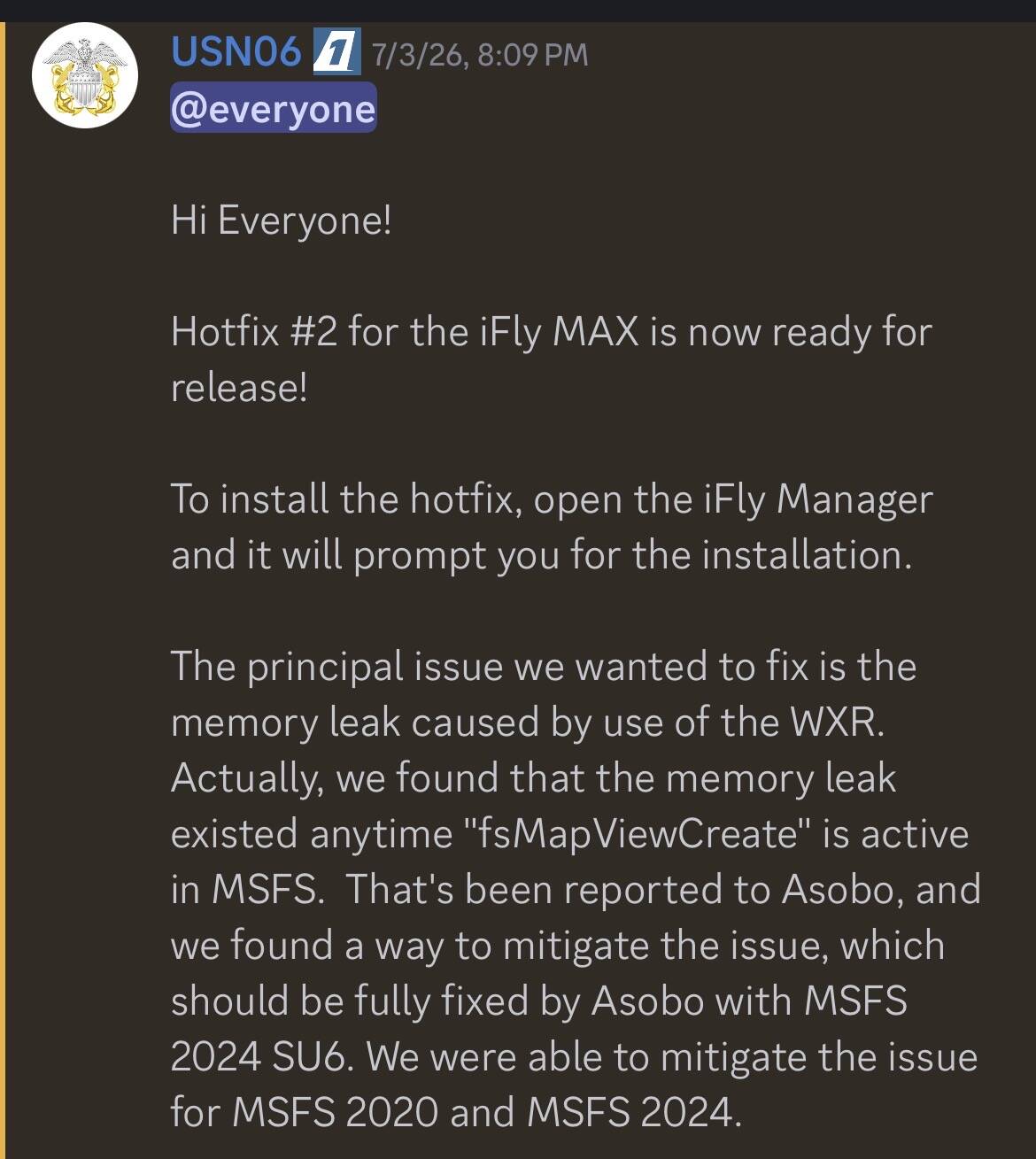
Maybe we should ask Ifly/Flight1 about the workaround they possible found to that issue…
This was the first time I have seen a hotfix kind of an update for MSFS itself. SU5.1.
So please MSFS do not let us wait for SU6 or make us all switching to SU6 Beta soon to fix this memory leak or what ever downgrades our FPS over the time!
If you can release SU5.1 you can do us the favor to release SU5.2 as well.
Does anyone else still get stutters say on landing not all the time but when you approach the runway or are landing on it ? My performance otherwise is pretty good in flight during taxi , and takeoff
I spent the entire weekend trying to figure out why I was experiencing slowdowns during landing and running on the runway, and then when moving around the airfield. This happens because as you approach the airfield, even though most objects have already been loaded, a few appear as you approach. These objects are cached and written to disk in the rolling cache. Since the disk write speed is several times slower than the memory access speed, slowdowns and main thread jumps occur. Furthermore, the situation is exacerbated by the object caching logic that I don’t understand. If you fly from the same airfield, each landing will be different: from very bad to almost perfect. I couldn’t fix this by lowering the settings, only making it less pronounced. I had a similar issue in MSFS 2020, and I solved it by using the manual cache. This option is not available here. I also suspect that trees have the strongest impact.
So problems are gone if you disable Rolling Cache?
It didn’t help me. I assume the sim still creates temporary files.
I have monitored the files accessed by the simulator some time ago, and there was nothing. But it should be easy to find out using SysInternals tools.