Ok - will try this. I did not notice it to this extent in any other aircraft.
I was wondering if anyone has had an issue with the Winwing PFP 3N buttons stop working at random points in flight? The screen still functions properly but none of the buttons respond.
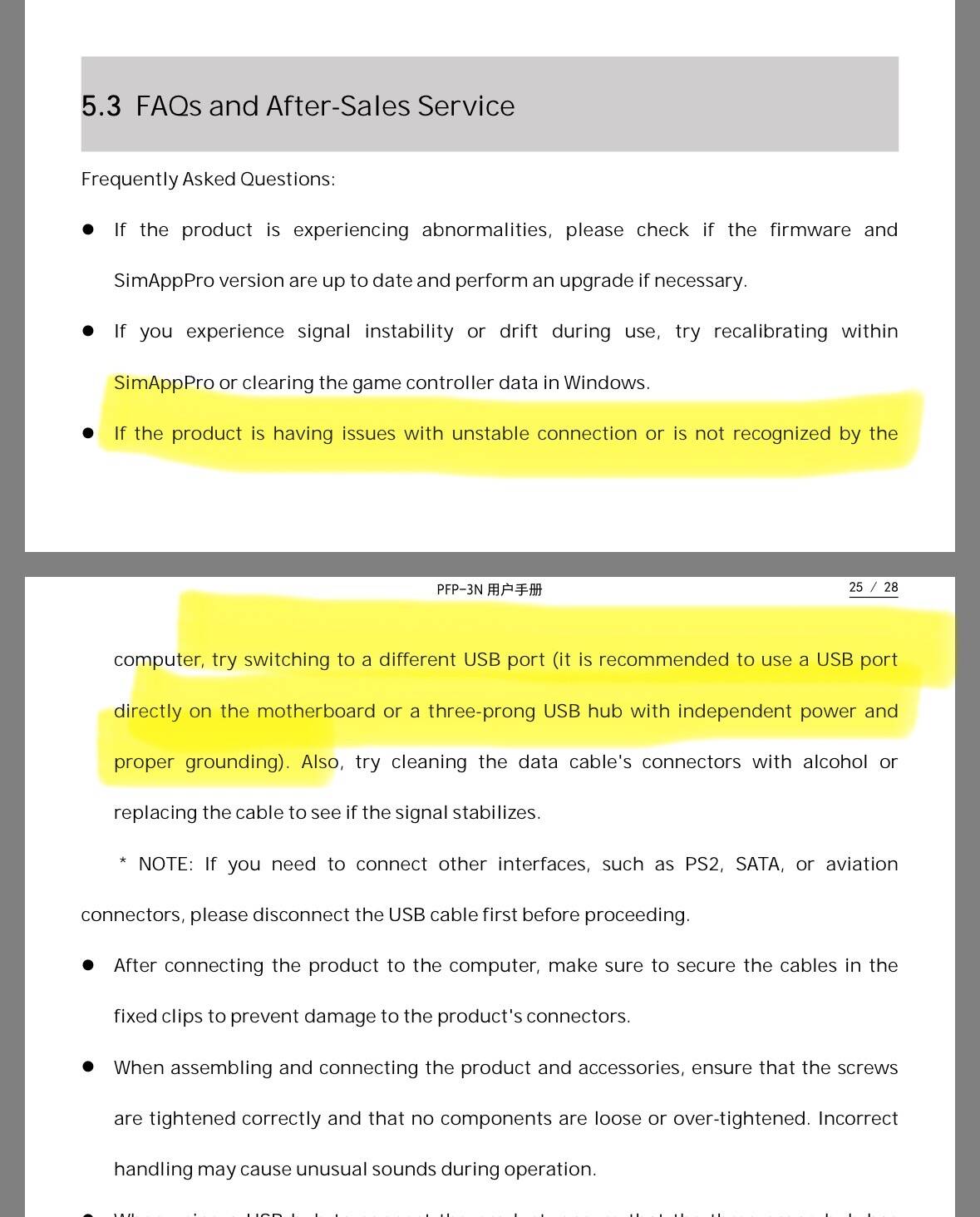
I use sim app pro and also have the Pap 3 Mag and the 3N PDC and have no issues with them. I’ve tried moving the PFP from a USB hub directly to the motherboard but still happens at least once a flight with the 737-800. If I unplug and plug it back in the PFP functions normally again.
Any thoughts or insights are appreciated
Is your USB hub powered? Even connecting directly to your PC may not provide enough current - most USB ports are limited to 500 milliamps. Note that the PFP boxes all have secondary power-only USB C ports. I have not run into issues with my PFP7 (using SimAppPro with the 738), but I have all my sim devices connected to powered USB hubs.
Yes, my usb hub is powered. I did forget about the separate power usb port. I’ll try using that as well and see if it makes a difference. Thanks!
I use PFP 3N with SimAppPro for PMDG 737 and after ten flights or so I haven’t had such an issue.
I have my settings set to “realistic”. Where did you see the suggestion to turn turbulence to “low” by PMDG?
The manual, as well as numerous posts on the PMDG forums over the last few years.

Thank you!
Yeah, I’m guessing it’s something on my end but wanted to check with the forum in case someone else ran into the issue.
It’s weird. Looking like a communication loss between SimAppPro and the simulator. I think if it was a USB problem the whole unit would reset, go dark or something…
Bad cable or port perhaps?
I just flew from KTPA to KPHL using the power usb port. I only lost the keypad once and it was when I paused the sim. I have the PFP7 too so I’m going to try that and see if it happens with the PFP7 as well with the 738.
USB ports are by default configured to go to sleep after a certain time of non-use, so you’ll want to check this in your Power Management settings in Windows. (Spad.next will give you a warning when any device is subject to power management, which is handy. )
It wouldn’t surprise me that if a PFP went to sleep and a button push woke it up, the display could well lose the connection.
I also have three powered USB hubs, pretty much mandatory for my three Stream Decks, and Winwing MDCU/PFP/FMS/etc. But plugging some old USB phone charger you might have sitting around in the “Power Only” port in addition to the main connection of the PFP might still help.
Finally, I’ll add that FS2024 is MUCH improved over FS2020 in terms of stability when you have flaky USB connections, i.e. CTDs. I would sometimes swipe the strip of my SD+ to change pages, then have a crash-to-desktop. Never had this in FS2024, thank goodness.
Back to the subject: the PMDG737 is still awesome. 
This thread isn’t really the right place for support with the Winwing PFP3N, but since you’ve already posted and some users replied, I’ll give a few tips. External devices used with MSFS 2020/2024 should ideally be connected through a powered USB hub. Also, make sure your system power plan is set to High Performance.
Lastly, you should disable power saving for the PFP 3N. Press Windows + R, then copy and paste this command:
explorer shell:::{A8A91A66-3A7D-4424-8D24-04E180695C7A}
press ENTER.
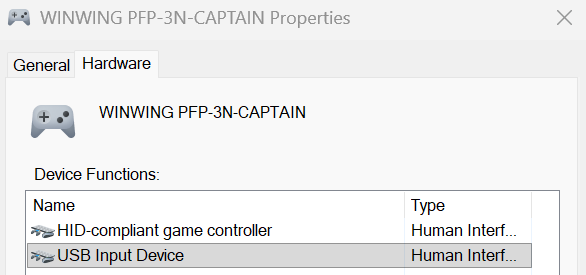
Then, double-click Winwing PFP-3N and in the new window go to the Hardware tab. Select USB Input Device and click Properties.
In the new window, go to the Power Management tab and uncheck “Allow the computer to turn off this device to save power”.
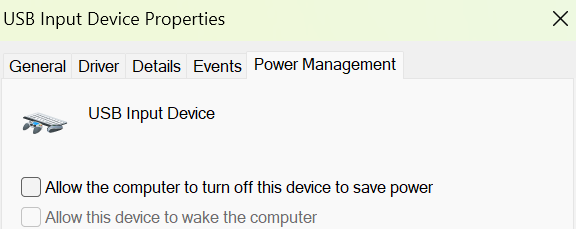
Click OK and restart PC.
This should help prevent the buttons from stopping randomly during flight.
Repeat this for all the devices you use with MSFS 2020 and 2024.
If you’re still having issues with PFP3N, please use the thread linked below, as it’s a better place for WinWing-related issues and configuration.
Winwing / WINCTRL MCDU, CDU, PFP3N, PFP4/7 - Configuration & Troubleshooting - User-To-User Support Thread - User Support Hub / Hardware & Peripherals - Microsoft Flight Simulator Forums
You’re very welcome to post there.
After importing simbrief flight plan and inserting departure/arrival, what is the easiest way to check the flight route is all joined up/complete?
I messed up yesterday when I neared arrival I noticed my flight path was broken so I had go into heading mode.
I often get a discontinuity in the legs, but I gather to clear that you just click the waypoint above the empty box and insert again and it clears it.
Not sure what I did wrong on last flight.
Did you press the execute key after removing the discont.?
Also check it is not a vector arrival.
There is more than one way to do this so likely a matter of sim pilot preference. I have a few old iPads so SimBrief is always up on one of them and Navigraph on the other. I check my work on the FMC Legs pages and make any changes/corrections at that time. This can also be done by changing to PLAN mode on the EFIS and “STEPping” through the route on the FMC using the STEP soft key. One can also pull up the flight plan on the PMDG UFT however I find it easier to read on an external tablet, so again, a matter of preference. Lastly, not every route discontinuity needs to be cleared this early in the flight and this concept has been the topic of many posts and YT videos. Cheers!