Just a friendly head’s up for anyone not able to get the Ops Center to connect: try running the updater directly from the PMDG folder. After 2 days thinking it was a server issue on PMDG’s side, I finally read on their forums that a manual update is required, and that worked like a charm (trying to update within the program was finding nothing).
Yes, I’ll second this, it’s not very forgiving there.
What is the SOP, btw?
1 Like
no prop reverse again and now my landings are not always logged. maybe i’m snakebit.
The tracking of the GPS was broken over a year, and I stopped flying the DC6 then. I just started again about 10 days ago, and the problems still exist. Flying along, everything is fine, and all of a sudden, usually on approach, the Gyropilot just stops tracking the GPS. I doubt if this will ever be fixed.
3 Likes
I’ve been unable to find a moveable heading bug in any of the flight instruments. OBS dial works. Ship reacts to my heading adjustments but unsure as to the visual feedback of my heading.
Full disclosure, per usual, I’m about midway through the 20 video YouTube series and about halfway through the written manual as I’m posting this question. Haven’t come across my answer yet.
This thread could probably get bumped up anyway; lots of new Xbox purchases recently I’m sure, and lots of good info in this thread.
This is because it does not have a heading bug. The Sperry Gyropilot is a bit different than a modern autopilot. When you initially activate it (via the On/Off switch on the face of the pedestal and lifting the black “clutch” lever down at the bottom left of the pedestal) it will track your current heading when activated. You rotate the large knob labeled “Trim” to set a new course and press the small chrome button at the 12:00 position of that knob to cease your turn and maintain the new heading.
When utilizing VOR you set the three-position selector to Localizer. Be advised that if you use Bendix radios rather than the GNS, you need to switch to the GNS (via the Tablet > Options), cycle the CDI to GPS then back to VLOC and then switch back to the full Bendix setup. There is a bug with the GNS/Bendix installation that requires this step every time you step into the cockpit. If you’re using the GNS, you probably still want to cycle the CDI then set it to GPS or VLOC, as desired.
This thread is also active for Xbox (perhaps they need a merge?):
1 Like
Yep its a huge shame as it used to be the best planes in the sim by quite a margin. The GP worked flawlessly when it was first released. I was thinking about giving it another go but after reading numerous posts like yours I don’t think I’ll bother.
Sounds like PMDG, with all the Sim updates since the DC6’s release, have no idea how to get back to a working GP.
I agree. I don’t bother flying it anymore, too many bugs that will most likely never be fixed.
I’m not really into the GNS for the DC-6 and use the Bendix radios. Other than the need to switch briefly to the GNS, cycle the CDI and then switch back to the Bendix for the duration of the session, I’m not having issues utilizing the Gyropilot, at all.
I’ve done several flights since yesterday tracking radials, locating radial intersections, swapping VOR frequencies, capturing Localizers & Glide Slopes and utilizing the Gyropilot to negotiate ILS landings.
The aircraft is not a buggy mess, at all.
4 Likes
So helpful. Thank you!
1 Like
Interesting. I haven’t flown it in a while but last time I did I couldn’t for the life of me get it capture a GS. I’ve seen a few posts from people saying the same thing as well. When it first came out I never had a problem.
Haven’t had a go since the last DC6 patch ( what did that do anyway? ) but if I could get the AP to track a VOR at all it’d also capture a G/S 100%.
something that came to my mind, Bob.. Do you click on that silver button in front of the turn wheel in the cockpit at any point before you attempt to capture a course? I know from early experience that this has always caused trouble as this button sends “Ctrl-H” to the sim. Or basically it’s the same as if you pressed that key, it says “Heading Hold”. I did that once or twice in the beginning and immediately stopped it. With all the bad things that come with the sim’s default KAP140 simulation in the background I just can’t imagine that this is a good idea.
At full price, too (this couldn’t have worked out better for PMDG!)
Don’t forget, PMDG promised that the original introductory price would be available again once the product eventually relaunched on Xbox, so if you’re tempted, hold fire and wait for the discounted price!
Yes, sometimes I do when I accidentally turn the heading wheel. I will try without touching it and see what happens.
Try it with the GPS and see how that works.
Hi Captains!
It’s been a while I haven’t flown in this great DC6, updated a few days ago and it looks like my FE did rest too long that I’m not sure that he’s still rating for that bird.
First he doesn’t set the engine’s values correctly after T/O and now in cruise it indicates 2600 RPM, 38 MP and 118 BMEP, FL110 same at FL090. He also forgot to lean the mixture!!! Engines are in green based on the Engine Stress Visualizer by the way!
Asking the FE to take his parachute that’s the only order he seems to accept. It looks like that I’m a captain without any authority on board!
So when I try to disconnect the FE I lost my authority on the RPM as well! Stuck at 2600 no matter what I tried as to decrease them, my RPM throttle works correctly, it’s moving as required but nothing happens stuck at 2600 RPM, never had this before.
NB: Looking for a good FE to hire, good pay and food for free on board (no vegan please)
Tks for helping!
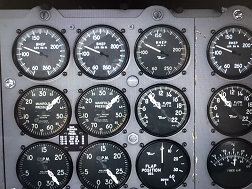
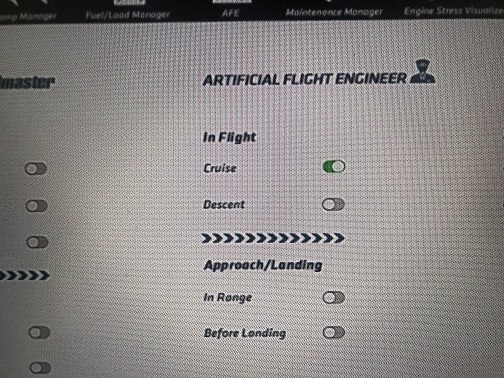
EDITED I found a way to set the RPM on manual by clicking on the appropriated button (I forgot the option) so that I can set by myself the correct engine values but still don’t know why my FE behaves this way?
I had to reinstall this bird incl manual removal of the packages folder before having a proper working dc6 again.
1 Like
I’m not seeing that with the AFE. I’m at cruise, right now, and all engine settings are correct, including lean state.
Maybe a reinstall is required? You’re on PC, yes?
1 Like
Okay.
I just did a successful flight from KSBP RWY 11 with a WYNNR4 Departure to KTVL, which I left on automatic. Upon being in range of KTVL ATC assigned an RNAV RWY 18 Approach via HATRY, which I programmed in and activated. The AP altered course for HATRY (IAF) and flew the rest of the approach without issue.
I know that issues with the GNS do exist. I’ve posted some of my findings on PMDG’s forum. I’ve even responded to a couple of your posts there.
Some info here as food for thought:
• I’ve been flying the DC-6 solely on an Xbox Series X, rather than my PC, since its rerelease on Thursday past
• I, currently, only have access to the two PMDG house liveries, as their livery pack for Xbox hasn’t been released yet
• I flew the B variant
Obviously, being on Xbox the Community folder and whatever contents one would fill it with is non-existent, so there is no possible mod conflict in that regard. Also, we had been tossing around the PMDG house livery vs. the custom liveries as a possible reason for the GNS issues. Again, I had to use the house livery since I cannot, currently, utilize any other.
I’ll continue to do some more flights with the GNS, rather than the Bendix, and I will happily report back to you my findings.
1 Like