ok thanks a lot 
Be sure to get our latest version 1.0.1 of the patch. There was an issue with some aircraft (ex latest Carenado PC12).
So thankful you are always able to fix difficult situations. Really outstanding. Big thank you for that and your great GTN!
What about the pms gns530 mod? Does that affect anything? Does it conflict with the wt gns530? Thanks in advance.
Good to hear you are up to speed with the WT GNS530.
Early days yet, fro the WT GNS530, but that knowledge does open up the potential for a PMS WT GNS530 “MOD”, if WT leave anythung significant out of their GNS530 – Like being to hold a list of Flight Plans (a very useful addition that the PMS GNS530 mode added to the Asobo GNS530)
You choose one or the other so you can’t have any conflict.
Unfortunately, that will not be possible.
The WT code is completely different. But you could use the GTN750 as a toolbar panel for that. It’s compatible with the WT GNS530 so the flight plans are sync (except potential beta version bug in the GNS).
On the surface, they may appear so, but when you examine what is happening in detail, here seems to be significant differences and issues.
for example.
One can make a FlightPlan to fly the Rnav 01 into KDCA (in LNM, or in MSFS World Map, and then load that into the GTN750, and save it there.
At the time you are making the FP in LNM or World map, it does not know what Plane / GPS the plane has, or it’s capabilities.
Then when you run MSFS, that FP in the GTN750 can sync with the WT GNS530, and the FP is there.
But, you cannot make a FP with the Rnav01 into KDCA, within the WT GNS530, I assume because the WT GNS530 thinks that the GNS530 cannot fly that approach, so it excludes the DCA RNav 01 from its options as an approach into KDCA - even though the WT GNS530 is a GNS530W
Its very confusing (at least to me ..)
In that case the GTN750 panel has the limitations of the GNS530.
The WT GNS530 is still in beta and maybe you can have some bugs.
If you find something abnormal. Test it from the GNS530 only and report the issue to WT.
On our side we’ll try to answer but we can’t provide support while the GNS530 is in beta.
Very sry for this report,
your last 54 version does some strange things, especially I’ve observed some strange behaviour at STAR arrival procedure. Really I don’t know how to better describe that situation but I try. All flight was ok, also STAR arrival started ok and aircraft follow track without problems. Then I observed my mistake (heh really lucky for that behaviour observation) that I don’t have so much time to correctly descent to expected IAF altitude. In this exact time I follow STAR with GPS as NAV selection, simply RNAV arrival. I’ve decided that better can be do left turn back to VOR passed 2min ago where also Hold pattern is defined (JAN VOR). So I set HDG mode and did normal left turn to back to VOR with hold and descend to better altitude. Ok. After arrival close distance to VOR I start do again left turn and expect follow descend but then I’ve noticed that indicator of HSI is not with opposite direction but with my back course flight synchronised. Really, I don’t have any screenshot because I was confused by this behaviour, simply I can say that after that NAV with GPS selected don’t wanted follow that track defined previously. Ok, maybe my description is not clear but I’ve put your 44 version again back to sim and start that situation again, I had some saved situations so no problem. With your 44 version all was working ok as simulated my previous steps. Really I don’t know, to me your 44 version looks correct still (but with that DEP 2nd leg no execution) and all next versions not, also that next versions with that bug with no ability to add waypoints to FPL, but here 54 version solved waypoints bug. I’m available for any questions in case…
New version of our WT GNS530 fix for the mouse input issue is online
The new version is 1.0.2 and works with the WT GNS530 v1.0.1.
Be sure to update to the WT GNS530 v1.0.1
Download the patch from this page: WT GNS530 Compatibility
I forgot one thing,
I don’t have any WT GNS installed, only GTN750 main and it’s Seneca in cockpit WT integration. Ok, no problem because I have still some saved situations and I’ll try play today with this 54 version and hope will find something relevant 
Hello,
I got it, very quickly reproduced, with last 2.1.54 version and also with stock GNS in this case with Seneca, only to compare. I’ll do probably also tests with 2.1.44 version of GTN750 if it does also same problems.
How to start to describe this problem? Ok, from my point of view there is probably some WT core bug because stock GNS (now pls don’t compare my test with GTN750 and WT GNS because I have stock GNS on Seneca, no WT GNS, nothing else) is doing procedure correctly. Screenshots.
1. Situation with GTN750 v 2.1.54 WT.
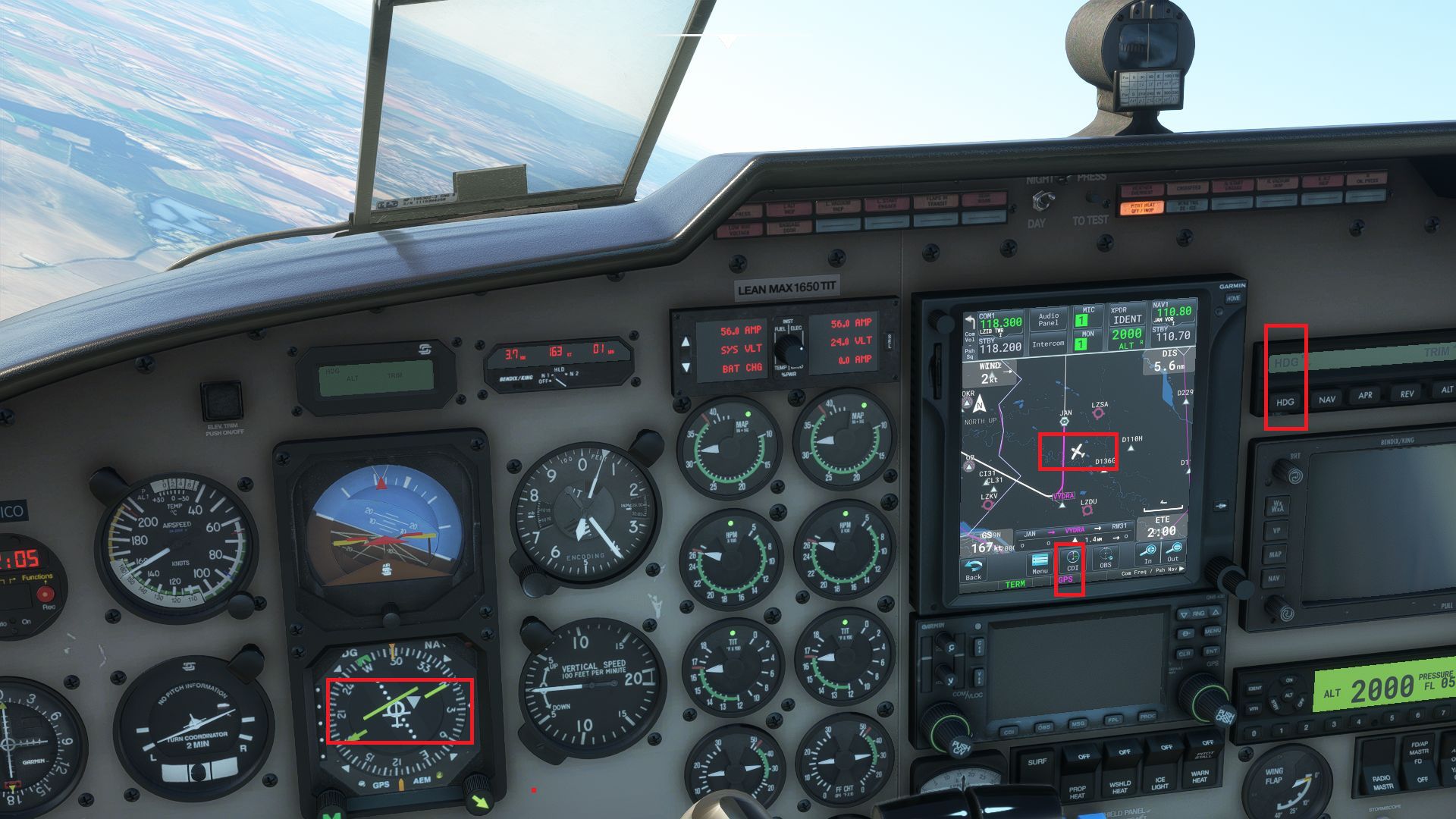
You can see from picture, arrival LEG is defined from JAN to VYDRA and I do that expected turn with HDG set to go again over JAN VOR to loose altitude (dashed racetrack as my expected track, no as published). Now look carefully, GPS as CDI is set on GTN but look left to HSI, needle is on opposite side in my opinion, I’m at right side of track and then I expect needle to be on opposite side (this is correct on stock GNS at screenshots, look down on page). Pictures 2,3 only show that needle is incorrect in my opinion, arriving to JAN VOR and GPS set as CDI. Freq of JAN VOR is only set on NAV1 freq for backup, in case.


Next situation shows that after click NAV AP command, AP option doesn’t follow (continue) GPS leg from JAN to VYDRA but does nothing, no reaction (screenshot 4). Aircraft simply continue fly its actual heading.

Next post will continue, with same situation but with stock GNS.
And now to stock GNS with same situation.
First picture shows simply same procedure with loose altitude over JAN and expect to continue arrival leg from JAN to VYDRA. But now look to HSI and needle, it is at correct side in my opinion not like as on previous post screenshots with GTN750. This is bug in my opinion.

Next screenshots only show correct needle and continue/follow arrival leg from JAN to VYDRA after click NAV AP command with GPS as CDI.


I understand that problematic is huge and hard, only experienced pilots can maybe say also their opinions. In my opinion, this isn’t look like GTN750 problem but WT core, it’s up to devs what description will tell us to better understand. I hope my investigation is correct and will be effective for next development of this system
Update as I promised
With GTN750 2.1.44 all looks ok so looks like I did good investigation, as I said previously about this version 2.1.44 (it is ok to me). Screenshot about same test situation, check HSI needle.
New version of our WT GNS530 fix for the mouse input issue is online
The new version is 1.0.3 and works with the WT GNS530 v1.0.1.
Be sure to update to the WT GNS530 v1.0.1
This version fixes some cases where the mouse input was still blocked.
Download the patch from this page: WT GNS530 Compatibility
Hello,
 sry but it’s not clear to me why I need to install WT530W addon and that fix, it solves also some GTN750 problem as I’ve reported? As I said, I don’t have WT530 installed only GTN750. I really start to be confused about this mix
  Or your message isn’t for me?
It is getting a wee bit confusing. Is this mod still meant to be used or can we disregard it now?
Hello,
now I’ve installed WT530W GNS in sim - Content Manager, GTN750 2.1.54, also put that fix in Community and it looks like it’s working, as the problem in my last posts with needle. Ok, thnx Scorpion for instructions.
Cheers Omico I’ll give that a bash.
but just one thing now inside test
As my first screenshot shows my hdg N to JAN VOR, needle is ok now but if I set NAV (GPS is on as CDI) at that position, nothing. I need do manual turn to be close to leg to VYDRA and then NAV AP command works. Really I don’t know now, this is really tired to monitor all things here if they works as they need…
Update:
Unusable now completelly, sry. As I said in WT530W topic, this WT530W addon has more problems and now if GTN750 use this system as I stated in my previous post, SID definition is not correct, offset is defined with SID because WT530W still has this bug. Really very sry, I’ll do uninstall WT530W, 2.1.54 of GTN750 and that fix and set again back GTN750 2.1.44, this works +/- ok to me, still some bugs but better than with some mixes with WT530W and other things.
