Can you show us a screenshot with the FPS Window in the Developer Mode activated when the popping has started and it stutters?
Hi, first let me know your system settings for Xbox; look like
System Console Info: 10.0.26100.8561
The version number “10.0.26100.8561” refers to a system update for Xbox consoles released on June 9th, 2026. This update includes general stability and performance improvements.
The specific build number is xb_flt_2606ge.260609-2200
?? If yours is older.. update is mandatory.
Rolling cache is set to: ?? 16.o or 32.0
?? If yours =16.0, increase to 32.0 GB
Landing @ Portland recorded with Xbox-x @720p
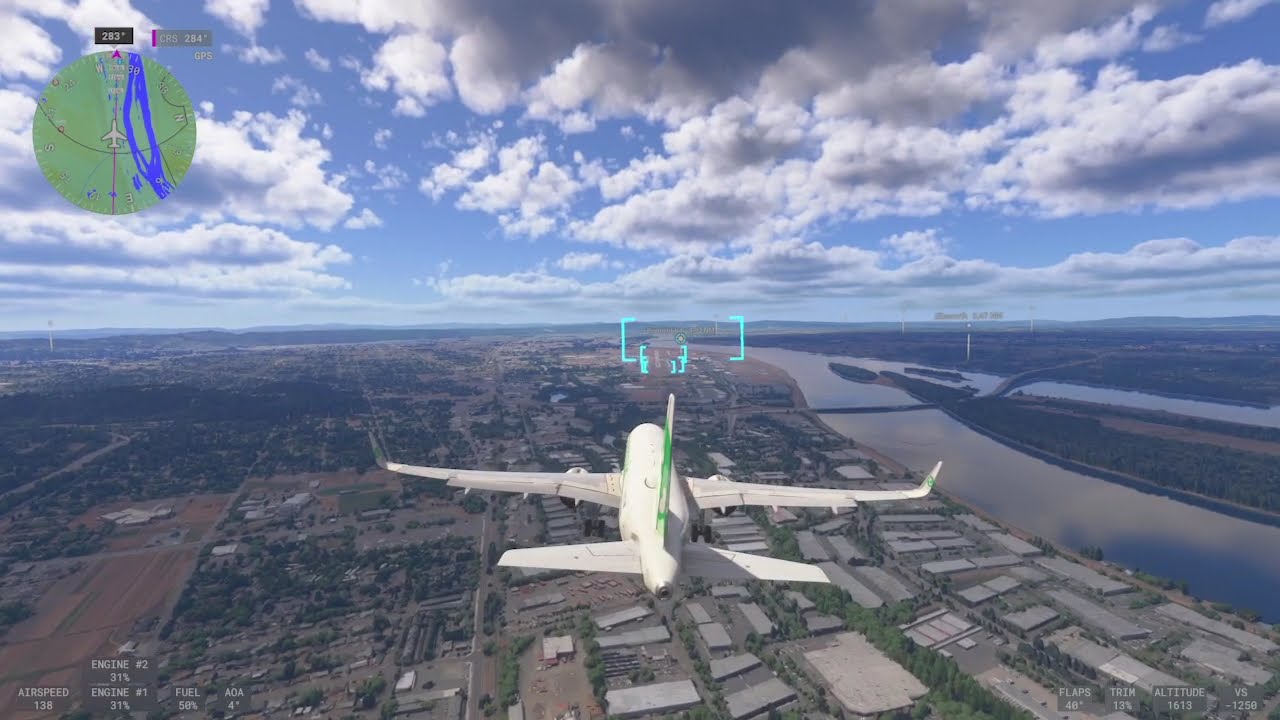
?? Whats wrong now on your end.
Read this as backround information what SU5.1 has achieved: [Polls] Microsoft Flight Simulator 2024 Sim Update 5.1 Feedback (PC/Xbox/PS5) - #105 by KLM1494113
1 Like
Latest test KMSP To KDEN in the Citation Sovereign+. Zero traffic. Everything set as low as can be set. No ATC. Again, all things that worked fine (or at least could be used) on SU4.
Started out ok but quickly deteriorated not long after departure.
Then by short final….I don’t even have words.
Couldn’t even see the runway. 2.5 hours for nothing.
Honestly tired of wasting my time. 


4 Likes
I’m on a newer build than that and having the same issue.
10.0.26100.8569
And yes, I have 32 RC set.
With the changes in SU5.1, have any of you had issues with the higher paying Airline Transport jobs? Not only are the highest jobs gone, the list is cut by probably 80%.
I have 3,300 hours in the game with an “S” rating. Prior to SU5.1, I would filter by Airline - Transport Passenger, then Select Aircraft Boeing 787-10 then select KLAX (Las Angeles, CA) and there would be several $50 million jobs such as a King Aziz airport in the middle east, and my favorite, Manilla Philippines. No matter what I do now it doesn’t show anything much above $30 million and it’ll even show sub-million routes. Yes, this is on Freelance.
I remember the notes talking about checking for destination lighting which shouldn’t matter since these are ILS capable airports, but I tried changing the time a little at a time with no luck.
Am I the only one experiencing this?
I can confirm that Mamudesign Powerlines, Power Lifts and Marinas run without any stutters in SU 5.1 … which is important as many players use those addons.
2 Likes
.. and the buildnumber?
Are you streamed or installed?
XBOX-X or -S
Longitude still producing stutters at airports, while taxying, when switching views to in and ouside of cockpit. When panning around the scenery while at 34,000ft it still loads scenery in in front of you.
PS5 pro.
PC - 5080, MSI X870E
A post was merged into an existing topic: [Polls] World Update 22: United States National Parks
I concur. I tested both with and without them and noticed no difference.
I have this issue with any aircraft
1 Like
Ok so cleared and reset cache and fired up 5.1 for the first time and immediately noticed 90% of the career mode missions are gone. Major hubs like Sydney, Tokyo Lax etc now only show at best 10 or so missions. Previously you would find 50+
So we have lost alot of missions, “over 1 million missions” is the mantra but currently about only 1,000. Ouch 5.1 
So free flight it has to be, Latinvfr A380 out of Sydney, first try was a sloppy rendering mess, LOD was 2020 vibes at launch, but history always says it takes time for new SU to warm up and fit into the console, so restarted everything and tried again, this time LOD was better. Flight was great, good performance has a memorable approach into Brisbane used the FCR and everything was really nice.
But pls investigate what’s happened to the career mode missions, I believe a server side hotfix is in order and fingers crossed prior to the weekend
1 Like
Just so that others can replicate and possibly open a bug report can you be more specific as to what kinds of missions? Employee vs Freelance, and then what specialization(s)?
2 Likes
Any, click on the airport mission list and see this for freelance and it’s similar for employee
I have no filters


Yeah, just checked LAX and saw about 5-7 missions total which is wild. I don’t have “before” screenshots but I agree that there definitely used to be more.
2 Likes
Whatever they’ve done to LOD and caching jas a terrible effect for me and makes it complicated to rate the survey.
“Performance” as a raw FPS figure is good but I see constant micro-stutters as assets get loaded on and off the VRAM even though there is plenty of headroom on my 24GB.
And the visual performance is very disturbing, when TLOD, OLOD and terrain pre-caching are maxed in the menu with neither CPU, RAM, GPU or VRAM being used for more than 60% and I see contant pop-in of scenery objects in a suddenly very short radius of my aircraft.
Most noticeable at night where the white lights of whole neighbourhoods pop in about 5 NM around me, as if they recovered from a blackout.
But its only the white lights. The orange orange ones for streets span out all the way to the horizon just fine.
A massive regression from early SU5 builds. It was reported during the beta tests but wasn’t addressed at all.
6 Likes
Streamed or installed what?
The only thing that I dowloaded in the past on 2024 was the PMDG 737.
But no, everything is streamed. Remember this is the advantage of 2024 according to Microsoft.
Edit: (I’m on Series X)
I appreciate you trying to help the Xbox users. I just want to reiterate that I’ve been through this song and dance from the beginning of 2020 with Xbox. When things work, it’s great or when you don’t have to jump through “hoops”.
SU4 is what brought me back to the sim on Xbox. Period.
To me, the Xbox Series X handles the core simulator very well for the most part.
It does need help with memory issues because we don’t really have enough to play with. But there is a way that allows us to have complex aircraft and a good core simulator.
Through Market Place, Xbox add ons can be - and are- produced that are platform specific. That’s where the optimisation can take place and I’m surprised it’s not mentioned more, it already happens and results are good where this is thought about and carried out in a sensible fashion. It might mean we end up paying the same price for a product as PC Users ( no way round that I think) with less features and lower res textures but well optimised, performance wise. If you want all the extra features, high res textures and bells and whistles then you’re not sensibly going to achieve that on Xbox or PS - we all have a trading space to get a good level of performance out of the core simulator.
My own experience with the Skyward Simulations Citation C680 Sovereign show what an impact sensible optimisation has on Xbox - when I purchased it, initially it would not run very well in 5.1, big stutters, Low Memory warnings, blurred LOD, it was awful and performed similarly - as badly - as the stock Longitude. Then Skyward Simulations released version 1.0.3 which addressed performance issues across the board. On my series X this made an incredible difference- from being almost unflyable the aircraft became a good performer in the simulator and although it’s not always the smoothest in built up areas, the experience has been transformed - and I don’t think there is any difference between Xbox and PC editions either.
But that’s not the point really, the point is that because MP allows add ons for Xbox to use different files, this is where a big difference can be made in terms of optimisation for Xbox users - probably same ideas would work for PS users too.
My experience was with a new third party aircraft but the same must be true for all MP add ons - and it was very clear that poorly optimised ones drag down Xbox performance far more than aggressive LOD reduction. The improvement in performance I experienced as a result of the update to the aircraft - there were no updates to MSFS2024 - were dramatic to say the least.
It doesn’t absolve MS/Asobo altogether - some guidelines about what works the best are needed - they do need to make some effort in the right places - as well as an initiative to do something to optimise some of the worst performing stock aircraft in the sim - and processes ( the current EFB/ATC flight planning process drags Xbox performance down far too much to be normal behaviour something is badly optimised somewhere…)
1 Like
They should give us SU4 until they manage to get it work well.
5 Likes
Using a certain historical precedent, if you think su5 of the sim is bad, wait until they reach su16..
2 Likes