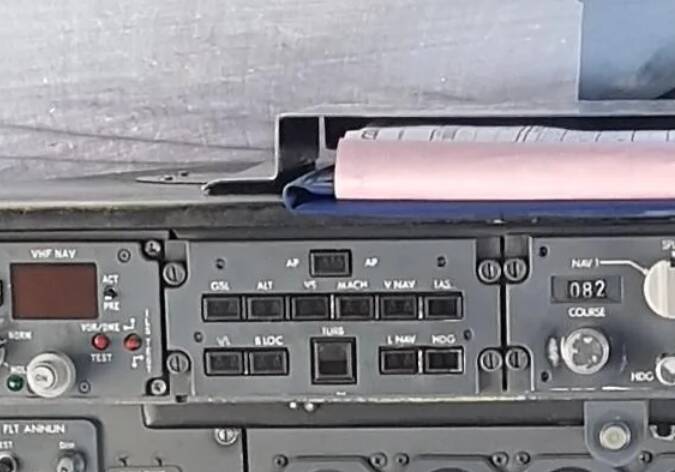
FMS is disabled, the plane is in the original configuration. It supposed to fly VOR to VOR only. My question is why there are still LNAV and VNAV buttons on AP panel?
I know what LNAV and VNAV is and how it works. I use it in 737 and 320 every day.
FMS is disabled, the plane is in the original configuration. It supposed to fly VOR to VOR only. My question is why there are still LNAV and VNAV buttons on AP panel?
I know what LNAV and VNAV is and how it works. I use it in 737 and 320 every day.
Ah, ok, I misunderstood your question.
Hmmm…, right, that’s strange. I don’t have a POH for the 146. Would indeed be interesting to know what purpose the buttons had in the real plane.
Regarding the VNAV button… I’m not sure if it was in that video someone posted here some time ago but I clearly remember seeing one 146 captain explaining the buttons on the glareshield and saying that VNAV is just a dummy button not actually wired to anything as BAe planned to bring the feature to the aircraft. But they never did.
I remember this statement too.
Maybe just like the auto throttle button on the ATR  it was there because they didn’t want to change the panel modeling after deciding not to include the feature.
Yes, I thought of that too.
Does the 146 have auto-complete checklists like the A310? I am just thinking about getting up to speed with it/ would be nice to just have some of the work ‘done’ during the first or tricky flights
It has happened in a couple of aircraft I flew and fly. Standard configuration and depending on the operator it was wired/activated. Also some features that were planned at the design process but then vanished and stayed there forever on the dash or pedestal…
It has the usual buttons to set starting states ( which do step through the startup automatically rather than instantly making things different ). I don’t know what the 310 does to compare.
So the A310 has built in checklists (from top menu) for various stages of the flight which you can have the ‘copilot’ compete either a step or the whole page. ( I.e. pre- engine start, line up, descent, 10,000ft etc). Allowed me to get up to speed on the aircraft without too much frustration as it can get quite busy esp. on the way down. That’s the feature I am asking about here.
It didn’t originally, they added it after complaints from people that expect everything to have autopilot so they patched it in.
So you’re saying that British Aerospace added LNAV and VNAV lights to the autopilot panel IRL because of complaints from future flight simmers?  Maybe you should re-read what they posted because the VNAV and LNAV lights are on the real life autopilot panel, even in real life planes without flight computers, which is what they were asking about. And then a few posts later it was explained why.
The 146 has the same automated checklists as long as you activate the interactive checklist menu in MSFS options.
So both LNAV and VNAV were just blank buttons on early versions of 146?
Dunno, just going by what mhron posted.
Might not have been this modes but sure I read that so thing autopilot / throttle was added.
Sorry if this has been asked before: could find 2 references but no solution. I’m on XBox.
I got the TCA stick and quadrant and I have assigned throttles 1&2 to the left lever and 3&4 to the right lever. My problem: while I can adjust 3&4 quite well the levers for engine 1&2 are not moving when I move the left lever?
Second question: the elevator seems stuck to the full up position even when spawning directly on the runway. It moves but neutral seems fully deflected upwards?
Any hints for me and sorry again if this has been answered already.
The elevator is free pivoting, its deflected by a control tab when theres airflow.
Have you unmapped the mini throttle below the main joystick?
I ended up unmapping everything and starting again. It works great now
Yep, did that but I am not clear if that did the trick. I uninstalled, rebooted the XBox, reinstalled, spawned on the runway: didn’t work. I did shut down and let it alone for two hours. Restarted, spawned on a runway again and all of a sudden all 4 throttles can be moved and work. Very weird and leaves me clueless on why this did not work right away.