The hold is the cargo/baggage compartments.
Hi, so Hold are the Cargo Hold 1, 2, 6, as shown in the figure below.
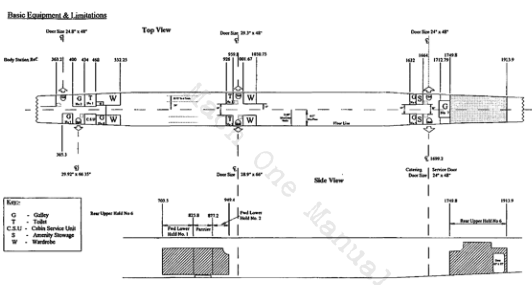
The numbers are the amount of cargo you want to put in each cargo hold in [kgs].
Request button gives you random numbers, then pressing Load will actually configure those numbers in the sim.
ok, so if say I want a full load plane, I go to set 120 pax, and then ues the cargo load in KG in the 3 cargo bays to set the balance, then set fuel load via the fuel and balance sliders and good to go?
does it only works at the gate or say if spawn on runway can do the same change? coz I tried spawn in runway and set the random numbers, press load and nothing happened
That’s @HotScallop27 who can provide feedback about how it works
I tried tinkering it at the gate, while entering numbers did shift the CoG quite a lot, but seems in game panel fuel and load don’t change a bit, not even total weight. so I wonders how could I load the passengers and change my fuel level to meet the max take off weight balance? since by default I saw there are some weight assigned to the cargo and passengers, I assume if that page is just adding on top of the default loading it could be unrealistically loaded?
It could be that it works the same as the ui when inputting the load but the changes are not reflected in the UI.
In any case, it works over the payload, not the fuel load
yea, I mean I open the payload and fuel load page, scroll to payload which shows the passenger and luggage weight, and the aircraft total weight.
altering that I can see the CoG meter change a lot, but the load page total weight or the crew, passenger and luggage value stays as what the default load was, like the click and fly load value, I just wonders if say the value is addition to the default fuel weight and loading weight, if I originally set the fuel load tot almost max take off weight, even if I add a few passengers inside it could exceed maximum.
or I kept the value low before start fly, load at gate for full passengers, but since the total weight is not shown in the fuel and load balance page, there’s no way I could tell if I over loaded the fuel above maximum. maybe it would need some guideline or make it interactive so we can reliably manage total load and fuel the plane for long haul?
It will have to be polished so that it is reflected in the UI. Of course, the events are very specific: it only updates the payloads based on those values entered by in the fmc, but perhaps it should be accompanied by refreshing the UI after that.
I see, I didn’t verify if that changed accordingly. The code I wrote sets the SimVars similar to how you can load paxs and cargo on FBW A320NX.
You are right, I do want to implement the fuel load as well but haven’t been able to work on it.
1 Like
right, so at the mean time maybe I just fly with the default loading and only altering the fuel load, in the A32NX I remember that when they do the loading, they make default loading values in the in game panel irrelevant, so it only loads what is inputted in FMC. and another drawback is that the fuel in FBW is set in the EFB only, the in game UI isn’t working, so maybe it will need to be done similarly, the trouble I can imagine is that in A320, you can go 100% fuel plus full passenger load without issue to take off, while Concorde have massive surplus fuel when needed in trim tanks plus spare space for fuel transfer, so if that’s done just like the A32NX I could imagine a full load plane = overload plane
So I downloaded the patch for the Concorde an hour ago over the marketplace but for me fuel transfer speeds remain very very slow. What can I do now?
Install the patch. If installed properly, fuel transfer is not slow. You obviously didn’t install it correctly
Well I just clicked on download. I now deleted the whole aircraft and am redownloading it right now. But it said version 1.0.5 before deleting it.
Edit: Okay so I made some measurements: pumping 700 L from 9 to 11 takes 1 minute 6 seconds
from 11 back to 9 then takes over 6 minutes.
Is this meant to be that way? I always use 2 pumps and 2 inlet valves.
You mean you use 2 of the 4 pumps from tank 11 to tank 9?
You do it manually? Why not use the automatic function?
(I’ve noticed some problems with tanks 7a and 7)
Okay there are 4 pumps. Need to check that only saw 2 of them all the time!
Okay sorry now it works with the 4 pumps on! Thank you very much!
1 Like
Yes you are the only one. Try removing all other addons
Are you on PC? Remove the plane and reinstall.
Anyone find the VFR map freezes with Concorde? Comes back after closing and re-opening. I have seen this on a couple of Concorde flights but not on any other planes. My last flight it was really consistent, the VFR map would update for 5s and then stop, couldn’t even zoom when frozen.
I’ve no idea how Concorde could influence this, be useful to know if others see it.