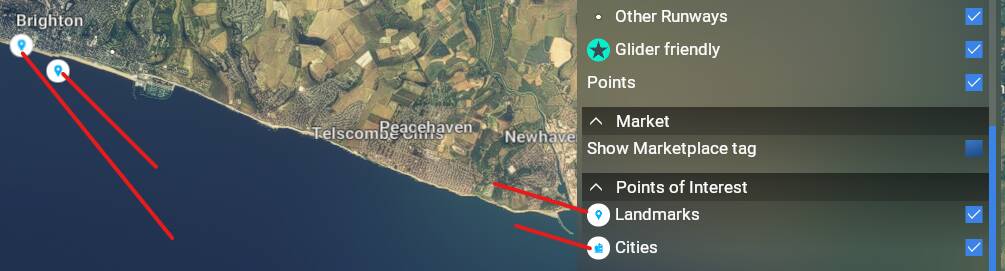
Save World Map Filters

At this time, the world map does not have any SAVE features. For example, if you open filters and turn on and off settings, they are lost the next time you exit and re open FS2020.
I would like to see all my airspaces, and VOR NAVAIDS, POI’s on the map if possible.

Having a SAVE button should be easy to implement .

2 Likes

Oh yes. Please!

2 Likes

This was working at one point, but not since a few updates back. You can update the filters xml file in the D:\Flight Simulator\Official\OneStore\fs-base\worldmap folder with the required changes.

2 Likes

Maybe this mod helps. It allows you to edit the xml per your preferences.
JayDee´s World Map Filter Presets for Microsoft Flight Simulator | MSFS

3 Likes

Thanks for the link, was also about to create a new wish thread for this expectation. The issue could be sometime some are asking for a feature and other for the reverse … not easy to satisfy each single expectation … :thinking:

I have to change my preferred map Filters every time I load MSFS because they do not persist between MSFS exit and launch.

5 Likes

If you are on PC, give that a go. I did and I’ve had the filters the way I like them ever since.

1 Like

This is from msfs2020, everytime I open the flight planning screen I have to uncheck some options to hide them in the map. Please, save these options for future flights

2 Likes

Was hoping this would be fixed for 2024 but nope.

5 Likes

Please, for the love of all that is Holy, make the filter settings retentative. This is a quality of life issue; it drives me batsh*t crazy to constantly have to set the filters. I don’t care about fauna or POIs. Please let me choose what is displayed without having to do the same thing over and over and over again.

Thank you.

15 Likes

ditto!

OMG they did this on purpose, by design, and thought it was good! :memo: :triangular_ruler: :straight_ruler: :eyes:

4 Likes

Original post from September 2020 and it’s still “feedback logged”

:eyes: :eyes: :eyes: :eyes: :eyes: :eyes: :eyes: :eyes:

Things like this drive me crazy with Asobo Microsoft. If anyone has a good reason for not having this as an option at least…

However, in FS2020 there is a “world” file somewhere that we could edit and save to permanently have the layers we wanted always on.
Has anyone found that same file location in FS2024? I haven’t.

Cheers!

1 Like

Asobo really do not care about a simple feature to add… I hated the fact that filter POI markers never saves… I guess 2024 is the same.. I hate the world map being covered in markers…

1 Like

You could try the old trick of customising the view to your liking, confirm that the following file has been updated, then making that file read only.

In 2024 it is here:

"D:\XboxGames\Limitless\Content\Packages\fs-base\worldmap\WorldmapFilters.xml"

Replace “D:\XboxGames” with wherever you have the sim installed.

I’ll test this shortly, both whether it does indeed save, as well as remember between launches.

So turning them off in the 2024 UI does indeed turn them off, but the file above is not updated.

After a relaunch the two options I turned off are back on again, kind of as expected.

So I set the following two options off in the file.

		<FilterDefinition>
			<FilterID>TYPE_LANDMARK</FilterID>
			<Title>TT:MENU.WORLD_FILTER_TYPE_LANDMARK</Title>
			<Descr>TT:MENU.WORLD_FILTER_TYPE_LANDMARK_DESC</Descr>
			<Icon>ICON_MAP_LANDMARK</Icon>
			<ValueType>ONOFF</ValueType>
			<OnOff>OFF</OnOff>
		</FilterDefinition>
		<FilterDefinition>
			<FilterID>TYPE_CITY</FilterID>
			<Title>TT:MENU.WORLD_FILTER_TYPE_CITY</Title>
			<Descr>TT:MENU.WORLD_FILTER_TYPE_CITY_DESC</Descr>
			<Icon>ICON_MAP_CITY</Icon>
			<ValueType>ONOFF</ValueType>
			<OnOff>OFF</OnOff>
		</FilterDefinition>

Sadly while I was about to test this the sim is now refusing the get past 54% as it loads world data, and crashes. Even after a reboot. :frowning:

So setting both of those values to ON, and the sim boots normally. You couldn’t make this up! I’ll try each independently to find out if one, or both are causing this.

But either way, the idea that the inability to remember your map settings as by design rings hollow to me. If you aren’t supposed to, then why have a file on disk which has those options in it in the first place?

Cities off, landmarks on, 55% then CTD.
Cities on, landmarks off, 53% then CTD.

Set them both to on, and the sim loads.

3 Likes

Is it possible this is due to the layout.json not having the exact file size when you set the options from “On” to “Off”?

Wild idea that may not work, ON is two bytes, Off is 3 bytes, maybe try 01 and 00? Grasping at straws here…

This is probably exactly why they enforce the layout.json file size now, it’s an easy way to “Keep people from editing career files”… Just guessing and probably wrong, but, with every action there’s an equal and opposite reaction…

sigh.

And… why, every time I open the map, am I staring at the Galapagos islands? Why can’t it remember where I was last and start there as the “center” of the world?

sigh.

3 Likes

Interesting idea. I added some junk data to the top of the file, and the sim also fails to load, even with the other two options set to on.

image

So I took that out, and the file length matches, and I’ve now set the other two options to “OFF”, and changed the “layout.json” to have file as “55,080” instead of “55,078” bytes.

Well, the sim launched! Except it doesn’t actually obey the settings in that file. :frowning:

Good catch on the file size, that was spot on.

But it leaves us with the original issue. The sim doesn’t remember your settings, and I think I can see why it doesn’t record them if the sim isn’t capable of updating the “layout.json” file as you make changes to the UI.

Oh, and the fact that it ignores the file except when the sim is loading.

Asobo got some ‘splainin’ to do, me thinks. Not least of all that the sim handles a mismatch of file data so poorly. Just falling over like that is just terrible.

4 Likes

Hey,
would someone be kind enough to share the original World Map Filters file with me?
I was experimenting with it and, unfortunately, didn’t make a backup. Now I can’t see any airports on the world map anymore, even though everything is switched back to ON.
I’d really appreciate it if I could just restore the original file. That would be awesome – thanks a lot in advance!

I’m referring to the world map or whatever it’s called where you can create a flight plan, launching your plane into a departure airport ramp or gate. I’m always needing to reset my preference for what to show on the map, namely clouds/precip/ or no clouds etc. Very basic stuff…

Over 5 year old wish, :rofl: . So this isn’t happening?

4 Likes

That is, disappointingly, probably a safe bet.

1 Like