What i dont understand is why, if they are aware that consoles are running at capacity to run the sim why they dont include more graphics options for yhe console versions. PC can alter many visual aspects such as grass depth, tree density and other detail levels to increase their performance. Why isnt this an option for xbox? Many of us are struggling to run smoothly, reducing some of these factors would increase our performance aswell.
Makes no sense.
Maybe they think console users are too stupid to understand and tweek that, so they do it for us with that terrible LOD every time you load a more complex aircraft. 
Yeah we on Xbox are locked on max for everything and instead of reducing those to help it cope with high demand, it just reduces how far away these things are shown making it look terrible
It’s the most bizarre and assumptive approach I’ve seen in game development. The dynamic LOD is the worst in this game, taking issues from MSFS '20 and making them three times worse.
It’s really jarring to be honest and there are times when I just want to delete the game from my system due to visual inconsistencies. NYC was a smudgy oil painting yesterday with broken crayons and polygons sticking out of the ground everywhere, not to mention the flashing textures a few hundred metres ahead of the plane. Today, it was just okayish, nowhere as bad but still leaving a bit to be desired.
And what is going on with the draw distance in this game or details not popping onto the POIs as you fly near them or over them? Are we back in the PS2/Xbox 360 era? What a mess!
I think I might as well save myself the stress and go back to 2020. I just want a virtual experience to work when I get into it, not spend half the time on the internet trying to find solutions or get answers. I think the visual aspect of this game should be outsourced to another company entirely, where they have teams of testers to flesh everything out before release.
How do you explain the fact that one day it looks dreadful, and the next day it looks kind of okay? Furthermore, if the textures don’t load in properly at all, which happens nearly every time, restarting the game seems to fix it for the time being. What is going on with Asobo? When can we enjoy this game without dealing with any of this nonsense?
I can’t say that I’ve had it look “kind of ok” so far unless I’m in a Cessna - in an airliner, dreadful is the norm. But server load is probably the main variable on that one. I spend 99% of my time in 2020 as airliners on 2024 are too stuttery
If it can’t even load a coffee maker in an office, what hope is there. Although at least it’s an improvement on the early days when I had a guy sitting in mid air as office itself wouldn’t load
Hi,
I`ve been more into astronomy the last years, climate changed a bit as my mood going out in the cold in the winter night. So i needed also a stronger computing machine for my imaging setup.
I thought, Ok, get in a gamer. Wow how this can do the job in a flip with a couple smallish adjustments. Impressive, fast, reliable in anything. 
Never regret that step I have taken for stacking images as working with them.
So what else you can do with it, it even does not blow air full power. 
Lets get some games in, hmmm something with big NICE graphics. 
Phuuuh I purchased some, really impressive, what!, I had no idea in my a bit old age that this all could be done so nicely to your ears and eyes.
So push up things to limit to get all out of it, wow!!, amazing the work from all this people.
So I got playing hours and hours, reaching big levels on games, with my old big thumbs on keyboard suddenly fast with huge glasses to see.
Ok, get an Xbox X in, give a rest to the compu-radiator in my astro room.
Wow such little thing in the first hours cooking a bit doing a very good job, well not all mods can load into it, but very good this boxy.
So finally I found the MS-FS  . Reading, issues, very bad reviews with the 2024. (???) Ohhh stay back. I`am not a fan on gamepass anyway so far, no purchase.
I gave it a go with the 2020, (purchased)on PC quite Ok, but some bugs to take off???
Why in my area is the premium deluxe not available in English??? Ok go with the deluxe, which is guaranteed in English. I am not an native English speaker, but makes the most sense in compu territory.
I could do it in french, german, spanish(not available), portuguese(only brazilian, nope!). But why not in English??? Common!!!
Further in game…
What is with that break there, why I have to push it a couple of times now and again. Thats very strange on PC as Xbox X. 
Got me in an hotas warthog setup, joystick and throttle. Bloody heavy that stuff, a bit plasticky the mechanism(will update the joystick surely). But Ok good to go with big hands.
Largely better than the odd Xbox controller.
Lately I got a bit more around with the controller, but not my thing really.
Visual performance is pretty good as audio on Xbox X.
What I would like to see as most users is the “community folder” in the Xbox.
I know I am dreaming, might be in ten to 20 years with largely other “tiny Box”.
So on the Xbox X can play perfectly with mouse and keyboard(certain games).
WHY it does not work within MSFS2020 as supposed to be.
It stand there my mouse and tenkeyless, but no mouse working.
Other games never a slightest sign of failure.
Other games on Xbox X with HUGE amount of mods are running, well take dinner before and be happy with yours.
Come back: works. NICE, great job done everyone together, you made it.
MSFS2020, ahh, when will my mouse work together with the keyboard on Xbox X?
I hope one day, I got a huge ticket open, but…, I do not know so far. Hope the best that this will work one day.
Wish also I could read nice reviews with the 2024.
Well now we are in 25`.
It works quite nice ok with some big hardware restrictions from the accumulative basic errors which you can read on PC.
Hope the best, all I can say.
- Martin
I`ve been reading in this forum that this problems are not solved since long time, for quite a few users on Xbox X.
Having just this weekend moved across from series x to my new pc build, I’ve got to say the visuals are so much improved, this is not rubbing it In, in any way.
But it feels like the Xbox was just some rush job and not tested, which many have stated already.
A good example is all the small quite airfields that have a stupid amount of aircraft dotted around, I go back to the same airfields on PC and the aircraft are not only properly rendered and realistic looking there is only a few that you would expect, not 10+ floating aircraft all over the place that pop in.
I think this has something to do with the omission of the traffic settings in the graphics menu, it’s all been removed and put to full whack for everything giving poor results.
This is just one of the examples of rushed to release.
The Series S and X are certainly capable, especially from a price to performance perspective. But to be clear, the S is working with a GPU equivalent of a 3050 and has 10GB of total shared memory (equivalent to combined RAM and VRAM on PCs).
The Series X is somewhat better off with 16GB of shared memory and maybe a 3070 equivalent GPU, but the added spec requirements in 2024 more than offset the efficiency savings they’ve found to-date compared to 2020 and it shows.
There is some efficiency savings with the OS compared to Windows, but when PC users with mid or upper-tier GPUs, 32GB of RAM and 12GB of VRAM are struggling with addons, it shows the limits of the consoles.
This was the first thing I noticed immediately when I tried 2024 on Series X after simming on PC, and I was shocked the devs thought this was an acceptable experience.
I agree. I won’t be getting a PC due to cost, hassle and I’m a Mac guy, but I really am frustrated at the sim and wondering why I spent $130 on it.
I had always reduced the amount of static aircraft and ground traffic in 2020 to more realistic levels. I am dumbfounded as to why they removed this option from the Xbox implementation in 2024.
If the default is the max value as it appears to be, it could only serve to improve performance to allow us to lower it. Hopefully this is something that gets added back some day.
The many hundreds of aircraft (all GA and gliders at terminal jetways) at even small airports on the sim on Xbox has got to be my biggest bug-bear, far outweighing the mouse problem. Can’t find anywhere to park, causes huge amounts of stuttering and look terrible anyway due to heavily throttled LOD, presumably caused by all these aircraft
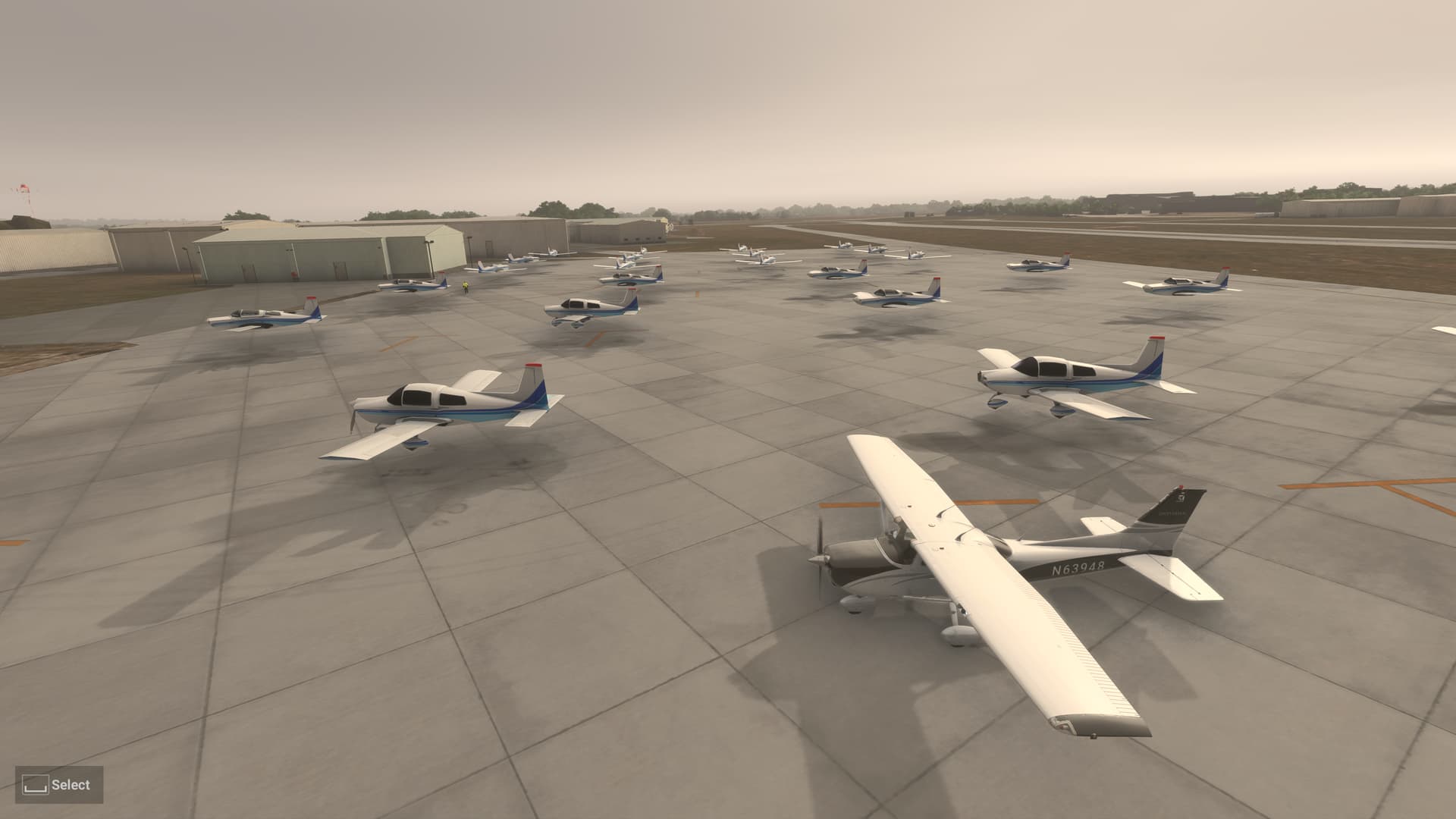
That OshKosh yeah? 
I didn’t really understand the complaints in this thread, but I’d only been flying the 172 and the x-cub, I flew the Vision Jet today and I am shocked at how terrible the terrain looks on Series X.
I hope there is a fix for it. Also, bin off the aircraft at airports, they look terrible anyway so I’d rather they weren’t there.
I also have the same problem with fixed objects not streaming in when in a hanger or office in career mode. I wonder if there is a server problem through Xbox, but that wouldn’t explain the difference in terrain between planes.
We need the sliders back from 2020, to control the amount of static aircraft and ground crew etc.
yeah the visuals are garbage in its current state. im optimistic its be better eventually, but part of me thinks end of 2025..
I just want them to roll out a fix for the flashing textures on/off which causes the world to look muddy and blurry as the textures either flash or don’t stay loaded in.
Everything else I can live with for now, please just make the flashing textures go away, it makes the game look like it’s running on N64!
and eventually make streetlights attached to a pole. lol c’cmon guys. floating orbs of light. ridiculous
Also, the textures on the world map flash too, like mad