Turned Photogrammetry off (but kept bing imagery switched on). A vast improvement. Just some stuttering evident when loading in real-time traffic when near Orlando Intl.
Photogrammetry definitely appears to be the primary source of the issues 
Turned Photogrammetry off (but kept bing imagery switched on). A vast improvement. Just some stuttering evident when loading in real-time traffic when near Orlando Intl.
Photogrammetry definitely appears to be the primary source of the issues
I’ve just turned off all data functionality (rubbish as i’m on fibre broadband) and the stuttering completely stopped. I’m turning it back on again except for photogrammetry to see what happens… and stutter has stopped.
The only bad thing was that when i turned it all back on it said my packages were out of date and logged me out. So not really sure this could fix any mid flight stutters…
Check your profile logbook. You may have been hit by the bug that wipes it.
I have recently built a new PC just for this simulator and it cost me a lot. However with my specs I am still getting stutters. It is more of a frametime issue I guess? FPS hopping from 20 to 40+ fps, gpu usage hopping from 60% to 99%, cpu usage hopping from 50% to 70/80%. all these are like every second.
specs: running on 4k resolution (low to ultra settings are still having same fps and stutters)
rtx 3080 ti, i5-11600kf on b560m, 850W psu and 2 x 8gb 3200mhz.
Please help as I am facing same stutters from my previous gtx1080 till rtx 3080 ti. Still unable to have a smooth gameplay since last year.
*tried all solutions on youtube and here mainly to settings tweak in the game and in the pc OS/nvidia settings…
Did you try turning off Real-time AI traffic? Also does it happen near congested airports? I have had the same issues. Your computer is prime for this game, as well as others, so more than likely I believe it may have to do with the traffic. Try it and let us know. 
Yes, realtime data completely off.. Its equally bad at any airport, doesnt make any difference..
Well, the problem is well known, there are several threads about this most important
matter of the stutters in this very forum, among them also mine:
Have you tried leaving real-time traffic on but turning off AI Offline traffic? And cutting back the AI generated aircraft on the ground and airport vehicles? I’m seeing AI Offline using around 5-10 FPS especially when ATC and AI Traffic are chatting away. These cause random FPS drops and stutters for me. If your stutters are consistent and persistent then something else is causing them.
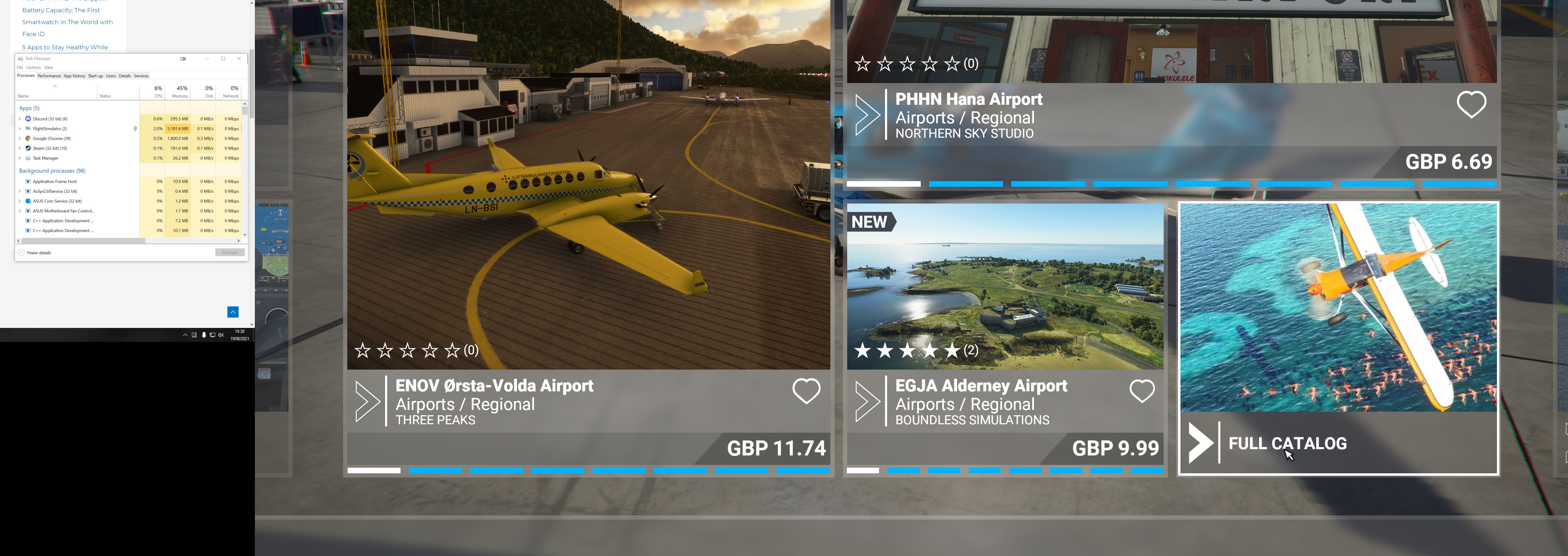
Navigating even the main menu, i am finding the sim is stuttering/hanging so i thought id open up Task Manager to watch what it was doing and what i found is quite interesting
The sim seems to be going into Suspend Mode (the green leaf icon in the status column) for a few seconds before the sim becomes unstuck. Is this expected behaviour and what triggers an app to go into Suspend
Thanks for the info! Well so there isnt anythinf we can do now? But im always seeing many youtube videos with the same cpu but 3070 running smooth fps. My difference is that i can never get a stable timeframe, cpu usage and gpu usage. I always see benchmark videos doing a steady 99% gpu usage but mine is always fluctuating. Same as my mood.
Anyway sorry for a newbie question, do you guys think changing my i5-11600kf to i9-10900kf, or upgrading 2 x 8gb 3200mhz to 4 x 8gb 3600mhz helps? I honestly feel its just poor game optimisation.
I think the SIM it is getting better. I used to complain a lot at the beginning, until I realized that as time went through, the performance in my PC kept getting better, with many issues fixed, and of course, some new issues were introduced in the process, which is a fact of life with programming. This software is just a year old and people are comparing it with other software that had been around for years and that is not fair.
One thing to keep in mind is your PC is running tons of software that could affect the SIM . For example, I had an issue with the SIM a while back with CTDs, which was later fixed, not by Asobo, but by REALTEK updating their sound driver. This is just an example. Another example, Intel releasing a microcode to mitigate some serious security issues with their CPUs which affected my PC performance, until I updated my MB BIOS that matched the Microcode released by Intel.
Today my PC is running buttery smooth with EVERYTHING in ultra at 3440x1440. The only stutters usually happens when landing at some airports.
I’m using MSFS since last August, and I tried a lot to optimize performacne and reduce stutters, even did an upgrade from 16GB to 32GB. There are many in this forum that even did experiment a lot more, so you will find many answers in many threads.
Just my short opinion to your question: Both will help a little bit, but not solve the problems. I would try to optimize the configuration first.
This tutorial was quite helpful: https://www.flightsimulator.blog/2021/05/16/best-graphics-settings-guide/
Hi, i realised that my ai traffic have always been off thats why i dont see any other aircraft in my airport other than myself…
Hi all, I realised that in VR mode (oculus quest 2), gameplay in first person, was very smooth and satisfying. There are some noticeable micro stutters BUT MUCH BETTER than non VR. All settings are near high. If ultra there will be lag when looking around (nauseous).

This definitely worked for me.
Switch off windows auto update, never update your PC and use it only with MS flight simulator. Then it will be butter smooth until Asobo makes a mistake with the microcode. 
You’d better have some top tier AV running on there then, as your computer will be increasingly vulnerable. And since you would only use it for MSFS then you don’t even have the option of air gapping it from the Internet.
When you have a PC specialy for MSFS and you only use internet to update the sim, your graphics driver and antivirus/firewall there is almost no risk.
and this kind of “I will not do updates” is the reason, why MS introduced the “Forced auto update strategy” .. they want avoid these many unsecure windows installations..