Building my PC soon (parts all ordered & inbound). Eventual goal would be 3 monitors for wraparound views. Honeycomb alpha & bravo in hand, logitech rudder inbound.
Question - how good is a basic gaming desk to support this? My dilemma is if I put the yoke/throttle on top of the desk, where do I put my keyboard & mouse? I’m pondering a few ipads as touch screens for various controls. If I mount the yoke & throttle below the desk now I have room for “stuff” but am I going to be constantly hitting my knees (I’m 6’0). What solutions are people using to mount 3 monitors or even better (someday!!!) something like 3x 55" TVs? I’m trying to avoid the $$$$$$ custom cockpit solution, mostly because of $$$$ not desire
Mine is 55" on desktop, mouse and keyboard on desktop, I bought a 12 dollar adjustable plastic computer stand from walmart, that holds the joystick, and I have a cherry humidor on the side that holds throttles. I use twist for the r udders, but I use pedals for driving sims, and they fit into the mix just fine.
If your going multi monitor, then your going to have to probably need more then one desk to make everything fit right.
It all depends on how deep you want to get into it, ya know ;p
One way I solved the multi-monitor/desk height solution…I bought a motorized adjustable height stand desk base. Got it on Amazon for maybe $170 a few years ago I think? (it was pre-covid, so can’t guarantee that’s still the price). But I just wanted a base, and then I just grabbed a piece of 6ft x 24"x3/4" laminated shelving material from Lowes/HomeDepot/any of those places. Usually not much more than about $30-40. They come in all shorts of finishes, so you can make it match your needs (or if you have an IKEA around you…I didn’t…you could get a desk/table top there for fairly cheap I think). If you want to get crazy, you can even get some laminate edge stripping (that matches your finish of course) and put that on the two side edges (only one edge comes finished in that stuff).
But anyways, take your adjustable stand base, widen it as far it says it can go, and then mount the top. You’ll of course want to keep in mind the amount of weight you’re putting on it and just make sure you’re not going to overweight what the stand is rated for, but with 3 monitors (1 ultrawide and 2 regular) mine was fine.
And then yeah, i mounted the honeycomb alpha and bravo under the desktop so I had plenty of room for monitors/keyboard/mouse up top. Then just raise the desk up to the height that fits your needs the best. That’s my two cents…worked for me, figured I’d share!
Ps. I think you can even get those laminate shelving boards up to 8ft in length…probably overkill, though, and your desk base may not be able to handle that. I found 6ft to be perfect.
Sorry, I’ve ripped it all down about a week ago to begin building a simpit For the height I would say I had moved it up maybe 4-5 inches above normal desk height, nothing crazy. But you can go as high as you want really…
I’m trying to figure out if the weight of all 3 monitors is on that one bracket? Either way I’m not sure that’s the setup I’m looking for, it seems like most of the cockpit builds need more instrument space than a car build.
This what I’m building currently in my Citation enclosed simpit. Have a 49" Samsung G9 as the “front windshield”, and then have two 34" LG ultrawides as the two “side windows.”
Did a test run on it the other night (12900K and 3090GPU) and between those 3 monitors, 3 more 15" LCD displays for instruments, plus one final 10" touchscreen display…it was cookin for sure. Still just “limited by main thread, as always.” I don’t doubt the 3090 could handle the visuals (used high setting profile, couple turned down to medium, terrain at 100, object at 150), but that thorn in everyone’s side about MSFS being limited by the main thread continues to hold things back. But that’s ok, while it was only getting about 24fps on takeoff/landings and 36fps cruising…they were a SMOOTH 24 and 36fps, and that’s all I care about.
Now the only thing missing is getting the “multi/render window” into a true multi-VIEW option that we can actually adjust the side views independently and not be based on the main camera movement. What they have now isn’t bad, but still far from perfect. Even more, the ability to make the airframe “invisible” when in home cockpit mode for those who build fully modeled cockpits where we don’t want any part of the cockpit in view, simply just the front/side visuals.
What software do you use for the additional displays for instruments? I’m looking at remoteflight as a strong possibility as it doesn’t (from what I can tell) tax the video card for rendering additional displays, it just has to keep the info in synch with the tablets.
I currently have 3 monitors (35 inch ultra wide and 2 27 inch monitors either side) on a very large desk/table I bought from Ikea. The desk also has PC speakers on it and a couple of small amps for my base shakers. Underneath this desk is a smaller one (also bought from Ikea) which is moved out a bit and used for my 2 Saitek throttle quadrants, a thrustmaster throttle, a T16000 joystick and a large mouse mat for mouse movement. My PC is on another desk to the left of this.
For what it’s worth, this works very well for me.
I was a little impetuous though a couple of days ago and ordered the Honeycomb Bravo (without even bothering to check the dimensions!) as a replacement for the 2 Saitek throttle quadrants. I just couldn’t resist the Black Friday price (£150). Hopefully, it won’t be too big for my own set up!
The sim does support multi-monitor, albeit needs some refinement. Look for the function under Graphics/Experimental. I use it with 3 27" monitors, works pretty good.
Any chance you could post a pic of the setup? I was actually at Ikea the other day for a different reason, took a long hard look at a few of their desks - they look steady if not super spacious. Do you know the name of the one you bought? I guess my biggest concern is the height & how much the throttle or yoke get in the way of other stuff. Thanks!
Really no software needed, unless you want to use a touch enabled screen and/or you want the instruments to automatically pop out each time you start up a flight…if either of those are true for your situation, check out MSFS Pop Out Panel Manager. It’s free at flightsim.to and is a great little mod.
But if you’re just wanting to pop out panels to other screens, all you need to do is hover above the panel you want to pop out (and assuming it CAN be popped out) you can just use right alt + left mouse click and it should pop out. Then you just drag to whatever screen you want.
As far as additional monitors for additional cockpit views, someone else already covered that above with the built in multimonitor/render window function in the game itself. I saw almost no noticeable performance hit popping out my instruments, maybe 2-3fps total in the end. That being said, my 3090 only has 4 ports on it, and 3 of them are taken by my main view monitors. I also have a motherboard that allows for 2 display inputs, which I used, and then added one more using a usb 3 to hdmi adapter (adapter has a built in graphics card that is good enough to just display an instrument panel).
That’s really good info - I expect I’ll spend some time experimenting. The last piece of hardware I need is a video card, waiting to see what the AMD cards coming out in a few weeks bring or if they lower prices of other cards (I had my eyes on a 3080 if there was a great deal). If you attach an extra display to the built in motherboard output, does it use the CPU based graphics engine?
Our son bought the smaller table first for a smaller, one monitor, pc set up maybe 5 or 6 years ago and I bought the larger table a couple of years later for a larger 3 monitor set up. I didn’t want to throw the smaller table away so I hit on the idea of putting part of it about 6 inches (?) under the bigger table and using it as a surface for my throttle quadrants, throttle, joystick and mouse.
The model of the tables unfortunately isn’t labelled on the tables and the models sold now by Ikea (I spent 20mins or so looking on the website) don’t ring a bell. Ikea however still sell similar tables just not exactly the same as ours.
As a rough guide both tables each have 4 height adjustable legs. The larger table is currently 80cm from the floor and measures 160cm by 80cm. The smaller table measures 120cm by 60cm and is 69cm from the floor.
At the moment this set up is just about perfect for me but as I mentioned above I hope the new large Bravo throttle quadrant doesn’t throw a spanner in the works
Yep, any displays you plug into the motherboard will use your CPU graphics card (assuming it has one). I of course wouldn’t plug any of the main game monitors into it, but it’s perfect (in my opinion) for pop out panels as it should have enough horsepower to run those. Now, I have no idea if that begins limiting your CPU or not, maybe someone with more knowledgable can chime in.
I’ve noticed, after hooking up my 3 monitors and 4 instrument panel displays, that my computer continues to be limited by main CPU thread. Once I utilize the MSFS multi-view/render window function on my 3 main displays, and then pop out all my panels, I drop to about 28-32fps. Now, it is a SMOOTH 28-32fps so I’m happy with it, but performance monitoring is not showing my GPU as being the bottleneck, it is (as usual) the main CPU thread. If they can ever fix that issue all would be right with the world

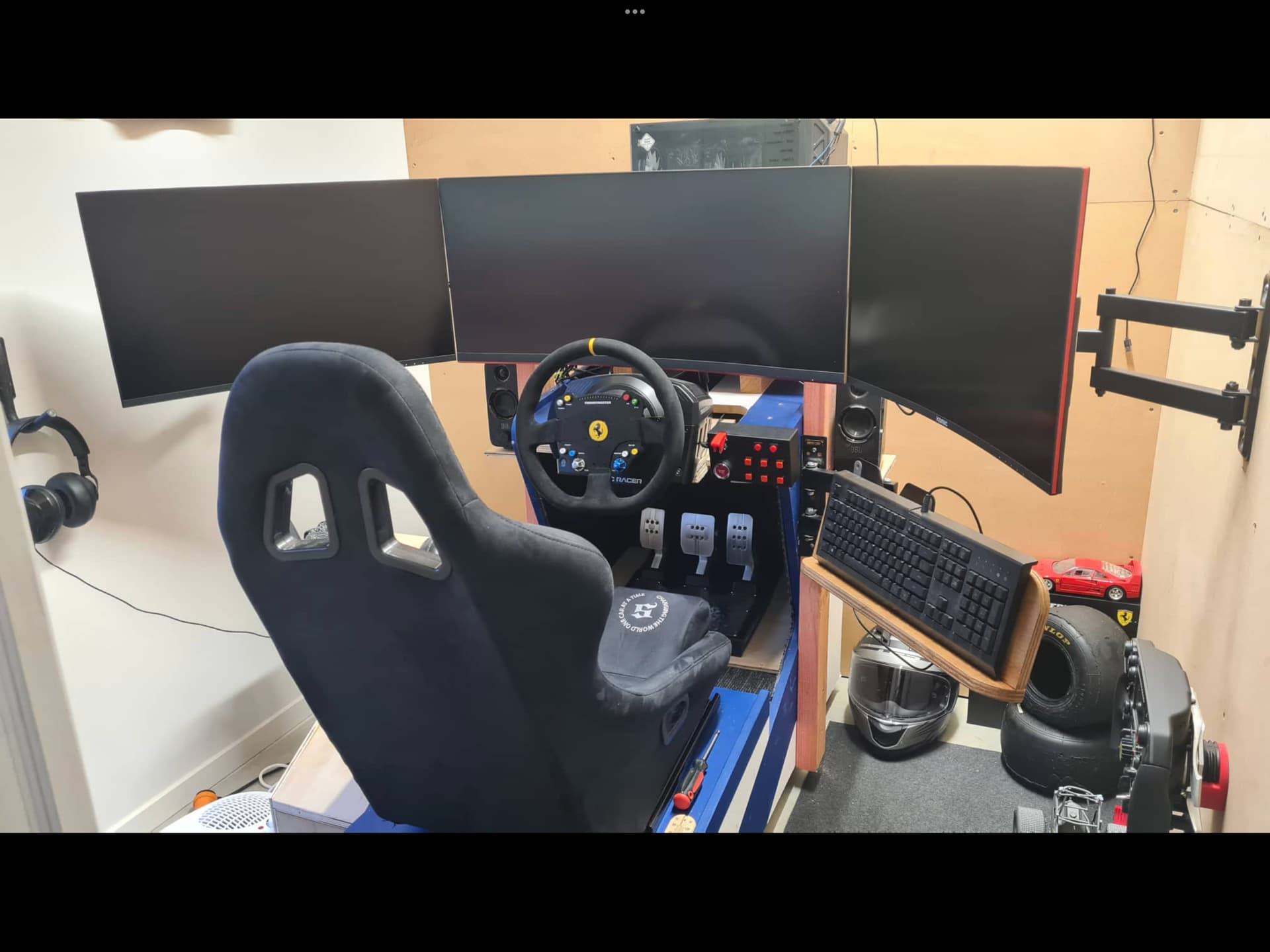
 For the height I would say I had moved it up maybe 4-5 inches above normal desk height, nothing crazy. But you can go as high as you want really…
