You just have to restart as you said. Even the live weather does not work when you change locations in the sim. You always have to restart the sim when changing locations…saw it from my beta days and its rule no 1.
Live weather works fine for me. Sure I get the bug where if you select Live Weather in the world map it wont reload for subsequent flights. But if I start with the unreal preset I’m always able to swap to live weather in flight. But the unreal weather never works.
It’s like the weathereditionmenu files aren’t getting mounted to the virtual file system. These are the files that are in the inaccessible WindowsApss folder on the MS store version. I can see the Unreal preset because this is mounted to a folder that is accessible.

On my system the MSFS core files are already a virtual link from my C: drive to L: drive so I wonder if that’s the problem? I was able to take ownership of the WindowsApps folders to see the dir structure but I cant do anything with the files (no copy, delete, replace) because the permissions wont extend to the file level no matter what I do.
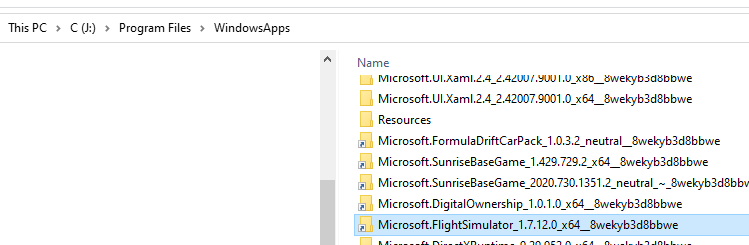

You shouldn’t take ownership of this folder otherwise it might break the entire Win10 Windows Apps system, or a subsequent update.
Instead, use IOBit Unlocker.
1 Like
So quick question - the way this seems to be built, is it doesn’t touch the original live weather at all, and only adds the additional option to use this plugin? That’s awesome! As someone who doesn’t like messing with core game files or removing functionality.
Yes you can those to use live weather as well! It just adds another weather preset that loads the metar weather
With that particular METAR report, you got clear skies and a bit of a wind. If you would have clicked on the bottom wind layer, you could’ve noticed that the wind was 110 deg and 7 kts.
That should not happen in ver. 1.3. (Ver. 1.2 would wait for the next METAR poll, though, so there could be a delay.)
I’d like to know more about this, if there is indeed such an issue. In any case, the METAR report should appear on the Weather Settings panel and the weather should be set accrodingly almost immediately.
Just did a quick flight with the plugin and I have to say I’m pretty impressed. The few issues I had (which are just my personal preference) are most likely limitations of not having a proper weather SDK implementation. I did a flight from KFRG to KPSM, skies clear leaving FRG, matched perfectly. As I headed north clouds started to form slowly, but then seemed to ramp up very fast. They sort of did this weird swell, and just as fast, started to unswell and disappear. This happened several times. As I approached destination, which was few at 3 and scattered at 13 (if i remember correctly). The clouds did start to form slowly. Here I kinda messed up and switched to live weather though to see its depiction, and then back again. This caused the plugin to redraw the weather(expected) - which was where I was really impressed. The clouds here looked very unique and natural vs what the in game weather engine produced. Also seemed to match alot more accurately what the weather was calling for. Another thing I noticed, and I think this is where the limitations come in, is as the weather changes, it changes ALL around you. So I dont think this plugin (or any ) could properly depict storms forming in the distance, or flying from a clear to overcast area. Either way, I’m interested to see how development continues and will probably use this for low and slow GA flights as it may be better suited for that. Gonna actually give that a go now.
Also want to voice my appreciation of your program: had a great flight with dramatic weatherscapes, rain, wind, turbulence, varying visibility. Top stuff! Thanks.
Has anyone figured out how to get the visibility/fog layers to work without the excessive stuttering? I know that it was known to do that but would maybe adjusting the transition timing reduce the duration of the stuttering to acceptable levels?
Great job everyone involved in this! Just sitting at KORD watching aircraft arrive (don’t see any departing)…oh and watching the weather change as the METAR changes. Excellent job!!!
Not yet, as this is an MSFS issue. The only way to mitigate this is to set your transition span to 0, which would lead to instant weather changes. Not a good solution, IMHO.
Really liking this but the only thing stopping from trying is the winds aloft, I mostly fly airliners so having less winds higher up is not realistic as now live weather will simulate jetstreams ect. This means I may have to increase TAS to stay on sched ect.
I did have an idea though, I do not know how or if it would be possible but if you could add simbrief integration it does provide a full wind profile for the current flightplan. There would be limitations sure like if you had to divert or changed your dest altogether but that is rare really. I believe most of the flightplan data can be pulled. I suppose it would still add another 3rd party integration that you mentioned but this one would be optional really and only if you used simbrief, but I think alot do use this. Example of wind profile from a LIDO:
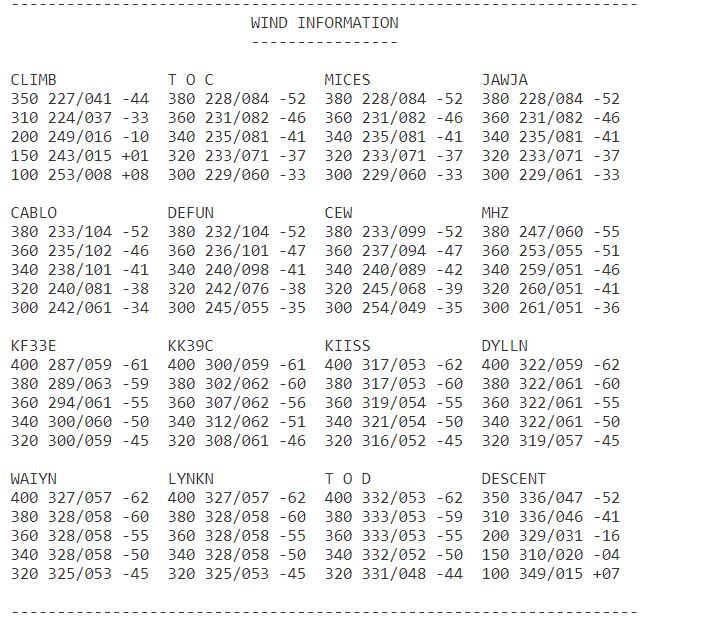
Thank you, but for now the mod is going to stick with METAR.
As of the wind layers, there are currently 3 in the preset, but the wind speed goes down as you go up. I am open to suggestions as to what can be done to improve that. The simplest way is to add a few more wind layers and apply a wind speed multiplier to the higher ones. It is a simple change, but I would like to know which values to use. Also, the wind speed in the METAR should be considered as the base one, so if you have 0 kts in the report, the multipliers will not do anything.
I was not suggesting not to use Metars, simbrief pulls Metars for dep/arr airports, just the wind data for the winds aloft data for wind layers. METARs only measure surface winds observed by the various instruments at the airport. Direction and intensity can be completely different at higher altitude so using that data as the base for upper level winds would not give you accurate aloft winds.
My apologies if I wasn’t clear.
Problem is surface winds can be drastically different than winds aloft. Take for instance KDEN current METAR, KDEN 031753Z 06006KT 10SM FEW200 15/M01 A3028 RMK AO2 SLP216 T01501006 10161 20056 58004
It shows a surface wind 060 @ 6knts but the jet it sitting almost right over so the winds aloft data is completely different in direction and intensity after 15000ft:
FL100 124/006
FL150 303/025
FL200 344/048
FL310 356/061
FL350 356/069
I think you would have to use a separate dataset to get accurate winds aloft. Of course for low altitude flying this is not really a concern.
It was just an idea with no criticism or suggesting you should fundamentally change the core meant. I’ll use this for my VFR/low alt flights for sure. 
I see. As I mentioned, I can use this as an example and scale the wind speed at the upper levels. I can also indroduce some variations in the wind direction from layer to layer. However, trying to make it 100% correct is too big of a challenge and definitely out of scope for now.
I appreciate your feedback, though; there 've been some other folks who mentioned similar ideas.
1 Like
The winds also seem far gustier than the in-built live weather presents, it’s basically lateral turbulence nonstop, although from what I can tell this is a limitation because wind layers can’t be added without gusts. I’m not sure how you’d be able to fix this.
At the very least for winds aloft you should consider changing the wind layers to increase above ground level, instead of decrease. As has been shown in this thread before winds tend to increase by a significant factor once you get a few thousand feet AGL
I just had the same problem with the mod not working. Did a flight earlier, working perfect. Shut down sim, eat something, got back for another flight, and not working. So I guess you need to restart PC inbetween flights to get it to work unfortunately
No, that should not be the case.
I will try after my current flight if it works after restart. But I chose the preset, went into flight, check weather and nothing. Same airport as previously (EHLE)