You don’t even have to use live weather on VATSIM however it’s nice to let the controller know about it if you don’t, an example regarding this is for ground speed purposes. We already have weather engines that differ in accuracy. I use Active Sky in P3D and XP and something I’ve noticed is when looking at the weather map (which shows other aircraft using Active Sky) very few are actually shown using it (which surprises me) even though many aircraft are around me, weather or not there is a limitation of how many aircraft will be shown using Active Sky I don’t know but I can have 20 aircraft around me and very, very few show up using it. I have not stopped using VATSIM simply because of this problem (nor the traffic visibility issue). I simply deal with it by using the clear skies preset. This tip is spread like wildfire within the VATSIM network.
The METAR that a controller uses (from VATSIM) is not always reliable. I’ve had controllers tell me an altimeter settings that are very old. Whenever a controller says something like “…more than an hour old” I open up the Active Sky panel and check to see what the altimeter setting actually is because chances are it’s not outdated. That isn’t to say that real life METARs will sometimes lag behind (they do) but I mean c’mon, I’ve come across controllers that are stuck giving METARs that are hours and sometimes more than a day old.
They could easily pull up AWC and grab that but many don’t, VATSIM has it’s own METAR system which like I said can be outdated. If a METAR reads PRESRR or PRESFR it can cause havoc if it doesn’t get updated on schedule.
I can’t speak for Microsoft/Asobo, but I am pretty sure they know it is still an issue. It is something that both Microsoft/Asobo and VATSIM have their part to play in getting it fixed. Only after MS/Asobo are done with all the altitude and altitude reporting issues can VATSIM take the final steps to address it. I would not be surprised if it takes another month or two (or 3).
I have a feeling that the fix will arrive with SU6 if not before, they seem to really be taking their time with this sim update trying to get it right.
You should find out from the developer of Smartcars just what altitude variable they are accessing. They are probably using “plane altitude,” which is the airplane’s true altitude. Post-SU5, when using live weather, the airplane’s true altitude will be a function of the pressure lapse rate. At least for cruise altitudes above the transition altitude, they should consider using pressure altitude (same as flight level) since that is what the airplane should be flying. There may still be some issues with MSFS-reported pressure altitude (due to pressure spikes and some small errors in the pressure vs altitude relationship), but it should work okay for determining if the cruise flight level has been reached.
Or they can just use indicated altitude throughout and just depend on the pilot to be using the right baro setting. This would then agree with what the pilot sees.
OK you wrote thousands of words here. The outcome is simple. Indication of altiude to outer apps and inner ATC is wrong. period. Fix this pls. Its not, some true calculations, right ones, etc. It is wrong. FSUIPC and simmconnect sends wrong data to out of sim. they should send aircraft FL indicated. Not true by the pressure. Period. Above TL or TA it is INIDCATED FL to be send via FSUOPC and SIMconnect
Ok, I’ll boil it down to fewer words. MSFS has the most accurate and advanced atmospheric model of any sim out there. The various altitude simvars are available to 3rd party apps. It’s up to those 3rd parties to use the correct ones.
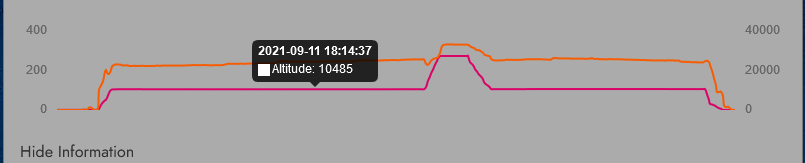
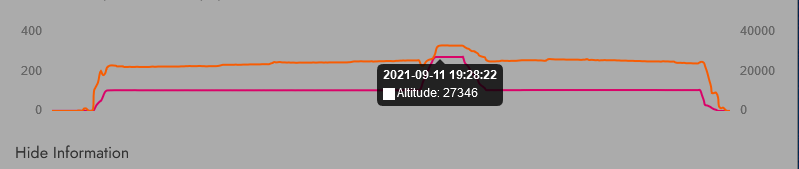
So you are saying, in decades of online flying, only one sim MSFS is incorrect in altitude, neaither fs9, neither fsx, neither P3d, xp11 or xp12…But only ONE sim is incorrect, and you call this most accurate. We really dont care is my altitude in sim world inside correct, i want for that altitude to be correct on IVAO, on VATSIM, on my stream software and on my PIREP software. Accurate or not, realisticor not, are you taking it from spot onstatic port or from inside ADC..who cares. Its incorrect one
If i set FL330, and my planes gets to it, then simconnect, which is your software, must bring that FL330 to others to see it.
That is really not small issue, or bug…Its huge misshap. Ok sim does it on perfect way for you guys, we are happy, now make that also for others to see correctly. Its the at least fair for all buyers and enjoyers of your sim
Sounds like you hit the nail on the head. Another year later they haven’t fixed this. Instead of fixing it, sounds like they’re having a temper tantrum that someone else isn’t giving them the data the way they want. Instead of a solution, they just point a finger and leave it broken.
This is exactly what already happens. All altitudes, including indicated, calibrated, pressure, and geometric are and have been available since the altimetry update. If a developer is not reading the correct value for the situation, that is an issue for the developer to fix. You are making an assumption that the simulator sends a single wrong altitude value, but this is simply not the case.
Yes. MSFS was the first sim to accurately simulate the correct altimetry caused by non-ISA atmospheres. All other sims up to that point always assumed an ISA atmosphere and thus the geometric altitude would always match the indicated altitude if the altimeter was set to the correct QRH. This is not how it is in the real world, where your geometric altitude above the earth will be off by some several to even a thousand or more feet, depending on the situation.
XP12 has also now adopted this model. The critical issue with VATSIM is that it previously used the geometric altitude, which, as mentioned above, will have some error in it just as in real life (and does now also in XP12). However, for some time now it uses a blending algorithm to match separation between clients with incompatible atmosphere models (i.e. folks flying in different sims, like XP11 (ISA only) vs XP12 (ISA or non-ISA)). Pilotedge also does the same. I haven’t had contact with the IVAO client developer, so I can’t say what they do.
This is not correct. As mentioned above, all the possible altitudes are available to developers to read. If a particular program still uses geometric altitude to validate your altitude, then of course it will not be correct, just as if you did the same in the real world. This is the whole reason for the transition to flight levels after a certain altitude: the radar altitude of aircraft is increasingly different from the indicated altitude the higher you go, so everyone goes to standard pressure and larger separation is maintained. Relatively, two aircraft in the same area at FL340 will be at the same geometric altitude at standard pressure, but only when the atmosphere is exactly ISA conditions will they be actually at 34000ft of geometric altitude above the earth. In real conditions you will be several hundred feet or more away from 34000 feet geometric.
Probably the best value for a developer to read in this situation to ensure correct altitude would be the calibrated altitude, which is the indicated altitude assuming the altimeter had perfect QRH calibration at all times, and then read pressure altitude at and above the transition.
Here is a screen capture from the r/w globe ADSB flight tracker that shows the phenomenon that @Bishop398 is talking about. DAL487, a B752 is flying at a pressure (BARO) altitude of 34,000 feet.
The aircraft’s true geometric altitude, derived from GPS (WGS84) is 35,675 feet. This sort of disparity is very common in summer. The temperature at FL340 right now is ISA+12
As @Bishop398 explained above, altitude isn’t as simple as a single number. There are multiple ways to describe altitude using physical distance, pressure and even ISA corrections to said pressure measurement.
My point was that even internally, the MSFS ATC isn’t using the “correct” one either. VATSIM and other 3rd party solutions aren’t all using the same value so thus the discrepancy.
Sorry, as a user/player and not a developer, that’s a bunch of “blah blah”. At the end of the day it results in a discrepancy that a RL pilot would either never have to deal with, or have a standard procedure for dealing with. In MSFS, it results in aircraft that are part of the official game (tbm 930) reporting incorrect altitude, unable to correct it as the “B” button doesn’t seem to affect it, and the ATC repeatedly calling out to “expedite your climb” yet as far as your autopilot can see, you’re at the correct altitude.
All this fingerpointing to VATSIM and 3rd party solutions does is ignore these issues with the game itself that have continued for years. The only solution I’ve ever seen offered is to simply turn off live weather. That’s a feature of the base game not a 3rd party addon. Any data that feature uses was chosen and vetted by MSFS developers and as such, if there is a known issue that has persisted for 2-3 years and is well known, why have they chosen to not fix it?
You are absolutely dismissing facts and creating your own narrative to satisfy yourself. Everyone here including @Bishop398 has explained it really well. If you refuse to accept these answers, you may have to consider another sim.
I think the core issue here is a misunderstanding of what the problem is. It sounds like there’s an assumption that some kind of data is faulty or being forwarded incorrectly to VATSIM, and thus there is something erroneous inside the sim itself that needs repair or is broken. However, neither of those things is true. I understand you’re not particularly interested in hearing why that isn’t the case, but I think it’s worth attempting to understand, as it does have real world pilot impact, which is why the atmosphere model was updated. I would like to also stress that the exact same set of issues laid out below also hold true of the XP12 atmospheric and altimetry model.
I’ll try and take you through the whole situation, to better explain what is happening here.
Historically, all ATC clients read a value called PLANE ALTITUDE. This value was the exact geometric altitude above the earth. This previously was safe to use, as in an exactly ISA atmosphere (which all simulators could only model to this point) the geometric altitude and the indicated altitude are identical if the altimeter is correctly calibrated.
However, in reality, temperature and pressure effects cause errors in altimetry. These are especially relevant to pilots in cold weather conditions on approach where you can see in some charts that you may have increased minimums, as cold weather can make the altimeter read higher above the ground than you actually are, which can be disastrous if not accounted for properly. These effects were missing from the sim prior to the altimetry model update.
As a result of this, the PLANE ALTITUDE value (which was never the indicated altitude, as a reminder, but reasonably safe to use before) does now usually not match the altimeter indication. I cannot stress enough, this is not a bug, but a feature. Real altimeters act in exactly the same way.
To allow third party developers to read the correct data depending on their use case, there are a few values which can be used instead:
INDICATED ALTITUDE: The altitude currently shown on the cockpit altimeter
CALIBRATED ALTITUDE: The altitude that would be shown on the cockpit altimeter if the altimeter was always perfectly calibrated
PRESSURE ALTITUDE: The altitude that would be shown on the cockpit altimeter if the altimeter was set to 29.92inHg.
In a real ATC environment, there is no equivalent of PLANE ALTITUDE (pure geometric altitude). The fact that this worked OK before is merely because the sim’s atmosphere model was incorrect and simplified. Instead, in real life ATC receives the pressure altitude from the plane’s transponder unit, and corrects that using the local QNH, showing the corrected value on the scope if under the transition alt, or the pure pressure alt if above it. It is 100% possible for third party clients to accurately do this by reading the PRESSURE ALTITUDE data value and it has been possible since the altimetry and atmosphere model update.
However, there is a wrinkle here, and it isn’t caused by MSFS. VATSIM, IVAO, PilotEdge and the like also have to support mixed simulations, which include mixed atmosphere simulations: in other words clients with totally different environmental and altimetry sims need to coexist under the same ATC. There are now two classes:
Sims that are only capable of simulating an ISA atmosphere, for which the geometric alt is safe to use (FSX, P3D, XP11, XP10)
Sims that can simulate non-ISA atmospheres, for which the geometric alt is very much not safe to use (MSFS, XP12)
Things get even more complicated when you realize this additional wrinkle: the ability to use non-ISA atmospheres means that if two people are not using the same weather, their altimeters may be reporting the same value for two entirely different places in space. I’ve actually talked at great length with the developer of vPilot and the PilotEdge client about this tricky issue, and as you can imagine, there’s no one single perfect technical solution to this issue from the client side. I’ll demonstrate why:
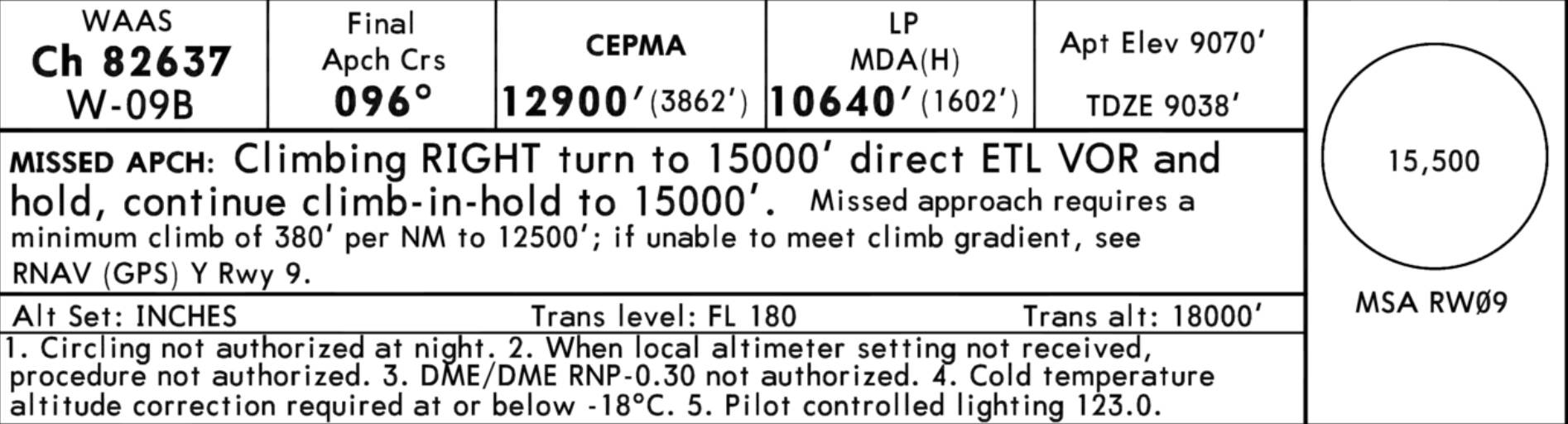
Let’s pretend there are two planes from different simulators both coming in to KTEX RNAV 9Z at 13000 feet. The OAT is -5F/-20C (it got that cold last year). You’ll notice the warning here in the chart regarding the required temperature correction:
Let’s assume both simulators have calibrated their altimeters to local QNH. One simulator can only do ISA atmospheres, so one client’s plane reports PLANE ALTITUDE at exactly 13000. The other simulator can do non-ISA atmospheres, so reports PLANE ALTITUDE at 12335ft. They both have the same INDICATED ALTITUDE value of 13000 feet. Where do you place each plane? There are three locations to consider:
Where does the non-ISA plane appear in the ISA sim?
Where does the ISA plane appear in the non-ISA sim?
Where do either plane appear on the ATC client?
There are a lot of unhappy options. You can place both planes at their geometric altitudes in all three locations, but this has some problems:
If the ATC client scope is doing the proper QNH correction, then the ISA plane appears to be ~700 feet high. If it isn’t doing that, then the non-ISA plane appears to be ~700 feet low.
The expectation of both pilots in each simulator who locally have correct QNH is that they would have 0 feet of vertical separation, but instead they have ~700 feet.
You could just stick each plane at their INDICATED ALTITUDE. But wait, this also has some issues:
If the pilots have the wrong QNH they still appear as if they’re at the right altitude on the ATC client scope, because they’re both at 13000 feet indicated.
If the pilots have the wrong QNH then they should have some vertical separation but would show visually in each respective simulator that they do not
Furthermore, the non-ISA plane is actually closer to the ground and is experiencing the effects that require altitude correction. If the ISA plane attempts to do that altitude correction, it will be flying at too high an altitude. So, there isn’t a totally straightforward answer as to how to support totally incompatible atmospheres or weather settings from the third party developer side. One plane is almost 1000 feet closer to the ground in these conditions, which can’t just be ignored or waved away.
VATSIM and PilotEdge have done the best possible compromise they can here, which is using an algorithm that weights the separation between planes highly on the simulator client side, so should show planes at roughly the correct vertical separations to each other’s clients as they get closer to each other. If third party ATC decided to drop support for ISA-only sims and also force everyone to somehow download the exact same weather, then these differences between clients would nearly vanish, but that’s not really a practical answer.
Therefore, you end up with the situation that exists today: old ISA-only sims must be catered to and worked around with these types of algorithms, and different weather settings in non-ISA capable sims can still wreak havoc with no clear and perfect solution for placing the aircraft in space in the ATC client.
 Its the at least fair for all buyers and enjoyers of your sim