Game crashes when you use vision jet in freelancer mode in career or select it in free flight after last update. (Xbox Series X)
Worked fine for me a couple of hours ago.
I had my flight CTD when I stopped at my destination and powered down the Vision jet in Career mode (Freelancer) also.
Just sold my vision jet in career mode because i won’t be using it for a while & now my game won’t even load.
Can confirm from my side → Vision Jet G2 Autopilot NAV mode (GPS) is now broken, not following the direction. HDG mode works.
PC version with beta of 31.01.2025, in career mode (did not test free flight)
Vote here, found there is a report:
Have you been using the beta? It solved a LOT of the problems with the Vision Jet:
- the checklist now works (and afaik even better and more realistic than in the FFX version with no split pages and remarks don’t turn green)
- the speeds go down automatically when you lower gear and flaps during approach (200 in the area, 180 with gear, 140 with flaps 50 and 95 with flaps 100)
- the AP does NOT disconnect anymore at 400 ft
- the TOGA button has become the AT/Disc button (as it is in real life afaik) and there is a clickspot now for the TOGA button (which unfortunately isn’t modelled)
- you can set the brightness of the screen using the rotation knob (though not enough imho… and the screens default to a rather dark setting).
All in all the MS version is better than the FFX version by now.
Unfortunately the TAKEOFF EMER BAT bug still is there and they still didn’t enable IPS STALL OFFSET RESET… which is weird considering all the good things they did with the plane.
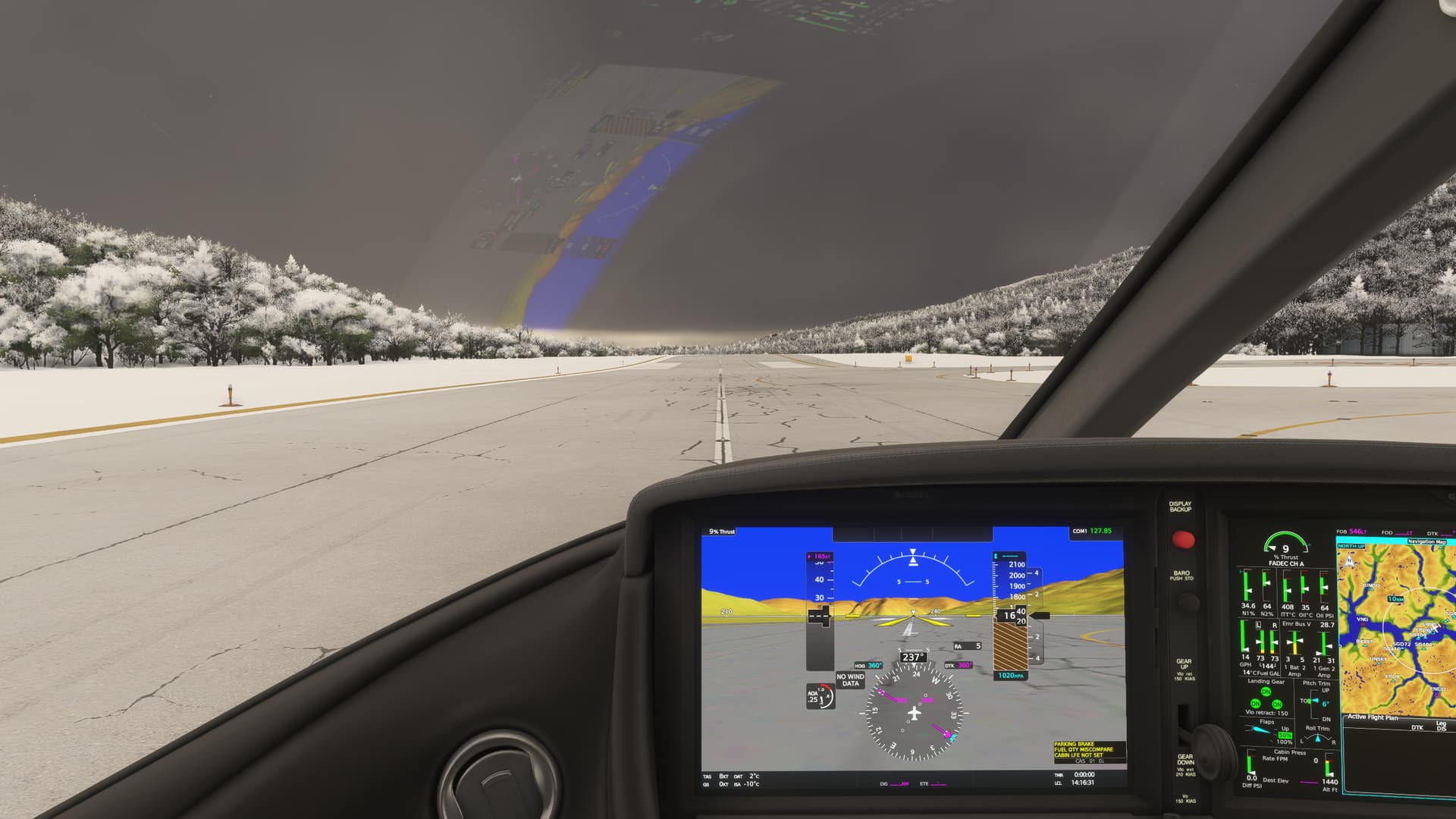
Anyway, what I wanted to ask you (knowing you from Discord and being a real life VJ owner): if you tried the beta, what do you think 1. of the improvements but also 2. of the new default cockpit view? The new view is quite different from the previous one. At first I didn’t like it but when I started to like it I suddenly noticed I couldn’t see the big white dots on the buttons underneath the PFD display…!
So my question is: can you easily see those white buttons in real life? If so, then the new default view is wrong. You can create a new default view quite easily (and even edit the details in the cfg) but I am VERY curious to hear (or perhaps even see) what YOU would consider to be a realistic default view!
Old default view:
New default view:
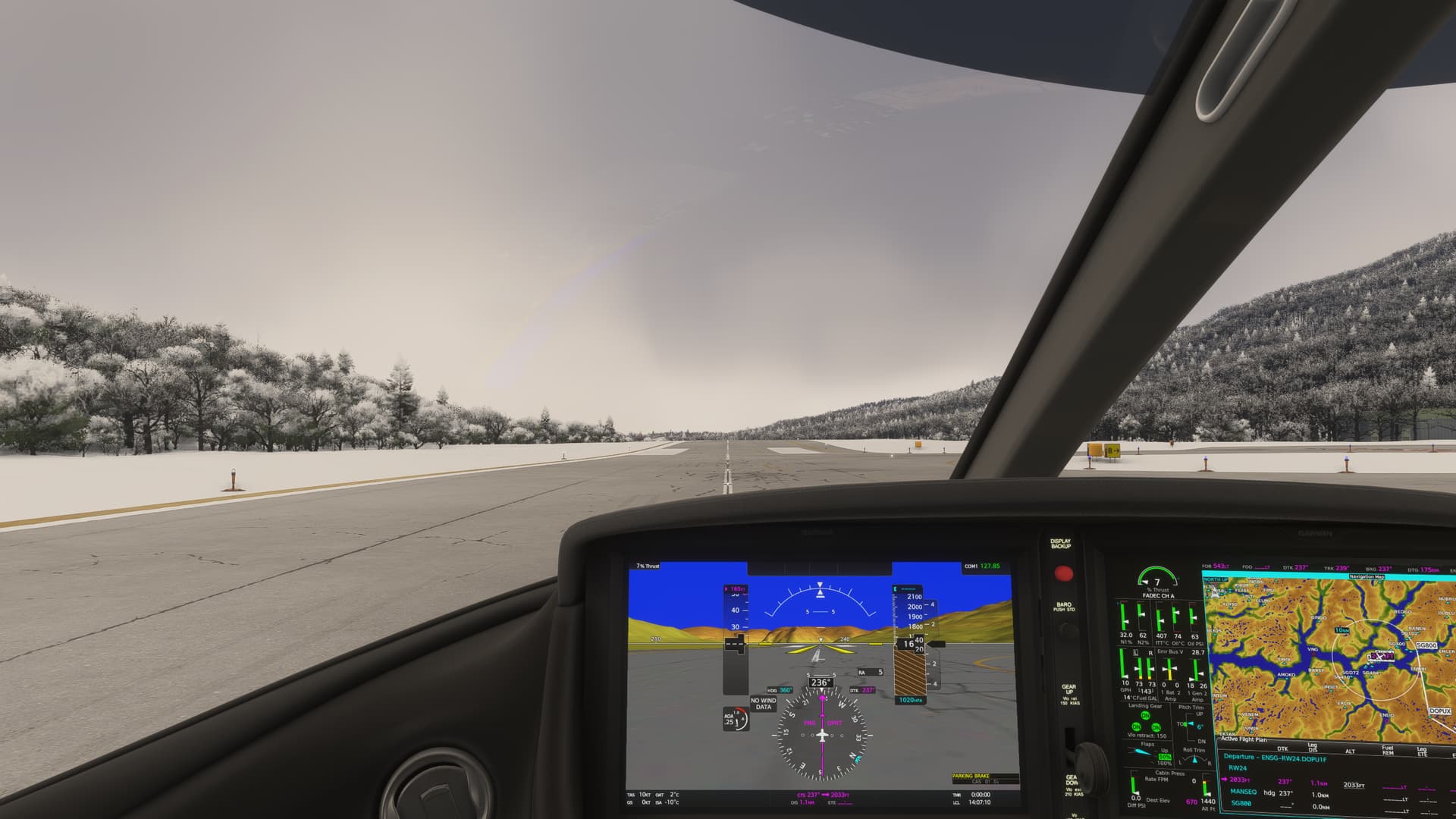
Unfortunately I didn’t pay attention to the white dots when taking the screenshots. By default you can’t see them at all anyway but when you do look down you can see them with the old default view but not with the new default view.
EDIT
And btw you still can’t arm NAV/HDG and FLC on the ground properly: when you try to do that they replace TO on the PFD. Pity. There still are a few things that really need fixing…!
List of bugs still in the VJ with SU1 beta:
- TAKEOFF EMER BAT still showing up all the time
- IPS STALL OFFSET RESET still not working
- NAV/HDG and FLC still can’t be armed on the ground before take off (at least not properly: ‘arming’ them replaces TO on the PDF)
Things that have been improved but still need some further improvement:
- brightness of the screens can be changed but not always bright enough (I also wonder if in real life the rotation knob that now sets the brightness 1. does this for ALL screens or not (like it does in the sim now) and 2. also sets the backlighting of the panel and the red lights above you (as it does in the sim now)
- TOGA button not modelled (it’s only a clickspot)
And I wonder if the new default view is correct since you can’t (easily) see the white dots on the buttons underneath the PFD.
I agree, the decision (or mistake) about the display brighness on lowest setting is weird. Not sure if it is intended.
TOGA button does not seem to have a “click” anymore now. It had that before.
The LOD problem of the cockpit, when looking from the outside, is also still not solved:


But overall a pretty good plane in my opinion.
On a sidenote: what was the TOGA button in the previous version now is the AT/Disc button (as it is in real life). The TOGA button only is a clickspot now and it’s in front of the AT/Disc button:
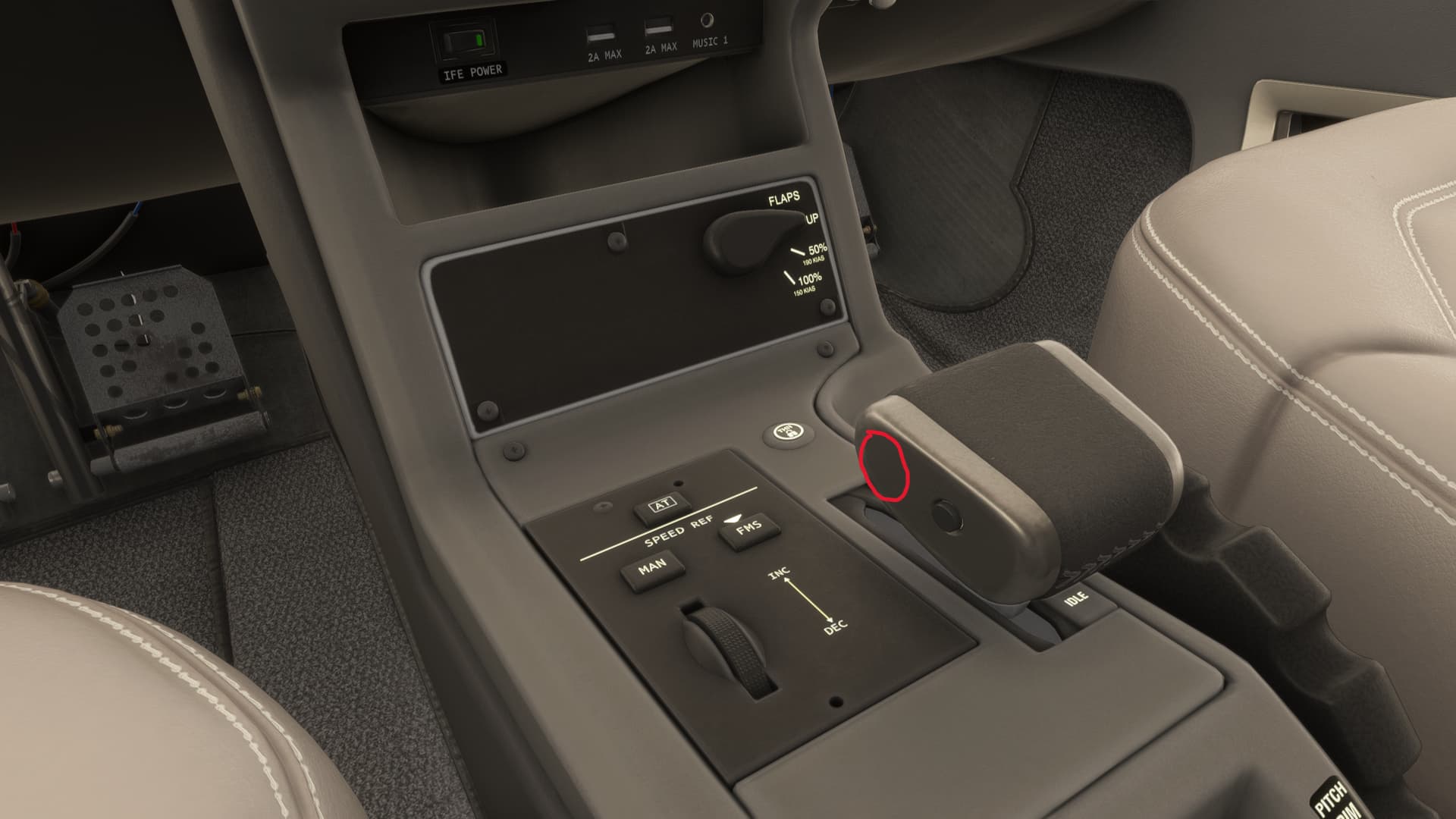
In real life the TOGA button seems to be at the front bottom of the throttle lever but it isn’t modelled in 3D and the clickspot is on the side of the lever for convenience (I suppose).
BTW I just landed and finished a flight and as usual the yellow AT kept blinking at the top of the PFD (after disabling all systems during taxi): that always annoyed me a bit. But pressing the (‘new’) AT/Disc button now killed that blinking yellow AT so that’s another little problem solved.  (Not sure if this behaviour is as it is in real life though… @RISCfuture…?)
Now if they could solve the TAKE OFF EMER BAT problem and add the IPS STALL OFFSET RESET I would be completely happy with the VJ. The brightness of the screens and not being able to arm NAV/HDG and FLX and little things like that I can live with. But these two problems really need to be fixed imho. That would make this VJ (sort of) perfect!
Not sure if your question was already answerd but the auto land button activates without the option to select the airfield of your choice.
It simply brings you to a decent airfield within 20 minutes or so.
Most of the time that works like a charme but sometimes it lands off-centerline and doesn’t brake hard enough in order to stop before the end of the runway.
Besides that: I’m impressed that the devs have programmed it.
Happy 
Not sure what you are expecting. How exactly is an armed HDG or FLC going to change to become active. Totally get arming NAV but not those.
When on the ground and after pressing TOGA you should see TO twice in green on the PDF. When you then arm NAV or HDG and FLC they should show up in white (= armed) underneath the two TO’s. However, in its current state when you press NAV or HDG it replaces TO in green just as FLC will replace the other TO. This is not how it should be. You should see TO in green with NAV or HDG and/or FLC in white underneath it.
The change to active is simple and logical: NAV/HDG as well as FLC should become the active ones (replacing the green TO’s) as soon as you enable the AP after take off above 400 ft.
Odd thing is that the AT actually can be armed on the ground: after engine start you can arm AT: it will show up in white to the left of the two green TO’s and it will become active as soon as you enable the AP.
BTW You CAN arm NAV/HDG and FLC as it is and they WILL become active as soon as you enable the AP so that part DOES work: you can test this yourself. However, because arming those two replace the TO’s on the PFD the take off will probably not be as it should be with TO on.
I have to add though that I don’t really know if the difference is big… or it’s it’s there at all. This might also just be a graphical bug (where the PDF only shows the wrong stuff while the aircraft still behaves as it should). But well, I’d rather see NAV/HDG and FLC armed in white underneath TO as it should. 
EDIT I will see if I can test the take off behaviour with TO on screen and with NAV and FLC on screen (and hence TO off). If it turns out to be merely a graphical error I will probably arm NAV and FLC on the ground from then on. As I already arm the AT on ground.
EDIT 2
Okay, well, forget what I said about arming NAV and FLC. Just found out this doesn’t work at ALL anymore with the latest SU1 beta…! When you press NAV you only get ROL and when you press FLC you only get PIT. Weird thing… you actually can select HDG on the ground…! And with TOGA enabled pressing NAV and FLC does nothing anymore. Weird stuff.
Anyway, what I DID test was a take off with TOGA enabled and without: turns out it doesn’t make a difference at ALL (looking at the numbers!)… So TOGA is merely a graphic thing (for take off). Bit disappointing.
This is an issue with the sim’s electrical system itself causing voltage instability and has been reported to the appropriate teams.
There was no need to explain white (ARMED) v green (ACTIVE) I understand that and hence my query. What you explained is not a true armed to active auto transition like you may get with NAV or GS modes. Having to push a button to make it active is the same as just making the mode instantly active. The only difference being it’s done with a single AP button press. All this gives is a TO flight director for a few seconds during the initial takeoff. Because the TO mode is not actually active, it seems what you described is actually not a armed to active thing but more being able to have 2 armed modes for the same axis at the same time. TO & HDG and TO & FLC. Interesting.
I’m a real life Vision Jet pilot. In the real aircraft, on the ground, pressing the TOGA button activates TO and TO. Pressing any of the lateral and vertical mode buttons (NAV, HDG, FLC, VS) arms those modes.
After takeoff, upon reaching 400 ft AGL, the armed modes automatically activate and the A/P button becomes available.
Unfortunately no, I haven’t had time to get it installed. When it gets released I plan to make a new video to replace https://www.youtube-nocookie.com/embed/O7WwEcMFaps
Yes, unless you happen to be very tall or very short. Here’s a photo I took during my last IRL Vision Jet flight, at 0.5x zoom. I put the camera right in front of my face:
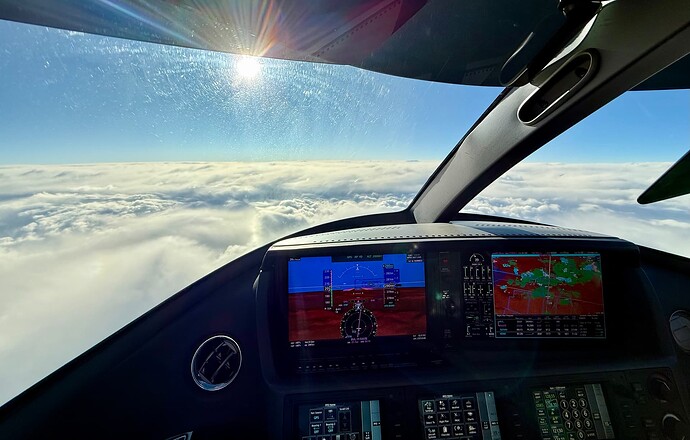
(Mind you, at 6’4", my viewpoint is going to be a lot higher than most pilots.)
Yes, it’s easily pressed using the right index finger.
Unfortunately as I fly a G1, my auto throttle experience is limited to my recurrent sessions. In recurrent I press the A/P button on the panel to disable the autopilot but keep the F/D on. When the A/P disables, the A/T goes out with it, of course. This will result in a blinking yellow AP and AT for a few seconds on the FMA, but both of those indications will then disappear.
Not sure if there’s any situation IRL that would result in a persistent yellow AT after landing.
You are correct. I (obviously) never experienced how all this arming works in a real Vision Jet and so I had my own interpretation of the information I gathered over time of how it would probably work. But I should indeed have known that armed would switch to active automatically at a given time. My bad.
Luckily RISCfuture came to the rescue!
Thanks for your real life insights (as always)! Good to (finally) know how this really works. One thing is clear: it does NOT work like this in the SU1 beta Vision Jet, unfortunately…
If you are on Steam: installing the beta takes around a minute or so. It feels more like an activation than an install. Last weekend I switched around 6 times between beta and non-beta (in order to make for instance the screenshots of the two different views) and it was done in no time, really.
But anyway, I am looking forward to your new video already!!!
Cool! Thanks! That’s a LOT higher than the default view and certainly the new one…! But it’s clear that even someone of a more regular height should see those white dots, I guess. I will try to ‘extract’ a non-zoomed view from your photo and see if I can mimic that somehow in MSFS.
I always use the DISC button option but I will see what happens when I press the AP button to disable it like you do. As it is now you do indeed get a blinking yellow AP and AT but only the AP disappears after a few seconds: the AT keeps on blinking ‘forever’ until I press the AT/Disc button on the side of the throttle lever. Another odd thing is that the FMS button (AT) stays enabled (little white triangle) and there is no way to turn it completely off after landing.
The VJ in MSFS is slowly getting there but they still need to put some work in it. Luckily the plane is awesome as it is already: it’s the only plane I fly in MSFS! (And the MS version clearly beats the FFX version by now BTW!)
OK, just flew it in SU1 and a big improvement! Only a few misses in my testing so far:
- IPS Stall Offset reset not implemented
- INIT → W&B: Station names are incorrect
- Pressing BARO knob to set it to STD should not show the PRE field until the knob is rotated
- Should be able to arm A/T, a lateral mode, and a vertical mode on the ground while TO/TO is active
- Weather radar should start in STANDBY, not OFF (also not implemented)
- Pressing HDG when NAV is active should set HDG SYNC mode and center the bug
- VNAV descent profile should target Mach 0.52 until changeover instead of going right to 250 kts
- VNAV descent profile should target 240 knots, not 250
- Checklist view should have associated Checklist page on GCU which allows selection of normal/abnornal/emergency checklists as well as resetting checklists
- Waypoint Info → Weather should show options for METAR (raw), METAR (decoded), TAF (raw), TAF (decoded)
- PERF page should show an error and reject the value if you enter a required landing distance > available landing distance
- Vr should be editable but pop an error if any value other than 85 knots is entered
- CAS display should not have a “CAS 0↑ 0↓” line
- INIT: Taxi fuel should default to 12 gal and reserves to 70 gal
- No “Confirm” for FOB Sync
- ECS should set DEFOG to on any time generator 1 power is not available. DEFOG can be turned off a few seconds after GEN 1 comes online.
- If ECS Disable is not pre-set from the last flight, the fans should rev once after BAT1 is turned on
- Display Backup not implemented
- Switching active pane should switch active page on GCU2 (this doesnt always happen when it should)
- ISA shouldn’t be displayed on PFD (only available on STATUS page)
- When an approach is loaded and GPS is active, NAV1 shadow bearing pointer/glideslope pointer should be displayed, and NAV1 frequency and ident should be shown on PFD
- Checklist scroll wheel reversed
- A/T should drop speed to 180 when in the terminal area
- ELT switch should be in ARM
- Flight planner should be in gallons, not pounds
- Flight planner: Trip fuel is way off, taxi fuel should be 12 gal, reserve should be 70 gal
- Music button should be underneath Services button, with other buttons: Phone, Connext, Bluetooth, etc
- FLAPS ICE should inhibit flaps 100 (I think)
- TAKEOFF EMER BAT caution
- No HITS
- Green donut too close to stall region
- Green donut should change dynamically based on g-loading
- Disconnecting F/D on the ground after an ILS shows
LOCin both lateral and vertical FMA section - FUEL PRESSURE LOW warning should not show when engine is off
- BLEED OFF should not show when engine is off
- MSA missing from available data fields
I’m sure I’ll notice others as I do more flights.
Thanks Stretch!
proceeds to list 36 misses 
thanks for the update!