Hi. There is already a reply from Pete underneath my question and the Lua files are in the FSUIPC installation folder in a zip file called Lua examples ( I think, I’m not at my PC at the moment)
Any users having issues with FSUIPC7, with VR insight devices or other, should really report any issues to the FSUIPC7 forum. I monitor the MSFS forums but for support you really need to go to the FSUIPC support forum if you want me to look into any problems.
As for LINDA, this is an advanced lua interface built on-top of the lua interface provided by FSUIPC. If LINDA can do it, so can FSUIPC without LINDA (probably - I’m not a LINDA user ;)), but you need to be fluent in lua to achieve what is easily possible with LINDA. For many users, LINDA is an easier option. Just my 2cents.
But please make sure you have read the provided documentation before posting, especially the specific document Lua Plugins for VRInsight Devices.
John / FSUIPC
This will be with the rest of the FSUIPC documentation, now installed in an FSUIPC7 folder under your windows Documents folder. It is only installed if you opt to install the documentation during the installation process (which is checked by default).
John / FSUIPC
Thanks, I found it. Also others .PDF are very interesting to undestand the interaction from VRI MCP Combi + FSUIPC7 + Linda.
In the end, being an old programmer in a PC environment, I chose to use Linda for the possibility of creating User Functions to better customize my peripherals.
Thanks for that suggestion!
Slightly different topic but rooted to VrInsight mPanel.
Anyone succeeded setting the transpondeur ALT ON/Standby with IVAO Altitude 1.10.2b and the default C172 Classic ?
In order to report, using the MCP Combo II B (MCP2B), I just have to launch FSUIPC7 (not registered) with its proper INI section set for VRinsight, then launch VRiSim, nothing more and it works, also for the C172 Classic, not limited to though
There’s, a small issue with Transponder Input which is refreshed to fast by the Sim. We have only to make actions as quick as possible for this part. Other than this, I’m very happy with this situation in its current state, making me starting more constructive flights than before
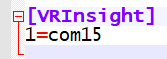
My own MCP2B is seen on port Com15 :
Hi guys.
For those having problems with connection the startup order and also running them as admin or not matters. I have the MCP combo and what I did was just to add this line to the bottom of FSUIPC.ini:
[Programs]
Run1=READY,CLOSE,“C:\Program Files (x86)\VRInsight\bin\VRiSim.exe”
This just uses the FSUPIC autostart feature to load VRiSim.exe once at the MSFS main menu (if you manually launched FSUIPC before game) or at the aircraft cockpit (if you used MSFS EXE.xml file method). The EXE.xml option may require to run game as admin if for some reason you also run FSUIPC as admin, which should not be required anyway, and it will be set automatically during FSUIPC installation. It´s the most automated and error free option. Replace “Run1” by “Run2”, “Run3”, etc if you were already using that feature to launch other applications, like TrackIR for instance:
[Programs]
Run1=READY,CLOSE,“C:\Program Files (x86)\NaturalPoint\TrackIR5\TrackIR5.exe”
Run2=READY,CLOSE,“C:\Program Files (x86)\VRInsight\bin\VRiSim.exe”
Once VRiSim.exe it´s launched this way you can click on the “Fly Now” button and your panel will be detected properly and be fully operational in game.
If you run VRiSim.exe manually after loading game it may not detect the panel and will drop the FSUIPC not found error, no matter what you do. If you close it (to change the profile) it won´t work afterwards either. If this happens that could be caused by having run FSUIPC formerly as admin. In that case you will need to run VRiSim.exe as admin too when you launch it after having close it or when you manually launch it without being called by FSUIPC. This problem should not happen if you are not running any of the involved apps nor game as admin.
Cheers
1 Like
One important addition. For those willing to remap the VRInsight devices as regular joysticks with FSUIPC you need to add the following block to FSUIPC.ini:
[VRInsight]
1=COM3,COM4
Where COM3 shall be the physical COM port used by your device (you can check it at the VRInsight software) and the other one is just a virtual one that will be used by FSUIPC. Add as many lines as devices you want to remap, but all must contain a pair of COM ports.
This will disable the usage of VRInsight profiles as the device will not be detected by VRInsight software. If you still want to use those profiles then you can´t use this method.
Cheers
1 Like
GRAYD0G,
I have been using the M-Panel for a very long time (5 years at least) and could not be happier until recently when I can’t get it to recognize MSFS (Flight Simulator is NOT running…). I followed most recommendations in the chat to no avail. Normally, I reinstall the app and that fixes the issue. I’m assuming that part of the problem is that I removed the entire MSFS and reinstalled it in the same location but something changed. Is there a configuration that I can edit where I can see where the application is looking for MSFS? I tried to edit the VRiSim.ini (// Flifgt Simulator Path) but that yielded no results. Any assistance will be greatly appreciated.
Hi Jose.
I’ve not really been using it much myself lately so my memory is a bit dusty but I assume you have reinstalled FSUIPC7 as well? Also did you download and install the M-Panel module as well as the base package?
I have the store version of MSFS and I launch it with a batch file (.bat) which is a trimmed down version of the one that comes with FSUIPC7 and includes a command to launch Vrisim (default installation path).
It looks like this below: Lines starting with :: are comment lines
@echo off &setlocal
:: remove CMD window
if not DEFINED IS_MINIMIZED set IS_MINIMIZED=1 && start “” /min “%~dpnx0” %* && exit
:: Variable to hold delay (in seconds) after MSFS has been started and before FSUIPC7 is started
set /a delay = 20
:: MS Store Installation: start MSFS with FastLaunch
cmd.exe /C start shell:AppsFolder\Microsoft.FlightSimulator_8wekyb3d8bbwe!App -FastLaunch
:: wait for MSFS to start (2mins)
timeout /t %delay% /nobreak > NUL
start “” /d "C:\Program Files (x86)\VRInsight\bin" “C:\Program Files (x86)\VRInsight\bin\VriSim.exe”
exit
You can copy that from “@” to “exit” inclusive into a text editor and save it as “MSFS.bat” but make sure your text editor doesn’t add “.txt” to the name, then either click it or create a Shortcut and use that to start MSFS.
I just tested it again on mine and it starts MSFS then Vrsim. Dont click “Fly Now” until the FSUIPC splash screen appears, it takes quite a while. (It seems that MSFS launches FSUIPC as there is no command for it in the .bat file above)
Hope this helps but get back if it doesn’t
GRAYD0G7,
Thank you so much for the script but unfortunately, it didn’t solve the problem. I am getting an error when I run the batch file.
Error message:
“Windows cannot find ‘ГҪ₤ГҪ¥’. Make sure you typed the name correctly, and then try again”
I confirmed the location of the apps and they are correct. Any help will be greatly appreciated.
Hi Jose
Sorry to see it didn’t work for you.
From what you’ve written I’m wondering if you used a “word processor” like Word or Wordpad as they include formatting characters like those you’ve shown in your message? What you need to use is a plain text editor like Notepad.
Windows “reads” the file and performs the actions inside and as you can see yourself those characters don’t appear anywhere in that script. (Sorry if you already know all this stuff)
See if that makes a difference and let me know how you get on?
GRAYD0G7,
That’s what I originally did and just in case I did it again for good measure but no luck. I am using Windows 11 and not sure if this may be a difference.
Mmm. That’s strange.
A couple of things though. Are you using the Store or Steam version? This is for the Store version. Also, I noticed that the line starting with “cmd.exe /C start” above is broken, that should be all on one line ending fastlaunch
Can you check that?
Oh. Just turned my phone sideways and can see the lines are not broken. But check anyway?
Using m-panel as well for years… and in MSFS also  Here’s my flow: I launch MSFS, after the FSUIPC pop-up window appears, then I launch VrInsight.
Just veryfing: did you re-install FSUIPC?
1 Like
Yes. That’s good although I find you can launch VriSim earlier but don’t press “Fly Now” until after FSUIPC splash screen.
1 Like
The third time was the charm. After my third attempt to reinstall FSUIPC finally success. The M-Panel is now working. Thank you to everyone that commented on this issue.
Excellent. Happy about that.