I found having this gives me peace of mind. I have mine placed just after the pump outlet.
There’s a wide variety of these on the market. Some have LED temp and flow readout.
For me seeing the impeller spin is enough.
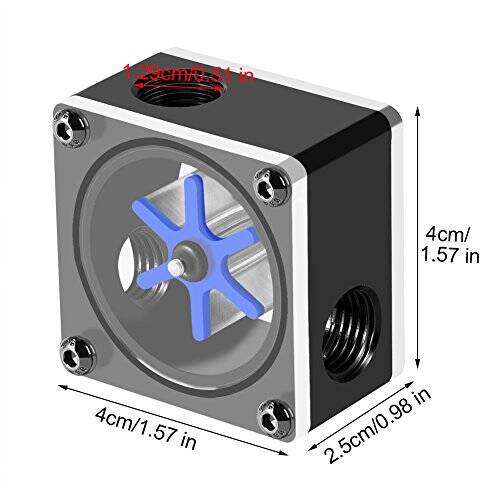
Nice.
I came across the D5 Next pump as part of the Alphacool “Ultitube” reservoir and pump combo, and it has a temp sensor built in, and a flow meter (which is calculated, not an actual flow meter). I’ve tested it enough with the PC open in front of me that I’ve come to trust the readings - an exercise I need to go through because the PC will end up at the back of my desk behind a screen so I won’t normally see it.
But yeah, I still get a flashlight and check for little bubbles moving in the reservoir as reasurance that it’s working.
Very interesting journey you are taking. I have been scared away from the watercooling. Please post some performance data on how the system does with MSFS 2024. My unwater-cooled Ryzen 7950 and 5080 is CPU limited and given how inefficient MSFS 2024 is coded, I really wondered how much more performance I could get with water cooling, which I really think I need to overclock the Ryzen. The 5080 is never really pegged.
Anyway, good luck with the adventure.
Thanks - I will when I finally get MSFS 2024 installed. I’m close. I sold the Xbox in December and started this process, so I haven’t been in MSFS in 8 months. Once I get through benchmarking the GPU, and a final stress test of the system as a whole, I’ll give MSFS a look.
I spent my project fund on the PC and screens, so I have to save up again before I can order peripherals (yoke, pedals, throttle, cyclic). That means for the next while I’ll be flying on this new PC on a half-built table with a keyboard and Xbox controller 
Actually I’m glad because I’m familiar with it and can focus on re-learning MSFS basics without having to focus on learning and troubleshooting peripheral configurations for now. Hopefully by the end of the year MS / Asobo will have improved the UX for controller setup. It’s part of why I gave up on Xbox.
GimbalAxis, I also have quick disconnects for my MO-RA3 420 pro and it really makes it very easy.
My first few attempts to fly in MSFS 2024 on this new PC were disheartening. In spite of the really fast new hardware. All I had was stutters and CTDs - which all come down to graphics settings.
There are a lot of good tips on this forum, but not always easy to put them together. After a few weeks of learning, I’ve finally enjoyed a few flights stutter free. I was missing 3 things, which allowed the sim to run smoothly for me:
- My Samsung TV originally showed up at 60Hz in Windows, which I thought was fine. The TV is supposed to be VRR capable (not G-Sync, however), and I thought that was automatic. It turns out, I had to set it to 120 Hz to unlock VRR.
- I enabled GSync and Vertical Sync in the NVIDIA Control Panel, which I think allows MSFS to then control VSync. Not sure if this had an impact.
- Maybe most important, the tip in another thread to set MSFS Max Frame Rate to 30 and then use Frame Generation to double back to 60 not only worked - it allowed me to increase the TLOD to 400 and LOD to 200 (the max). This makes all the difference, found in this thread:
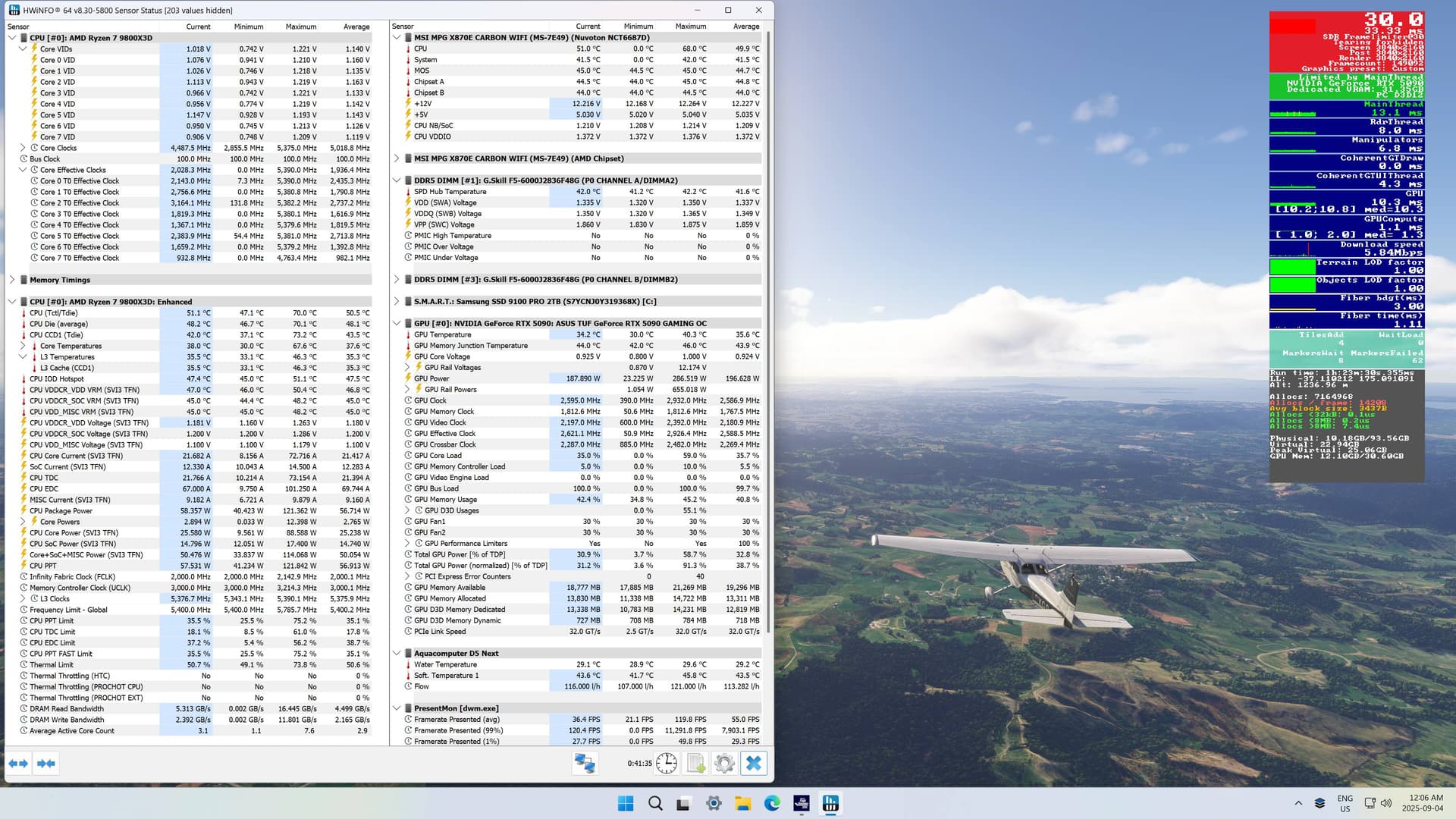
A quiet test flight across New Zealand in the C172 at 60 fps, with max TLOD and Ultra settings, and the rig stayed very cool. After 8 months of putting this together, a small victory! (It stops the x2 Frame Gen when you put MSFS in the background, which is why it only shows 30 fps):
If any topic from this forum (or elsewhere) helped you, please add a link to the source - it might also help others with a similar hardware setup.
Also, since you mentioned “x2 Frame Gen” keep in mind that this is only useful for NVIDIA 50XX series GPUs.
You’ve got an RTX 5090, so I’m really wondering why you even bother with such tricks? I’m on an RTX 4090 myself and I don’t need to enable FG or DLSS to enjoy smooth gameplay.
EDIT
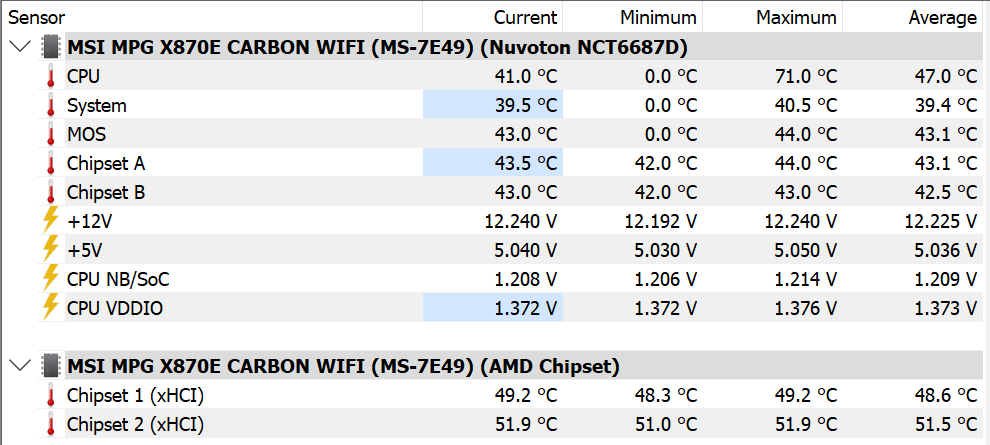
In HWiNFO from your screenshot, I noticed that MSI MPG X870E CARBON WIFI (MS-7E49) (AMD Chipset) is not expanded – could you please expand it and check what temperature is shown for Chipset1 xHCI and Chipset2 xHCI?
Glad to hear you are up and running.
May I ask why you are using a TV versus a monitor?
I wanted 3 large screens for surround view, and at 48" TV is less expensive than monitors. I also use 1 TV as a TV.
I hoped it would be simple as well, and when I loaded in with the default “Ultra” settings (TLOD and LOD both at 200) with TAA rendering 4K at 60Hz, in the 787-10 at KJFK with live weather and traffic - intentionally testing a heavy workload - I thought I was in the clear, until I took off, which was not smooth at all, and landing was next to impossible. So I had to figure out the bottlenecks. Enabling VRR on my TV was probably an essential part of it.
I started by doing what everyone recommends - turning things down from Ultra to High, reducing LOD, etc… But someone posted that with GPUs that can do Frame Generation (eg RTX 40xx and 50xx), reducing the rendered frames and supplementing with FG actually allows INCREASING LOD.
So I went to a rural airport in New Zealand (Rotorua) with the C172 to test, and once you see higher LOD you don’t want to go back - high detail, and virtually no terrain popping in as you pan or fly. So instead of chasing FPS, I set out to see if Max LOD was even possible.
As I will have 3 monitors (coming soonish), I will likely have to dial things back, but at least now I have some understanding of what its doing. For example, I will reduce the render scale from 4K to 2K before I reduce LOD.
I’ll have to do another flight and open up that section, but I believe it’s the same temp as the Chipset A and B shown above that in the screenshot - if not exactly, certainly within a small margin.
In my case, HWiNFO shows that the temperatures of Chipset1 xHCI and Chipset2 xHCI are higher than those of Chipset A and B, so I’m curious if it shows the same on your system.
If we were to compare temperatures (we have the same motherboard), mine would probably be higher because I have 8 drives, while you probably have only 1, so my chipset is “under more load”.
I’m also considering adding a TV to my gaming setup, something like the LG C3 4K 42” OLED series, but I’m not sure if it’s worth it? Currently, I have a 27” 2K OLED MSI monitor.
I believe RTX 4090 is capable of Frame Generation (eg x2) just not “Multi-frame generation” (eg x3 or x4)
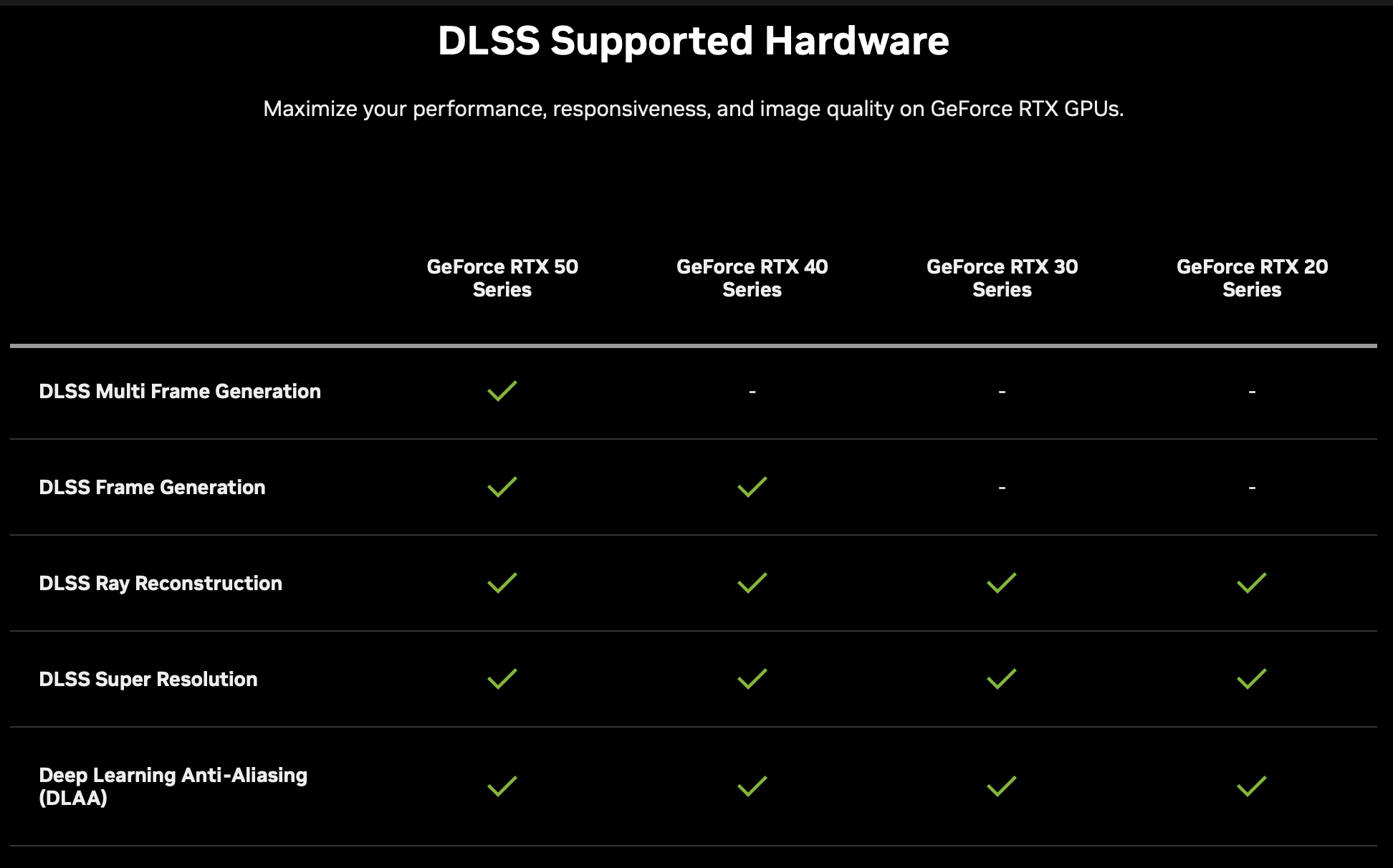
Worth it depends on what gives you immersion at your price point. I get a more immersive experience with a wider view and sense of motion from peripheral vision - and talked myself in to this being a long term ‘investment’… I also want to fly helicopters (in the sim), so I want not only some surround view, but also to keep them as low as possible in my field of view for seeing the ground. Once I can replenish some savings I hope to also get a Tobii eye tracker for head tracking.
With zero experience I really struggled to find screens. I would have preferred Displayport monitors, which mostly have high refresh and GSync and VSync compatible, etc. but at larger sizes they are too expensive for me. I was unsure if the GPUs - which have 3 DP ports and 1 HDMI - would play nice with 3 TVs if 2 of them were DP to HDMI adapters, and how would the settings work…
I spent a LOT of time on Rtings.com and Youtube for reviews. I cut all kinds of cardboard sized to various screen sizes, trying to figure out the ergonomics in the relatively small space I’m allowed to use .
I had a hard time deciding between 3x 42" or 3x 48" … 55" was not going to fit. There was a local clearance sale and they had 3x 48" Samsungs at an OK price, so out of exhaustion I bought them - 2 are still in the box as I’m still building a corner table. The TV I opened has been using HDMI to HDMI with VRR, but today I’m going to try DP to HDMI to see if my settings will work ok.
The one thing I hate about the TVs is all the “smart” settings, “detecting” the PC, and it took me a while to figure out how to get VRR working. The one thing I like is having a remote. I think I saw in the NVIDIA control panel the ability to use the speakers in various screens to create a real surround sound - but that’s a complication I’ll leave for later.
Thanks a lot for taking the time to explain and for clarifying that it was about FG and not multi FG. I also always check rtings.com before buying a monitor or TV - their reviews are super professional.
BTW, you had a small typo in the link, it should be rtings.com not rtngs.
Thanks, fixed.
I’ll just say that when I first set everything up with defaults, I thought it was great: TV native 60Hz, rendering native frames at 4K with TAA, Ultra settings… Loading in to the C172 everything was really good… mostly, But as soon as I went to the airliner in a large airport in a PG city with live traffic, using the EFB… it was somehow too much. I don’t know how many aspects of that are just still not optimized, or, if it was more to do with VRR on my screen…
At any rate, I avoided Frame Gen because of all the negative press about NVIDIA claiming it was as good as or better than native frames (deserved press). However, as soon as I saw that it allowed me to double TLOD, I wanted to try to make it work, so this is really still a test.
The bottle neck seems to be Main Thread - but I’m impressed to see almost full utilization of the other cores, meaning multi-threading is really working now. The true test of this will be 3 screens, in an airliner, with live traffic. For the first time since last October, I feel optimistic that MSFS can be enjoyed again.
PS, I found the post (actually in another thread) that inspired me to try:
I’m glad to hear you’re enjoying MSFS again. If you have some time, could you please compare the temperatures of Chipset A and B with Chipset1 xHCI and Chipset2 xHCI in HWiNFO?
I have not done a full flight, but here are the temps after loading in the 787 at KLAX, with full 4K rendering, TAA, Ultra TLOD 400, Live Traffic and Weather, sitting at the gate. This is Max Frame Rate 30 + Frame Gen to 60.
The chipsets are under the large heat sink below the GPU, so all I have is the fans from my lower radiator blowing upwards. I’ve tried to build the fan curves - which are based largely on the CPU, GPU and water temps, to also take RAM in to account, but I should keep an eye on these temps as well.
There is definitely something wrong, either with the 787 or combination with max settings, max traffic, and using the EFB. Things were smooth loading in but as traffic started appearing, ATC chattering to traffic, and I had the EFB open to plan a flight it just degraded to a choppy mess after a few minutes as I was flight planning. To be expected, I guess, with everything literally at Max settings. Yesterday’s tests were with traffic OFF and no EFB… So I’m going to try without Traffic and just EFB, and vice versa.
Issues with the EFB have been reported in other threads.
Yes, thanks - unless we all file specific bug reports, Asobo will never notice, so I’m filing bug reports for every issue I find.
Water cooling requires a ton of maintenance, so I would not advise doing it, but anything for good temps I guess. Wishing you good luck if you go through with it.