After the introduction of Nvidia’s new DLSS 4.0 Game Ready Drivers Asobo still has not updated the old nvngx_dlss.dll, nvngx_dlssd.dll and the optional nvngx_dlssd.dll files.
MSFS2024 and MSFS2020 are therefore not fully supporting DLSS 4.0.
When can we expect the update of these files and when will both sims fully support DLSS 4.0?
11 Likes
Yup I too would like to know, it’s supposed to be as simple as using the app. I don’t want to faff around with inspector and DLL files
3 Likes
dxtr
January 30, 2025, 8:12pm
3
Given the current pace it might be part of SU2 in summer
5 Likes
all you need is the DLSS swapper app
Contribute to beeradmoore/dlss-swapper development by creating an account on GitHub.
just download the new dlss version in the app,
and change it for the game
I get twice the frame rate in DLSS4 (v310.1)
2 Likes
That’s true of so many things, isn’t it?
I’m used to needing to manually update/ restore/ clean/ reset quite a few things after sim updates. I’d love it if that wasn’t the case, but it’s wishful thinking, so I simply do the needful.
1 Like
Wrong, they said that FS2020 and 24 support the over ride feature, not that they have day 0 DLSS 4 support…
1 Like
I’ve used DLSS swapper to install v310.1 but could you tell me where I might find the overlay page shown in your image above to “change it for the game”? I’ve never seen that before. Thanks.
dxtr
January 30, 2025, 9:22pm
11
But it is not overridable in the nVidia app?
Cetieel
January 30, 2025, 10:54pm
12
What’s weird is that it appears I can override it in the Nvidia app for FS2020 but not for FS2024. Under FS2024 all of the options are grayed out.
1 Like
make sure you have the latest version of DLSS Swapper from GitHub
Habu2u2
January 30, 2025, 11:20pm
14
Just for everyone’s info, there’s a whole lot of discussion about these issues here: NVIDIA Game Ready Driver 572.16
Regards
1 Like
**So first off, you do not need to download any DLL’s or swap any DLL’s.
1.) Download new NVidia drivers. Install them
2.) Download new NVidia app. Install it.
3.) Restart PC.
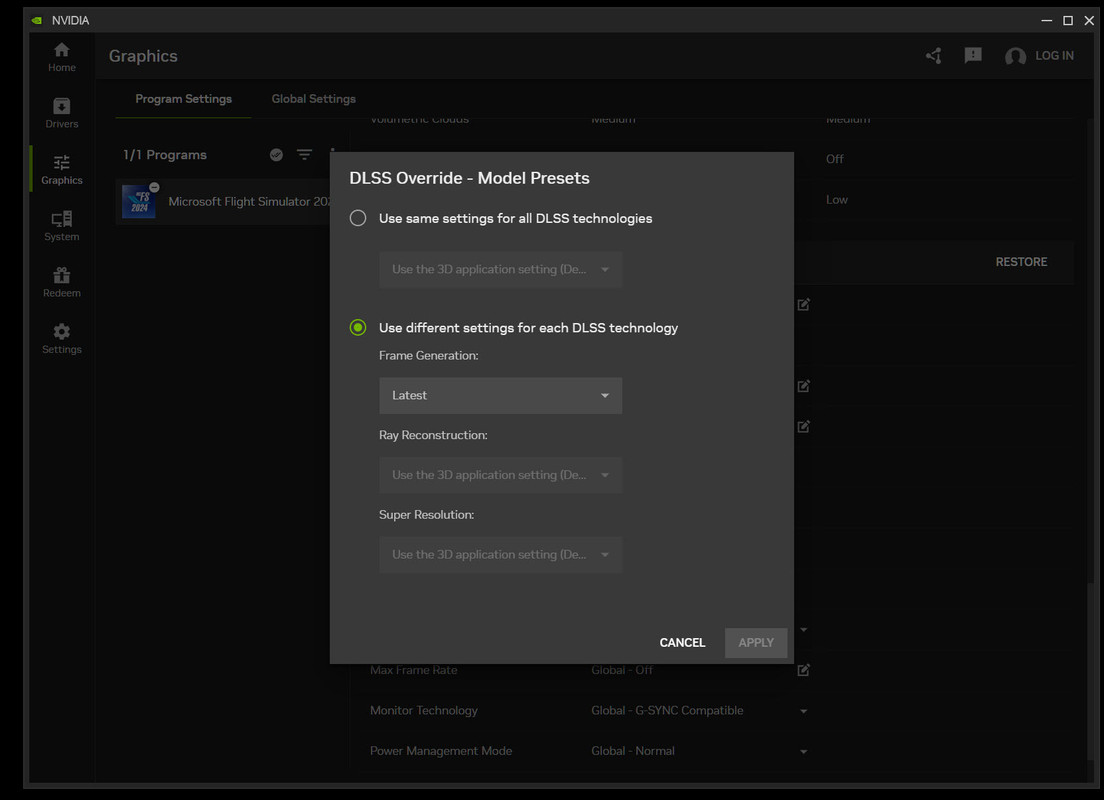
4.) go in new Nvidia app, select MSFS2024, and make sure that in DLSS override - Model presets is set to ‘frame generation - Latest’.
5.) Download NVidia inspector. You need new version 2.4.0.8 https://github.com/Orbmu2k/nvidiaProfileInspector/releases/download/2.4.0.8/nvidiaProfileInspector.zip
6.) Run it and change the settings as per my pictures below.
7.) That’s i! All done, go fly MSFS2024 in new DLSS4.
2 Likes
Nvidia app is not required and in some cases, it may even be responsible for CTDs .
1 Like
Thanks but this is a complete joke, I’m so grateful I did not buy this… It’s working on the FS2020 but not FS2024, simply a bad joke
4 Likes
Same here …. 2020 yes … 2024 no (SU1 beta)
2 Likes
Same here. Says unsupported
1 Like
talgmar
January 31, 2025, 2:17am
21
Also,this DLSS 4 shows up in the overlay as DLSSv3 and dll’s are 310..
Is this intended?
If this ISNT the “official DLSS 4”, why are we calling it 4?
EAL92
January 31, 2025, 2:33am
22
Did you seriously expect Asobo to be ready? I have zero faith in them to do anything correct or on time. At least this way they never disappoint.
6 Likes
Do you have 3xxx series or 4xxx card to get two times frame rate?