All good.
1 Like
And does this have to be edited every time we get an update, for example?
BTW, thank you for always having the correct response. Appreciate some of you trying, but some of you are giving completely incorrect information.
Hi is this true pls ,
I clicked on My Library and it doesn’t do anything. Possibly because the market place isn’t working yet. I’m not going to modify any .cfg files yet. Going to wait until the market place is working and try again.
My point is why can’t someone from Asobo answer this question? Community folders shouldn’t be created on the C: drive unless you want the game on the C: drive. That just seems like, yet again, another big miss.
2 Likes
Well, technically it isn’t created there but on the installed disc. It is not in the folder where you would expect it to be, like the install folder itself. Overly complicated system, and unneeded.
for MSFS2024 I went with the Steam version, but what confuses me is I set the installation on my drive (F) which is only 11.6gb but there is still another whole part of the installation in the users folder on (C) which is 60gb, cache file included. So what is the point of a specific installation location when MS just plonks stuff all over the place and in a place you don’t want it?
Not to mention having tried getting into the game itself for 12 hours now with absolutely no luck.. Its all very infuriating.
that worked for me now still gotta get back into FS2024, did get it working and loading and got to main screen but needed to restart due to one of the graphic settings… and now back to 0% but it did now populate the files to my FS install on other drive. the user settings and generic stuff are still on C but the main stuff is on the installed drive, I checked my FS2020 cfg file as well and it does have same type of setting with the installation folder set to the correct folder/drive where I keep my community folder. but now if I can get back into FS2024 I can try to get rid of everything being streamed now
that is so false i picked my D drive but yet still installed on C
2 Likes
Just to break the process down step-by-step for folks less experienced with this edit…
If anyone wants to move their Community folder to a less nonsensical place than:
C:\Users[YOURNAME]\AppData\Local\Packages\Microsoft.Limitless_8wekyb3d8bbwe\LocalCache\Packages
…before they start downloading Marketplace and web add-ons, here’s how to change the folder:
Find your usercfg.opt file in the folder below (might be in a different spot for Steam, this is for a Windows Store version) and edit it in Notepad:
c:\Users\[YOURNAME]\AppData\Local\Packages\Microsoft.Limitless_8wekyb3d8bbwe\LocalCache\
Change this line (in my config, it’s the last line in the file) to something like this, with the folder where you want your files stored:
InstalledPackagesPath “S:\FS2024”
At the very least, it will likely save you some headaches from long filenames at some point in the future. Plus you can easily find the Community folder without having to pin it to File Explorer!
2 Likes
At this time there is no way to make a custom community folder unfortunately
The handling of the content data including community folder is way better now.
You now can just directly in the SIM change the target location of you official & community folder. Most people just havent found it yet.
And since this is now very easy to do, there was no need for a popup at startup, where people could choose the location.
Here is how it goes -
- open Marketplace
- open Library
- click on the small cogwheel icon on the right sight above the list
- now you have the dialog/UI to open/change the locations
Here would be my tutorial for this in german language.
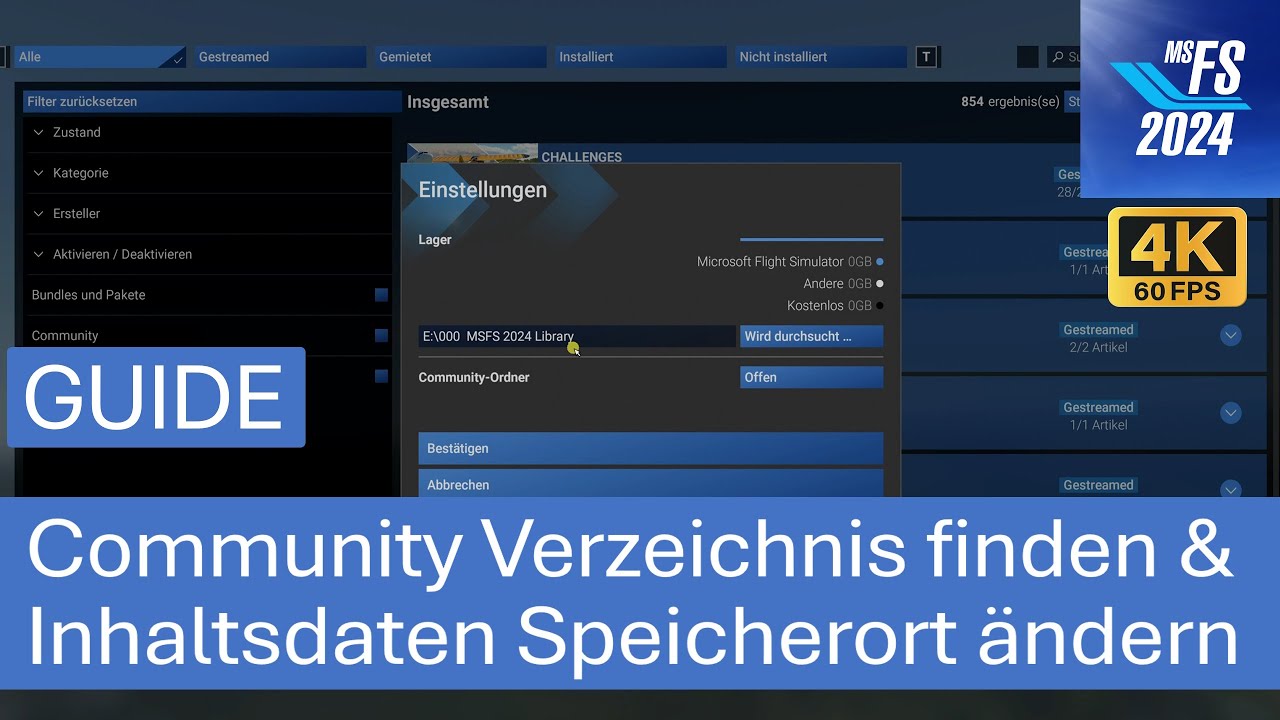
Cheers
14 Likes
(post deleted by author)
5 Likes
Okay, no, this is unacceptable. This is P3D levels of BS. If I select a drive to install the game, everything EVERYTHING has to go there. If I wanted anything in C I would have selected C. This is totally unacceptable
4 Likes
Wow.. I can’t get that menu where to store the stuff..
It works the same as in MSFS 2020. Nothing has changed - you can still have the official and community folders located anywhere on your drive or partition. The only difference is the size of the launcher: 2GB vs. 12GB
2 Likes
No It doesn’t. The official and community folders are installed on C regardless of what I set. If I select them on the menu from the marketplace and then move them to my other disk, it will re-download everything on C again. Like I said, unacceptable. Everything has to go where I set it to. Period.
Please, could you provide a screenshot of the open folder named Microsoft.Limitless_8wekyb3d8bbwe located in AppData\Local\Packages?
Thanks a bunch for posting this.  Clicking on the gear icon did the trick. I just pointed the libraries to D://MSFS 2024. Restarted the sim and it worked, the community folder is in my MSFS 2024 directory where it should be.
3 Likes
To clarify, in Steam version, the folders are in
C:\Users\xxxx\AppData\Roaming\Microsoft Flight Simulator 2024\Packages
The folder “Microsoft.Limitless_8wekyb3d8bbwe” doesn’t exist.
In there you have Three folders: Community, Official 2020 and Official 2024, all of them empty. You can change the folder route in the marketplace, but it doesn’t change anything. The folders are still in the default folder and I still have 17GB of core game files in “C:\Users\XXX\AppData\Roaming\Microsoft Flight Simulator 2024” that should be in the drive I selected instead.
2 Likes