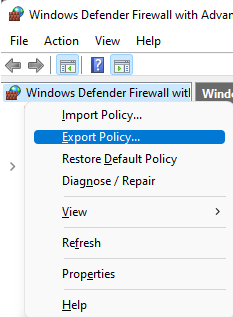
It would also be worth you reviewing your firewall policy. If you don’t know what you have configured, how can you fix it if something goes wrong? It becomes a black box you know nothing about, pray doesn’t break, and don’t dare touch. None of that is good.
I upgraded to windows 11 yesterday hoping that I might see some improvement for MSFS 2020. I have an i9 system and a GeForce 3070. I reverted to windows 10 today. The simulator with windows 11 was stuttering, especially flying the f-18 or any aircraft in places like NYC or Las Vegas. I do NOT recommend upgrading to windows 11!
It works, I run it on a machine that ‘cant run it’, I share my one install between win11 (upgraded over and over from win 7) and a fresh install of win 10. Sometimes it actually runs better in 11 then it will in 10, and then other times the reverse is true here.
Right now Im trying to get it to run under Linux, seemed alright a couple of weeks ago, but there were joy stick issues, restarted the project this morning it launched, I check the joystick setting all good, restarted steam updated, Maverick upgrade downloaded and installed and now it ctd’s when you click fly. Try again in a couple of weeks no doubt.
It’s not Win 11 itself that is the problem. I switched from 10 to 11 when it came out, and found performance with the Win 11 original build in general PC use and with MSFS was at least as good as before, if not slightly better.
The only problems I have experienced is with new builds / upgrades to Win 11. A few months ago there was an update that radically changed CPU usage in MSFS. The percentage CPU usage, FPS and performance all dropped really badly, and I couldn’t find a way to eliminate the resulting stutters. I tried hyperthreading on / off, DX12 and DX11, frame rate limited, countless variations of power modes, NCP settings etc etc.
I went back to basics and reverted to the lowest possible graphics setting in-game, turned on Dev mode and tried to build up from there and get some sensible settings, but I just couldn’t achieve decent visuals with no stutters. Prior to the Win update, I had smooth 50-60fps everywhere in 1440p.
The simple solution was to reverse the Windows update and revert to the previous build of Windows 11. It took 5 minutes and performance was restored.
If you are able to find and use the original build of Win 11, without the upgrades of the past 6 months or so, then it should work perfectly with MSFS.
When I griped about Windows 11 a few days ago, I failed to include all the facts. (My humble apologies!)
The stuttering and other performance problems occurred when I tried to fly in VR mode. (I have a VIVE Pro 2). When I ran the simulator is 2D mode, Windows 11 worked without problems.
I thought I should clear that up. Again, my apologies for the oversight.
Be cautious about rushing to upgrade to Win 11. I did it and it cost me dearly because I was running AMD Adrenalin Software version 22.5.1 when I upgraded to 11. Everything worked smoothly for a few weeks and then AMD announced an upgrade to Version 22.5.2. It pops up in the software when there is an upgrade and I always install the latest version. This time it was a disaster and the minute I ran MSF2020, the system crashed. Nothing fixed the problem except wiping out Windows and reinstalling, so I went back to Win 10. I since discovered that the Adrenalin Version 22.5.2 is not recommended for Windows 11 at this point. It would have been nice if they had put a note about that alongside the new software edition BEFORE I installed it when they offered the upgrade.
My point is that no company knows all the possible consequences of upgrade compatibility with new versions of software (Win 11), so hold back until someone else goes through all the trauma.
I upgraded to 11 because they bragged that it was terrific for gaming. In my case, it did not show any noticeable improvement to MsFS 2020, so I do not recommend jumping in unless you feel you really need to.
Where as I would recommend not automaticity updating software such as Adrenalin unless it fixes something or is critical for security or performance. Nvidia come out with new drivers regularly but I stick with what I have because its working perfectly ok so why fix what isnt broken?
My experience with Windows 11 Beta Release is a disaster since 3 months now. Heavy stuttering in VR and micro stuttering in 2D mode. I was on the public release before without any issues and I did the stupid thing to move to the Beta. I applied to go back on the public release again a month ago and I still wait the automatic switch as I can’t reinstall everything right now for work reasons.
Thanks for answering!
I have an Aorus Master X570 and I use the F36e Bios which it should fix the stuttering issues, no good luck here. I am sure there is something wrong with the Win 11 Beta release, many other users have the same issues as well and all of them are on the Beta or the Dev Insider program.
Only hope is when I’ll get back to the public one…
Its quite probable its a win issue, I know I lost the use of the sliders on my midi keyboard yesterday after an update going to uninstall it and see if it makes a diff or if there is something else wrong …
Thanks, its not a huge issue but sometimes I dont think MS likes musicians, a couple of years ago they appear to have put the whammy on my korg keyboard wouldnt work at all, and it took two more updates before it started working.
I play music as well, I have a Montage 6, Korg Wavestate, Roland MX 1, Roland TR-8S, Roland TB-3 and a ROLI Seaboard.
Korg Wavestate had a driver issue for 2 years as well, now everything works fine but I am having some random stuttering issues in general when I use Cubase, in Win 10 everything was nice and clean.
Win 11 suffers on performance issues in general, while seems fast in some things, it stutters in others!
Thats what Im running is cubase, its doing the same thing on both installs win 10 and 11. Dont know what the is going on with this. Its an aturia keybase essentials I looked on the web this morning and couldnt find anything new for bugs with it. I was out all day so I havent had time to pursue it further.
All I can say is when I upgraded about 10 months I had an opposite experience. MSFS runs much better (for me). I still get those occasional stutters like everyone else but Win 11 resolved all of the CTDs I got with my RT5700XT.
MODERATOR EDIT:
Hello, I just switched to win 11. And of course mfs 2020 no longer launches, it remains on updated verification. I tried everything deco reco Xbox and Microsoft then repair reset mfs 2020 then Xbox too. I uninstalled Xbox then reinstalled. In short, apart from uninstalling and reinstalling mfs 2020, I think I have tried everything. Does anyone have the solution please I reinstalled it 1 month ago I don’t want to start again. It was running fine before installing win 11 but phew win 11 works
Bonjour je viens de passer sur win 11. Et bien sûr mfs 2020 ne se lance plus il reste sur vérification mise à jour. J ai tout essayé déco reco Xbox et Microsoft puis réparer réinitialiser mfs 2020 puis Xbox aussi. J ai désinstallé Xbox puis réinstaller. Bref à part désinstallé et réinstallé mfs 2020 je pense avoir tout tenté. Quelqu un a t il la solution svp je l ai réinstallé il y a 1 mois je n’ ai pas envi de recommencé. Il tournait nickel avant l installation win 11 mais ouf win 11 fonctionne