Seems like you are the only person that knows how to fix this game. Help me, please 
what was your issue with PFP3N?
It turned out to be pilot error, an oversight on my part. Two simulators, models and variants spread across both of them; was trying to get the PFP7 to work on the updated 772 while forgetting that it only works on the 77W and Freighter at this time. My bad, too many toys to play with!
I did open a chat with WinWing on their USA site and got a prompt answer to my question about SimAppPro version roll-back. As it turned out, no need to do that once I got my things together this morning, which was a relief. So much easier to sort out the pilot than the PC, LOL!
UrbanizedRug11
Refer to my screenshot of the PFP3N settings. Key things for me that made it work is to make sure the areas circled in red are as follows:
-
Make sure the Backlight settings are turned all the way to the left. Click on the settings buttons next to each one and make sure “Synchronize with the game” is selected. Doing this makes you set the brightness of the buttons/displays within the cockpit itself (at least this works for me in the PMDG 737-700).
-
You can make sure the lights actually work by clicking on the “Lights ON” and “Lights OFF” buttons. I leave them off and let the game synchronize with the unit (step 1. above).
-
I’m not really sure what it does, but I’ve clicked on the PFP-3N-CAPTAIN button and made sure it’s turned light grey.
I too use Steam, so if you need to understand the paths settings for the game let me know. I can post those if you need them.

This selection determines which side PFP-3N is synced with and controls; captain side, first officer side, or observer.
i did everything you said, still the same problem ;\ cant really understand why those marker lights wouldnt work. MGS, EXEC lights light up in the game, but not on the MCDU. Screenshot your paths please.
i have it in my steam folder and steam game directory. I wonder if paths might be incorrect. But if that was the case, how would mcdu even connect and interact with my PMDG




These work for me for a Steam install (MSFS 2020).
User data Path: C:\Program Files (x86)\Steam\userdata
Install Path: C:\Program Files (x86)\Steam\steamapps\common\MicrosoftFlightSimulator
Aircraft model Path: C:\Users\yourwindowsusername\AppData\Roaming\Microsoft Flight Simulator\Packages\Official\Steam
Third-Party Aircraft model Path: C:\Users\yourwindowsusername\AppData\Roaming\Microsoft Flight Simulator\Packages\Community
Mine is 1.16.50. I wonder if i should try older version, for the sake of it.
i might have issue with folders. Under Aircraft model Path C:\Users\mrain\AppData\Roaming\Microsoft Flight Simulator\Packages\Official\Steam i have just empty folder.
Same goes for Third party aircraft model path C:\Users\mrain\AppData\Roaming\Microsoft Flight Simulator\Packages\Community, just empty folder.
is thats how you have it?
dont even know if i could get an older version ;\
If your folders are empty, it’s most likely because you installed MSFS 2020 in a different location than the default one.
@Nikita has added a link to download an older version of SimApp Pro.
https://forums.flightsimulator.com/t/winwing-pfp3n-help/703213/82
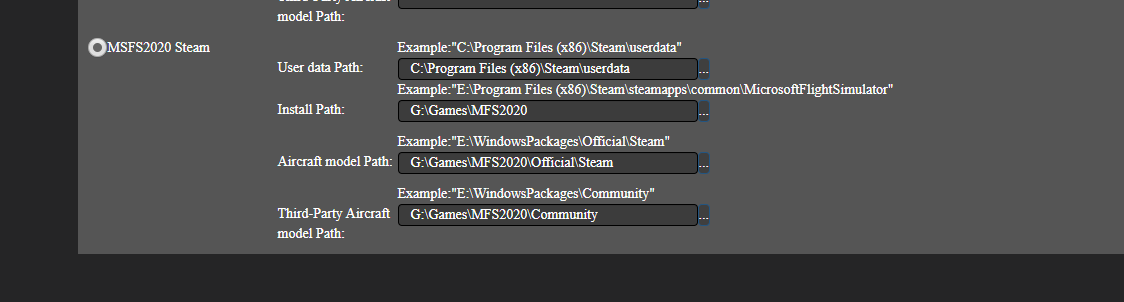
It didnt work with older version. Winwing support tried to fix it via Anydesk remote connection. They couldnt figure it out :))
Could you please check in SimAppPro if the backlighting for the CALL, FAIL, EXEC, MSG and OFST lights is working?
Also, while in the sim with the PMDG 737 loaded, could you test if these lights illuminate when using the lighting test switch.

And finally, could you upload a screenshot showing the open 737_options.ini file, with the last 10 lines visible?
Also, please let us know the full path to that file on your system.
P.S. I’m leaving today for my second holiday this year - so I probably won’t be able to assist further for now due to lack of access to software and hardware, especially things like the CDU.
Lights ON and OFF switch in the SimAppPro does light up actual lights on my MCDU.
This is the path for the 737_options.ini file
C:\Users\mrain\AppData\Roaming\Microsoft Flight Simulator\Packages\pmdg-aircraft-737\work
Lights test in pmdg lights everything up everything in the sim, but on my actual winwing MCDU.

i hope you have a great vacation  come back to us
https://forums.flightsimulator.com/t/winwing-pfp3n-help/703213/93?u=warthog647190
Sorry for the late reply. My two folders (Steam and Community) are packed full of stuff. I agree with TenPatrol in that you probably installed MSFS 2020 in a non standard location. From my experience, most everything addon wise gets installed in the Packages\Community folder, with standard included Asobo stuff going into Packages\Official\Steam. Either you installed non-standard, or something is wrong with the installation in general. Maybe you installed on another drive other than C:.
