Thanks. That accounts for it then. Appreciate the reply.
I have noticed many erros when the G1000 NXi is installed , my computer chrash to desktop barely in the loding page . Trying of getting in the game a pops up is shown saying that the computer doesn’t fulfill the minimum requirements ( of curse that isn’t tru).
Then a explanation is shown saying that i just metioned above could be related with 3rd part content.
Deleting the G 1000 NXi the computer works properly with the simulator.
I’d bet you money that if you moved your Community folder out of the sim and installed the NXi, that you’d find that the sim runs fine. My bet is you have some kind of other conflict.
2 Likes
Yes you’re right, because the issue just happened again and the NXi is unistalled .
My apologize about the assert I made before.
Really I would like to know why the game is crashing to desktop.
First, are the crashes happening at the same location or random? If they’re at the same location, look at addon sceneries. If random, check your Windows Event Viewer and Reliability Monitor - look for anything that might be specific to a single addon. If there’s nothing there, then empty your Community folder and start adding back a little at a time until you start getting the CTD’s again.
Moderator edit: Can someone tell me how to get the manual I have? I can’t find it on the garmin site.
Kan iemand mij aangeven hoe ik aan vermelde handleiding kom? Op de site bij Garmin kan ik hem niet vinden.
Mvrg
Stef
“Can someone tell me how I can get this manual? I can’t find it on Garmin’s site.”
Give this a try.
1 Like
Main Site
For the Cessna
This is for the Bonanza G36
3 Likes
Hey everyone, is there a way to increase contrast in the PFD? It’s pretty hard for me to see the runway on it on final.
Yep I have the same issues when loading from maps, e.g. no destination bearing shown, no distance, autopilot erratic i.e. not following expected route, no recognition of ILS etc…
I think I’ll uninstall this add-on as it’s really bad compared to original in msfs. I don’t know what all the fuss is all about as there are so many bugs. Am I missing something here?
You must be. The Working Title G1000 NXi is the most polished avionics system in the game.
4 Likes
You do know that this update is so polished that its going to be the default version in the sim in just a few weeks time? I suggest you try uninstalling it, re-starting your PC then re-installing this excellent mod because it certainly isnt the mod that has issues, its what is happening with it on your system that is.
Yes, there is clearly something wrong. Which aircraft are you using and are you on the beta?
I am using the Cessna 172 with GS 1000, and downloaded the latest NXI GS1000 add-on.
For example I went to maps and logged YPAD to YPED airports as my flight plan using IFR low altitude and ILS18 to land at YPED. you will see what garbage NXI GS1000 throws out once you try to fly autopilot.
Hi, I have the latest version I downloaded and re-installed it only a few days ago.
If you want to see my issue foir yourself I suggest you try this:
I am using the Cessna 172 with GS 1000, and downloaded the latest NXI GS1000 add-on.
For example I went to maps and logged YPAD to YPED airports in Adelaide South Australia, as my flight plan using IFR low altitude and ILS18 to land at YPED. you will see what garbage NXI GS1000 throws out once you try to fly autopilot.
I did. Here are my screenshots:
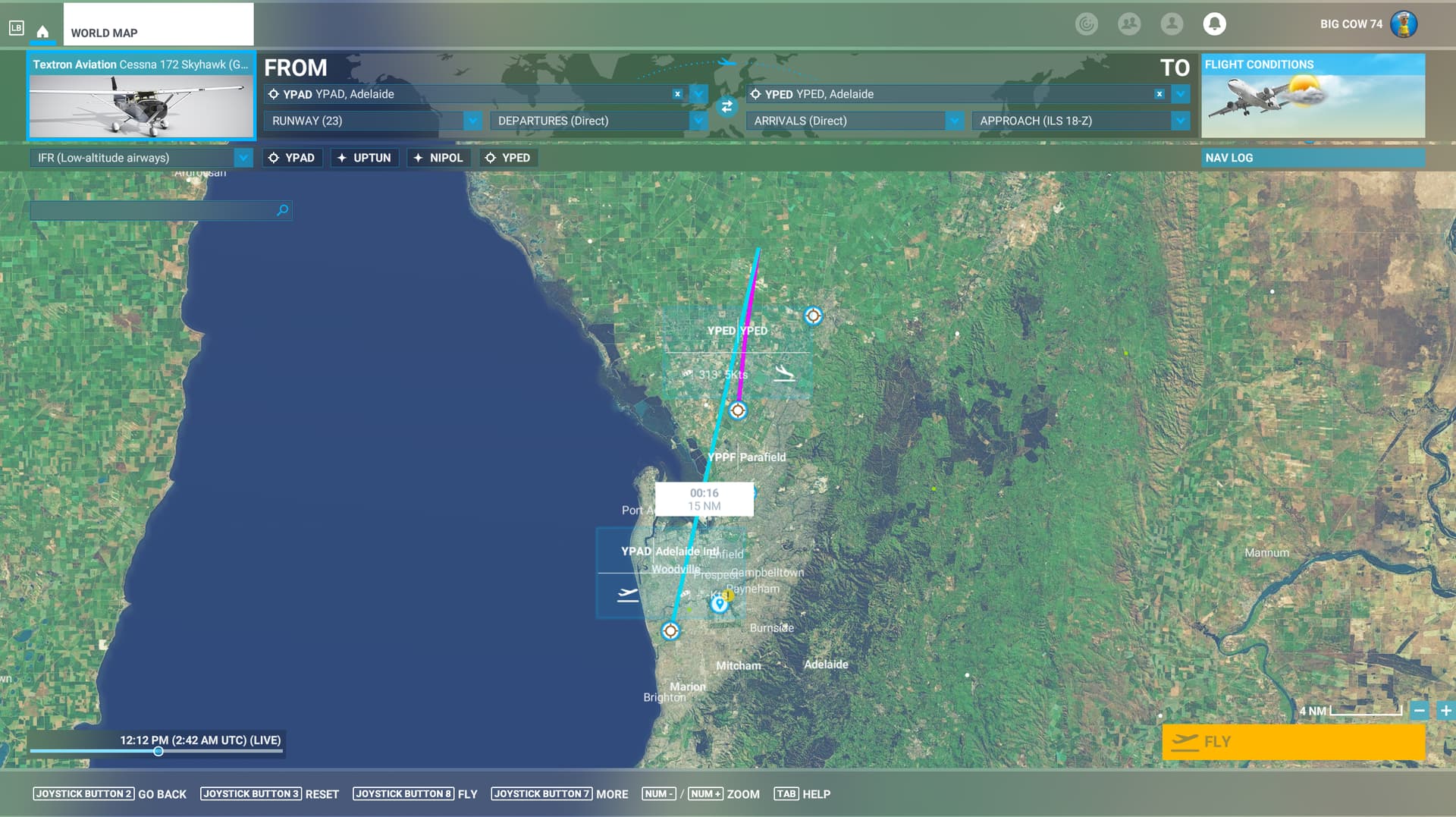
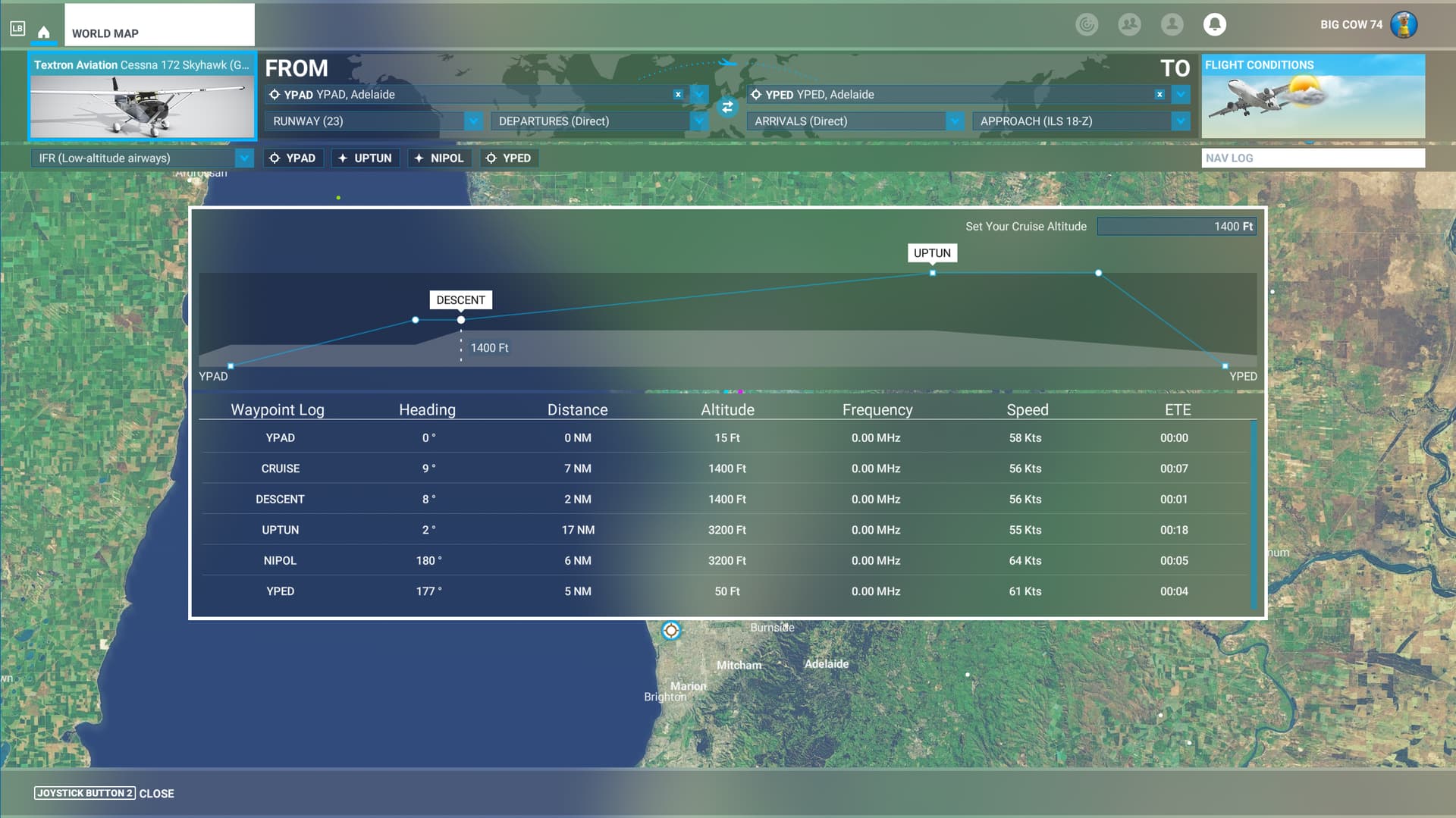
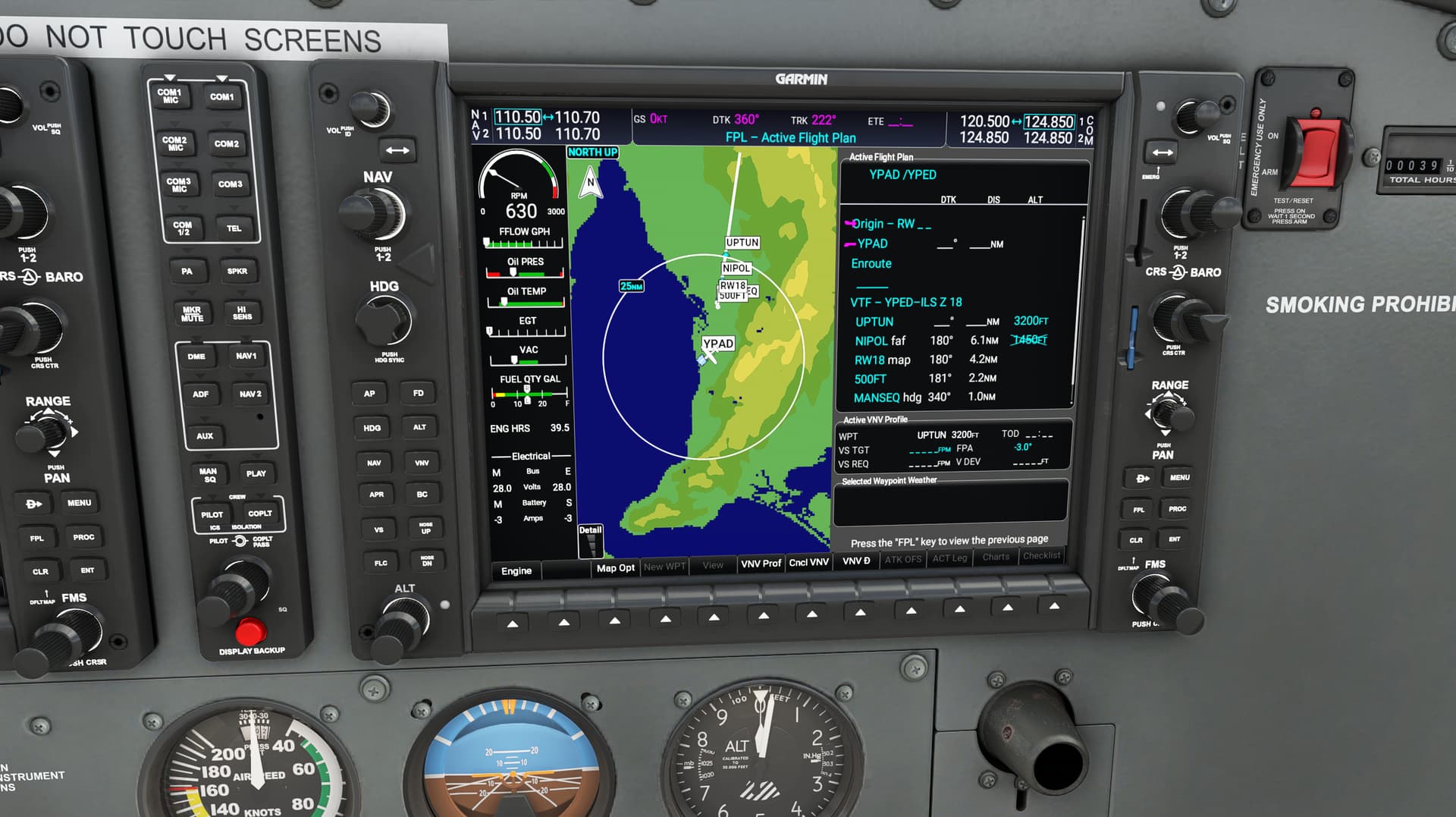
Here are my observations.
Your two airports are 15 nm apart, yet you are selecting an ILS approach. The World Map sets the cruise altitude at 1400 ft. The initial approach fix UPTUN is 3200 ft. The World Map inserts no enroute waypoints in the flight plan. The first waypoint is the initial approach fix that is part of the ILS-18Z procedure.
I don’t know what you would expect the NXi to do in this case. The World Map planner is feeding it a flight plan that would probably never exist in the real world. It’s unlikely anyone would fly an ILS approach in a GA plane between airports separated by 15 nm. If someone did want to fly the ILS, then the flight plan would have enroute waypoints to get you to at least the altitude for the initial approach fix, along with any relevant STAR, which it appears you did not select. Also add on top of that you would probably be receiving vectors to the approach, not relying on NAV. MSFS doesn’t give vectors at present.
There are many things wrong with your example. The World Map gives the NXi an unflyable plan. This is a flight planner problem, not an NXi problem. Is there a different departure and arrival that you’ve tried that you can share?
8 Likes
There is your problem. It’s available directly through the content manager now. You don’t need to download it
Here’s some closure for those of you on the edge of your seats. It was a beautiful morning in Adelaide. I added an enroute waypoint in the NXi flight plan. ATC told me to climb to 3200 feet. I vectored myself onto the approach, set my CDI to NAV1, captured the localizer and glide slope, and had a nice smooth landing.

3 Likes
What makes you think they didn’t download it from the Marketplace?
1 Like
Unfortunately, this is more of a user education issue. And I don’t mean that at all in a mean way, everyone has different knowledge levels and that’s totally OK! However, what our NXi is showing is 100% real world unit correct for this specific case: a flight plan with YPAD as the origin, YPED as the destination, with ILS Z 18 selection and no selected transition.
Here’s the real unit:

And here’s ours:
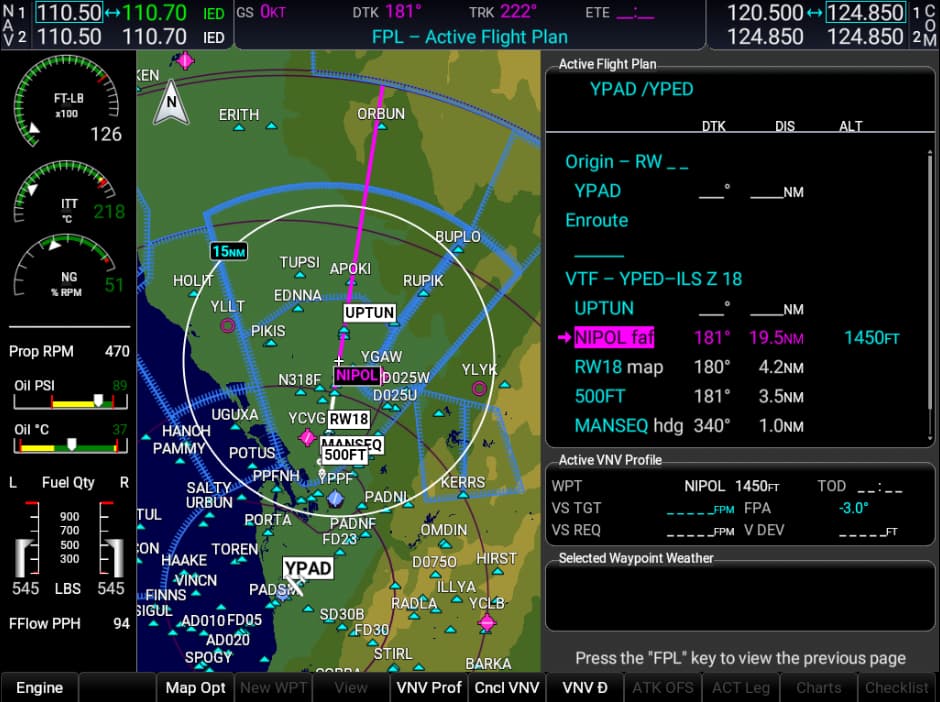
As you can see, they’re matching perfectly (except for the change in the FAF name, slightly different navdata). The reason you’re seeing a discontinuity in your plan is because you have not selected a transition for the approach, and thus this is a Vectors-To-Final, which requires the pilot to make their way to the final approach course on their own before activating the approach.
If you would like to have a more conventional approach, you would need to select a transition in the approach, which would then make it look like this:

Of course, because the flight path you’ve chosen has a super acute angle turn, our unit, just like the real one, will insert a course reversal for you.
Hopefully that helps!
-Matt
9 Likes