Brilliant, yes VIP has loads all over the world.
Plus, buy a few more when you can because I will % guarantee you will either loose a plane or 2 through no fault of your own or be forced to pay many credits to repair a crash you did not cause.
I’m not being a pessimist about 2024, it’s reality and just a fair warning about the many bugs that will tax your game.
The others will earn passive income, but there is a point at which owning too many starts to cost you time and credits to repair the passive planes.
You will need then to move onto airliners to pay for them. Then think about how much time you want to waste repairing them all.
Congratulations with your purchase and happy flying.
i’d highly recommended an iniBuilds A320neo v2.0 as your first airliner, because:
the Asobo Heart Aerospace is terribly bugged (because of course it is). don’t even bother; and
the Asobo Boeing 737 Max breaks down continuously and costs millions to repair
the iniBuilds A320neo v2.0 is actually pretty decent, stable, and very reliable. it doesn’t have any enormous, embarrassing or egregious errors in its systems or avionics. it’s no Fenix, but it’s not too far removed from the excellent freeware FlyByWire A32NX.
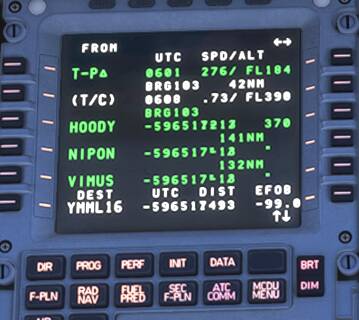
YMML → YPPH. here’s the flightplan MSFS drew up for me (i’ve stopped using SimBrief with airliners because MSFS’s AIRAC is always outdated so the import doesn’t work 9 times out of 10).
first line, first error. apparently FL360 is unobtainable. okay then.
then we have the departure from R16 YMML:
…which inexplicable includes the entire route including the arrival runway.
how about the enroute section?
so… we fly back to runway 16 and start again? sure. why not?
then the approach:
mmhm. starting to see a pattern here. how about the arrival?
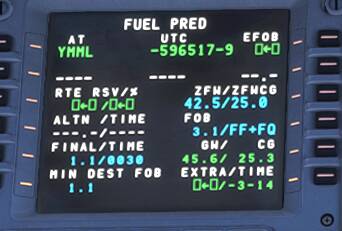
oh, back to YMML R16 again? i hope we tankered enough fuel! surely the missed approach will be correct, right? right?
wrong. it is not.
honestly, this game.
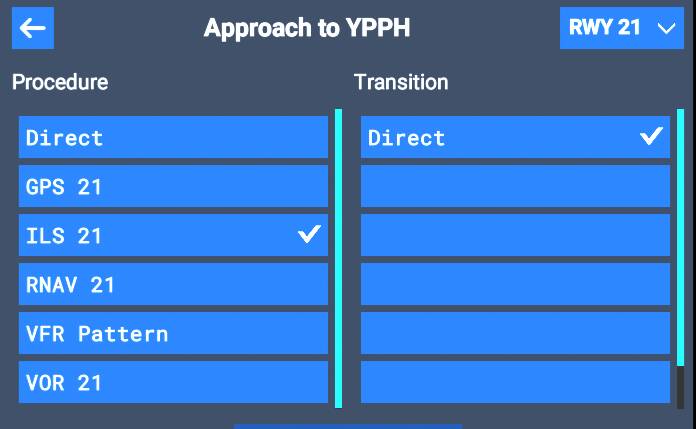
oh, and YPPH has ILS Z and ILS Y approaches to R21 – but not here:
A bit off-topic for this thread but… what? MSFS’s AIRAC is updated the day it releases, same as Navigraph’s (and SimBrief’s, with a Navigraph subscription). If you mean MSFS’s data doesn’t match SimBrief’s, that’s either because you don’t have a Navigraph subscription (so SimBrief is the one that is outdated) or the flight uses one or both airports that are not in the SimBrief database (this is common in Career, though less common in Airline Transport flights).
i’ve flown between multiple international airports where the SimBrief flightplan fails to import because Microsoft’s AIRAC has the wrong/outdated information. i have a Navigraph subscription. i trust Navigraph. i don’t trust Microsoft. simple as that.
The team at Working Title would be really interested to hear more details about that, I’m sure, as the sim takes quite a lot of pride in ensuring the navdata is 100% up to date and accurate to the real-world AIPs. Do you have any specific examples of this?
it’s happened several times recently, which is why i now use the sim’s own route, despite its manifold issues (taking off with a tailwind, landing with a tailwind, etc etc, ad nauseum). but thanks, it’s nice to know the sim takes a lot of pride in something.
This is worth posting an example on the WT Discord server. If you work with them they will probably be able to debug real-time and if there’s a sim bug, log it for a future fix.
the only issues with the iniBuilds A320neo v2.0 that i’ve encountered are:
occasionally has problems with descent profile (profile doesn’t descend although you’ve passed T/D marker, or thinks you’re high when you manifestly aren’t, etc);
autothrottle is very unstable on final close to the ground (likely due to ludicrous “realistic” turbulence), so be prepared to handfly landings;
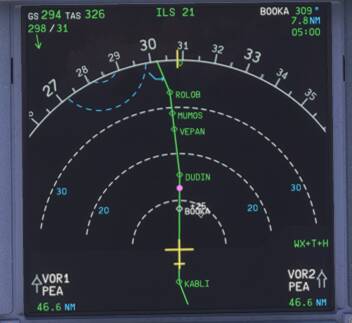
worst issue atm (for me): RNAV and ILS will not capture unless you manually input them into the MCDU. they’ll appear in the MCDU flightplan, and you can arm them, but they won’t activate. a clue that this is going to happen is if “RNAV/ILS (runway)” has failed to appear in the center of the middle MFD by around 120 nm out. it’s possible this bug is triggered by SEND TO AVIONICS.
in the above image, ILS 21 at the top of teh screen indicates that the avionics will actually tune and capture the glideslope and localiser. if it’s not present, they won’t, even if you appear to have the approach loaded in the MCDU.
EDIT: images uploaded to avoid uk geoblock by imgur.com
 % guarantee you will either loose a plane or 2 through no fault of your own or be forced to pay many credits to repair a crash you did not cause.