Yo I have changed my config a little here. With options to upgrade in the future if needed. Here’s my latest build from my PC builder.
Specs:
• AMD Ryzen 7 7800X3D (8 cores / 16 threads)
• ASRock B650M-HDV/M.2
• 32GB Lexar Thor DDR5 6000MHz CL32 RAM (Might upgrade to 64GB)
• Tecware Mirage 360 AIO w/ 3 x 120mm PWM ARGB fan with ARGB sync
• Inno3D GeForce RTX 4090 24GB iCHILL X3 with ARGB sync
• 1TB Samsung 980 Pro PCIE Gen4 NVMe m.2 SSD
• Intel AX210 WiFi 6E + BT 5.3 Wireless Network Adapter
• EVGA SuperNOVA 750 G+ 750W 80Plus Gold Fully Modular PSU
• Custom Sleeved Modular Cables
• Darkflash DK352 Tempered Glass ATX Chassis w/ 4 x 120mm ARGB fans with ARGB sync
• Windows 10 / 11 Pro (Activated)
• [BONUS]GPU SUPPORT BRACKET
Some notes from my pc builder :
I have also included 4 separate bios profiles:
• Stock
• EXPO
• EXPO AGG
• AGG PBO CO -20
AGG PBO CO -20 is what I’d recommend. This is a profile running the RAM at EXPO settings with aggressive subtimings and with PBO set to +200MHz boost with an undervolt of -20 in Curve Optimizer. Rest assured it has been tested to be rock solid stable. By undervolting the CPU, it runs cooler and thus it can boost higher and sustain that boost clock over long durations.
This is true, but (at least in my MSI BIOS) I can adjust the fabric timing (FLCK) manually. I set mine to 1800 (1/2 memory speed) because I’m running XMP-2 @ 3600 MHz.
So I’d guess that with 5600 MHz you could manually set FCLK to 2800 and have the correct timing. (Maybe DDR5 is different?)
I just joined the PC club five minutes ago. Went with the spec outlined in my previous post. Not being shipped till 6th March so I should be able to make changes/additions if need be.
Looking forward to no black-screens/CTDs with complex airports, along with proper AI traffic!
I love my Series X but I’m really not sure the current issues will ever truly be resolved. Nikita in another thread said something I think perfectly sums up the Xbox experience:
If you’re satisfied with two, Series X will mostly deliver. But at this time, only a powerful PC will allow you to choose all three. Ultimately, the sim’s systems and physics are identical across both platforms, so it’s not about how dedicated or serious a simmer you are, but rather, whether or not you feel you need the extra bells and whistles that can make the experience that bit more authentic.
The Xbox Series X is a fantastic machine that, for many, will be all that’s needed to enjoy MSFS. You don’t need an airport to look like its real-world counterpart in order to sim realistically — a lot of it is about imagination and filling in the gaps — after all, if you want the TRULY authentic experience, you’d go book an hour in a Cessna 152…
That a console is admirably handling one of the most demanding PC titles is itself some kind of near-miracle, but doing it at a fraction of the price is super-impressive! I maintain that no PC can compete on a direct, pound-for-pound basis, without having its a*se whooped!
Congratulations JakTrax on the good purchase. I am very sure that you will not regret it.
I’m also planning to switch from Xbox to PC. For the most part my config will look similar to others here with the 7800 x3d as CPU. The only thing I’m still unsure about is the GPU, whether it should be the RX 7900 XTX, the RTX 4080 or the 4090. I would be very grateful for any further opinions here.
As others have already said, the choice of GPU depends largely on your own setup and expectations. So here are mine:
I’m currently playing MSFS on a large Sony 85X95J TV that supports 120 Hz, VRR and HDMI 2.1.
The GPU should be able to handle the MSFS smoothly and largely without stuttering in 4K.
I would like to use FSLTL, FS Realistic and GSX Pro as add-ons.
I mainly fly with the PMDG 737-800, but I will certainly also get the Fenix A320.
I often fly from the big hubs like EGLL or KLAX. So I would like to be able to use FSLTL + GSX Pro there without the FPS dropping significantly.
Due to the size of the TV, I have no ambitions to use VR at the moment.
Does the 7900 XTX (or 4080) also manage to run large airports in 4K with Live Traffic and GSX Pro smoothly for the most part? Or do I have to choose the 4090 for this?
There exists, at the very back of my mind, a little doubt that it’ll be significantly better than the Xbox experience. But that’s more a testament to how much I’ve enjoyed simming on console, rather than meagre expectations concerning the PC version. The real bonus will be the avoidance of constant black-screen incidents and CTDs. Plus there’s also a better selection of airports for PC (how I’ve long looked at Jo Erlund’s EBBR with envious eyes!) and sales are more frequent. Every little helps!
To be honest, it’ll just be nice to be able to run the likes of Ini’s KSAT and Orbx’s YMML without having to be REALLY careful! Two of a number of owned airports I’ve not actually explored much with the drone, due to those Xbox memory limitations.
Despite what people are saying about GSX, I doubt I’ll be rushing to buy it. But then again, I had no intention of jumping to PC a few weeks ago…
The SU15 beta balancing act convinced me that, despite Asobo’s best efforts, the Xbox is never going to simultaneously handle all the add-ons I plan to run. I also have my doubts about FS2024 — irrespective of how much they improve (V)RAM usage, it will remain a ludicrously complex and demanding game.
I asked the shop I bought my setup from about the 4090. There’s no doubt it’s the no.1 GPU but you are really paying a premium for only slight benefits (apparently). They told me it represents poor value and that the 7900XTX is still one heck of a GPU. When I called, they were quite taken aback when I said I wanted a 7900XTX — their response was, “Wow, someone’s going high-end!”
I think it’s easy to get carried away and spend money you really don’t need to spend. A figure frequently presented as being the minimum you need to spend for a high-end setup is £2.5k but I’ve managed to come in £220 below that.
I run the 7900 XTX and a 7800X3D. I have no issues with addon large airports and high fidelity aircraft in 4K Ultra with FSLTL. I don’t use GSX but I don’t imagine it would be an issue, either.
I have my object and terrain LOD set to 175 or so and get a solid 30-40fps on the ground in the most demanding scenery and 50-60+ while in the air depending on what I am flying over. This is using DX11 and no frame generation.
To get a guaranteed 60fps+ on the ground in the most demanding situations with addon aircraft and airports, I’d say the 4090 and/or a GPU with DLSS3 frame gen would be the best bet. But flight sim works great a 30-50 fps, looks better than the Xbox, and is more stable too.
A few things I noticed about moving to Xbox just to help set your mind at ease:
You will immediately notice the lack of lag with mouse movements in the menus. It’s a small thing, but it’s shocking how nice it feels coming from the micro-laggy console.
LODs are significantly better. Small things like cars in parking lots generally have minimal to no pop-in. I can move from a following view to a side view and scenery is consistently there. I tried this the first time over Manhattan and I was impressed.
I’ve been on PC for 3 months with a similar setup and put maybe 100 hours into MSFS. I have gotten no black screens and one CTD, and that crash was after exiting a flight back to the home menu.
I sometimes get the occasional micro-stutter, but this isn’t common and usually resolves by itself. I usually get them when running the FSLTL injector. I did have major stutters once when flying the Longitude on approach into IniBuilds KOKC, but I determined it was from rolling cache. After disabling rolling cache, the stutters disappeared at that airport.
Of course, each setup is different and there are more possible points where issues can arise on PC, such as drivers, hardware faults, or software settings. But you won’t have issues related to raw power with your setup, that’s for sure.
Yes, I’m also looking forward to more frequent sales and a larger selection of airports. Especially the EBBR. And of course no CTDs and black screens.
I’m curious to see what I decide. The 7900 XTX and the 4080 are undoubtedly great GPUs that would certainly fulfill my expectations. Nevertheless, I’m still thinking about the 4090. But yes, the additional costs are high and the value for money is certainly not good. And I’m not really prepared to pay almost 4,000 euros for a PC that I only use for MSFS. For my other purposes, a PC for 500 euros would be sufficient. At the moment I’m leaning towards the 7900, but I’ll certainly have to sleep on it for another night or two.
Thank you for your opinions! A really great community.
Mine is running stable with 64GB Corsair RAM @ 6000. I’d say look at the cost difference, if it’s small get the 6000 over the 5600, when I was shopping the price difference was minimal.
I’d say the same that we said to Jak. 1000W PSU and 2TB SSD. See above for discussion. That 980 Pro SSD is a serious weapon, but look at the cost difference with the mid range SSD and see if you want to pay that.
Yo gonna have some good times with that mate… Enjoy!
I haven’t used any of those but from everything I’ve read they will all smash 4k single screen. With MSFS 2020 everyone is main thread (CPU) limited, probably with the exception of people using VR or multiple 4k screens. I’m running a second hand 3060 for 1080p and I was heavily main thread limited even with a 7800X3D! I now have frame gen enabled, I have MSFS rendering at 1440p and the GPU downscaling to 1080p (this gives a better image than regular anti aliasing) so I’m working the GPU much harder and only now is it reasonably balanced between GPU and main thread. Don’t buy a 4090 unless you will go VR!
This is so true. Next someone will be in here saying you need to buy an UPS and probably more (you don’t). With my new 7800X3D/64GB 6000/X670E/2TB/1000W Gold system just by using a second hand 3060 my DIY build cost came in at about £1600. Including a genuine retail Win11! The system is high end, I just need to upgrade the graphics card when the time is right for me.
With nearly everything on ultra (clouds on high, using variable LOD) my system will get 60fps away from busy areas and traffic and will drop down to 30-40fps around London. I always use FSLTL even for GA. Having airports alive is one of the biggest PC advantages for me.
The “CPU limited” thing always kinda stymied me… with my 4080, when I pull up the GeForce overlay to see temps and things, usually my GPU utilization is right around 95-98%, and my CPU utilization is SELDOM over like 30%. Does this sound odd to anyone else?
You have 8 cores and MSFS main thread is a single thread so can only run on one core. There’s 7 other cores it can’t run on. Think of the roadworks where 5 guys are watching one worker, it doesn’t happen 6 times faster. This is why we don’t buy a 7950X3D. MSFS does have some other threads so there is other core usage, but the main thread is critical path. Beta SU15 seems to have improved this a little but still main thread limited. Supposedly 2024 is going to be much more effectively multithreaded and if they get that right you might get a huge performance boost.
If you want to see the numbers for yourself in the MSFS settings enable dev mode. Then in flight use the top menu bar to enable the FPS overlay, the is the only way to see the thread level detail. It will tell you if you are main thread or GPU limited, quite literally using words.
Haha, you might get the last laugh if MSFS 2024 is seriously multithreaded. Although I think if they manage to scale it fully to 8 or more cores we’ll all be so happy nobody will mind! (Full disclosure, I’m not expecting it to be that good, but one can hope.)
Of course the 7950X3D is also a great choice for those doing other compute heavy workloads outside of MSFS (which I do not use mine for).
I did look at the Ryzen 9 7900XTX and wondered whether it was as irrelevant for MSFS as the 7950X3D currently is?
I’m just hoping I built the thing right and won’t regret any part of it — in the end I decided to save a bit of money and go for 32gb 5600mhz memory, rather than 48gb. Right move? Should I have gone for 6000mhz?
Am I screwed with the 7800X3D if FS2024 is multi-threaded?
With the dispatch date being 6th March, I’m sure I can do a bit of chopping and changing…
Just one thought is 2tb SSD big enough for the amount of addons you have. I’m not far off that now and have no where near as much as you do mate. Remember the size of downloads will be far greater than them on the Xbox. Just a thought and is it best using 1 hard drive say 4tb or using 2x 2 tb
The add-ons aren’t actually that much bigger on PC — maybe about 10-15%, in my experience. Depends what optimisation has been done as the platforms are otherwise identical. I’ve over a hundred add-on airports now, plus 8 third-party planes, and I’ve still over 300gb of my 1TB left on my Series X. I can always easily remove and re-add stuff if I get into a situation in which I’m running low on storage space.
The SSD is about the only piece of the thing I’m not jittery about!
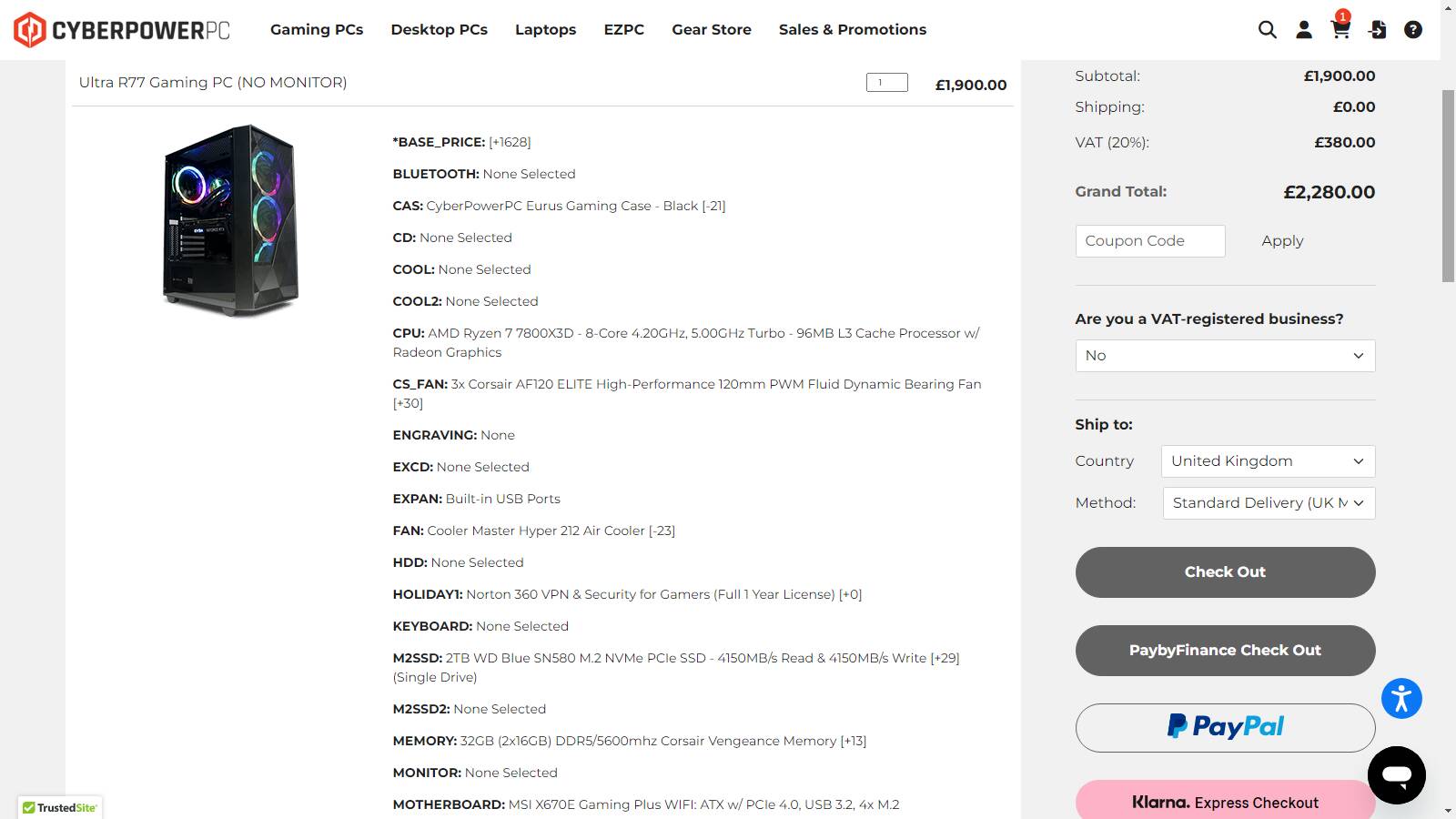
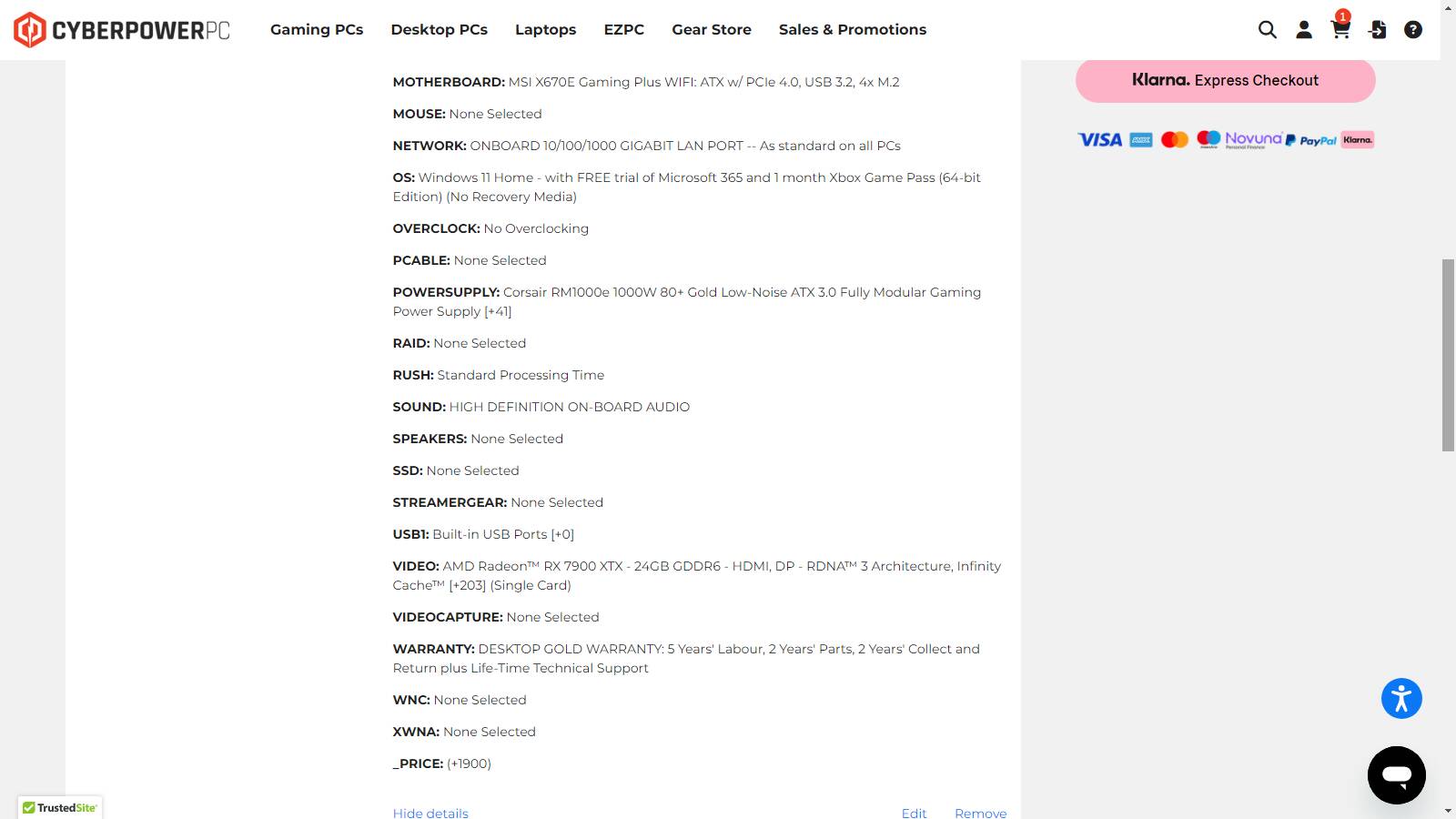

 And of course no CTDs and black screens.

 But yes, the additional costs are high and the value for money is certainly not good. And I’m not really prepared to pay almost 4,000 euros for a PC that I only use for MSFS. For my other purposes, a PC for 500 euros would be sufficient. At the moment I’m leaning towards the 7900, but I’ll certainly have to sleep on it for another night or two.


