Oh roger haha!
Thank you for your reply, @NiKoTin3420 . I’m trying to find the answer to the question: will this or the 208B analog ever hit the Marketplace?
sorry l have no clue regarding this maybe you can try reaching JustFlight directly, since we are speaking about an already published aircraft asking them shouldn’t be an issue
" Information about Just Flight products
If you would like to ask us something about a Just Flight product which is available to purchase, please email support@justflight.com.
You may be able to find the answer to your question on the Just Flight community forum, where other customers discuss our products.
Unfortunately, we cannot answer queries about products under development."
don’t quote me on the following but l guess there is many issue to get sorted if you want to be on marketplace like being 100% xbox comptatible wich seem to require a certain amount of work, without speaking about JF exclusivity… l may be wrong, but in my opinion this will not happen in a close futur.
1 Like
Did a search on the forum but couldn’t find anything.
Would ilke to know how to disable all possible failures programmed into this aircraft, random or scheduled. Even with he most conservative settings in the Wx I still get engine failures and other things.
Any ideas?
Roland
reset active failures then decrease the the global failure rate to 0
it should turn off faillures thought, if you still get some faillure you may start concidering a conflicting controller profile
Oh my oh my. First time i touch this majestic beauty since months. I missed her. She’s soooo good!
Anyone using Sky4Sim in VR with this King Air? Always I try to use this or other PDF reader with a webserver running in background, FPS drops and only recovers after a full restart.
I run Sky4Sim with the analog King Air and VR and haven’t noticed and performance issues.
Thank you, will try that.
Is it possible to make that permanent by amending some config file?
See the BQ-Manual at page 63 ‘Failure Configuration & System Status’. On page 64 it reads: Random failures can be completely disabled by pressing the indicated decrease key until the global failure rate indicates “NO FAILURES”.
Finally I figured out where and how one can define a preset for the cabin and instrument lightings.
The presets have to be done in the *.flt files which are located in the following folder:
..\Community\bksq-aircraft-analogkingair\SimObjects\Airplanes\bksq-aircraft-analogkingair
In this folder you will find several *.flt files, each of them represents a startup situation depending on your preferences.
Because I never use the Missions in MSFS, I only need the two files ‘runway.flt’ (if I select to start the simulation with running engines, located at a certain runway), or ‘apron.flt’ when I decide to start with ‘cold and dark’ cockpit at a certain parking position.
In all these *.flt files you will find a section named ‘[Switches.0]’. In this section scroll down a bit and you will find the ‘Potentiometer.n’ list. Each of this potentiometer represents one of the switches on the overhead panel. The intensity of the light is defined by a decimal value between 0.0 (dark) and 1.0 (bright). The following list contains the description for each of the potentiometers (after the semicolon). I have also uploaded a screenshot providing the numbers of the respective potentiometers. Note: The numbering starts with 2 (not 1, or 0)!
Potentiometer.2 = 0.15 ;INSTR INDIRECT (Glareshield Light)
Potentiometer.3 = 0.0 ;PILOT OVHD FLOOD (Pilot Flood Light)
Potentiometer.4 = 0.0 ;COPILOT OVHD FLOOD (Copilot Flood Light)
Potentiometer.5 = 0.5 ;PILOT FLIGHT INSTR (Pilot Flight Instruments)
Potentiometer.6 = 0.5 ;COPILOT FLIGHT INSTR (Copilot Flight Instruments)
Potentiometer.7 = 0.5 ;ENGINE INSTR (Engine Instruments)
Potentiometer.8 = 0.5 ;AVIONICS PANEL (Avionics Lighting)
Potentiometer.9 = 0.5 ;OVHD PED & SUBPANEL (Ovhd/Ped Instruments)
Potentiometer.10 = 0.5 ;SIDE PANEL (Side Panel Lighting)
Potentiometer.11 = 0.5 ;COPILOT GYRO INSTR (Copilot Gyro Instruments
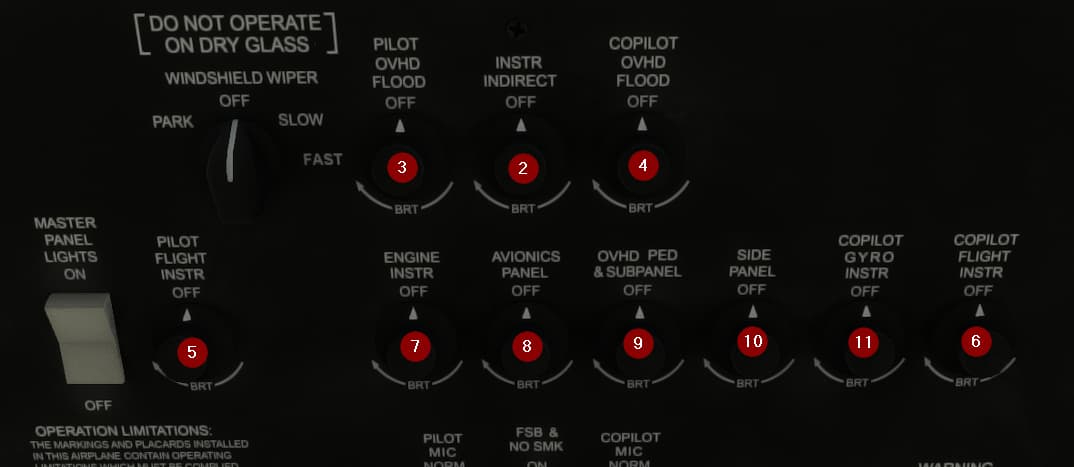
After changing the values, don’t forget to save the file. And also don’t forget to make all these changes only when MSFS is NOT running. Changing these files while MSFS is running can lead to unforeseeable issues.
4 Likes
Well done! This will save me adjusting the brightness everytime I fly in this great AC.
Thanks 
Based on the official King Air AFM/POH and other online resources such as: Ask the Expert: The Autopilot’s IAS Mode - King Air
It seems the real King Air Autopilot DSC mode is supposed to function by setting a Vertical Speed descent around 1200-1500 fpm, instead of the current implementation as a IAS / level change at 240 kts / 10 kts below barber pole.
Can someone with real world experience comment?
I used to right seat in B350s and 200s. That is my recollection as well. I will report that to JF. Current implementation is a bit annoying…I would prefer to use VS in descents but also you can’t really see the VSI while setting the VS with the rocker switch in the sim.
Do the AP issues with the latest WT GNS530 version still exist?
I have the impression that the autopilot implementation is quite buggy in general. It doesn’t seem to be possible to arm NAV or arm the approach mode (unless one uses the WTT mod with the PMS GTN) which does not seem realistic to me. Also, sometimes in approach mode the glidepath is not followed at all (one or even two dots off without any intent to correct). On the other hand, I don’t think it is possible to fly an LPV approach with the PMS50 GTN, although it was promised that it would work as soon as the WTT mod is there. Also, as mentioned before, DSC mode doesn’t seem to work as intended.
I hope, there will be an update soon that fixes the autopilot.
I believe Black Square is using the stock KAP140 AP logic only. I imagine you would see the same behavior with the default C172, for example. I can sort of live with that in the context of the Analog Caravan or the Twin Otter…but it does seem a bit too clunky for the King Air.
Make sure to report to Just Flight then.
Each click is a 100 fpm at least what I’ve noticed. But yeah a little annoying.
I just press ALT SEL, then VS, then start clicking down hehe
1 Like
With TDS everything is working great. APPR mode works in FD or AP during RNAV approaches with vertical minimums.
But yeah if it’s not working in WTT they need to fix that for you PMS guys.