Agree: Once I had made sure all other settings were enabling good general performance, this is the one setting that made things much less stuttery, especially when looking around in cockpit.
@TheUKDave2 and anyone else experiencing this issue. I noticed this too. My performance is good, but my cockpit is violently shaking. I’ve narrowed down the problem as being tied to the engine. I’ll be in the air in a C172 about to vomit from the cockpit shaking. I cut the mixture, killing the engine and the cockpit immediately stops shaking.
Same here! Good FPS but a lot of headset shaking.
Reverb G2 + 3090ti + Windows 11
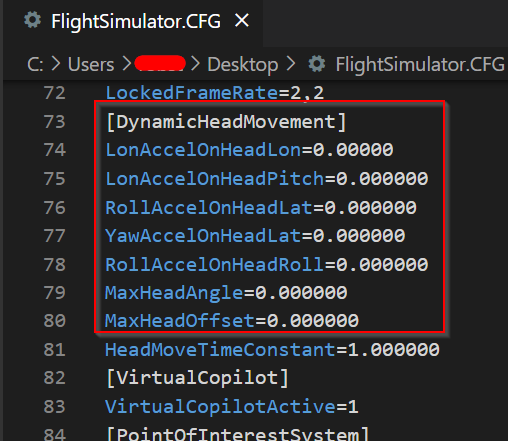
Try going into your config file, and zero out all these values. Should be located here if you have Steam version:
c:\users\[you]\appdata\roaming\Microsoft Flight Simulator
Here if you have MS Store version:
C:\Users\[you]\AppData\Local\Packages\Microsoft.FlightSimulator_8wekyb3d8bbwe\LocalCache
This seems to have fixed it for me
In my case, resetting the Environment Data in the Windows 11 settings did the trick.
At least for now…
Where is that? I’m still on 10 for now. I was actually surprised that flight sim worked a little better the other day when I forgot to stop the windows 11 virtual machine in the background. Also proof that resources / head room have nothing to do with it.
Sorry for the late answer, did not see the post.
If not too late for you, it’s in the Windows Settings (the new control panel).
Check the Mixed Reality section, the in the Environment area.
You can click a button to clear the data.
Hi guys! I just played for the first time…. And same problem  it’s kinda disappointing…
I’ m running an rtx 3090 + i9 11900 + 32 gb ram on win 10 with a quest 2 on link.
And yep stutters in the cokpit… low or ultra: same smooth outside and stuttering inside with natural head motion…
I’m trying to find a solution on FB groups too as some pilots experience the same and other have no idea what we are talking about… so far: nothing
My pc + quest 2 can run buttersmooth squadrons at ultra and DCS high without stutters…
Mfs is the only one making me go mad… cant be my pc, can’t be the quest 2… then what is it?
If anyone has news on this topic i’ll be happy to hear it !
Thanks mates!!
Consider trying the OpenXR Toolkit just recently released.
There is an attempt to reduce shaking with prediction dampening:
and here is our forum thread
Yup i tried it and it makes no difference… really the game looks smooth (outside) fps is great even when it stutters. it feels more like a tracking issue, like the information from my head moving is not precise or fast enough to come back to the headset, Resulting in stuttering… no idea why… maybe the cable?
Ok i just reinstalled windows from scratch and did a very clean reinstall: same results.
I also locked the max fps to 35 fps in the nvidia panel and looked at the perf of ODT while playing : solid 35 fps all along, whatever i am doing or looking at. Not a single drop frame. But still, the cokpit is laggy/stuttery .. so it has nothing to do with the fps or performance. What could it be 
@Exblow,
Have you tried the OXR Toolkit (mentioned in the General VR threads) - it has an option for what the author calls Prediction Dampening which should help with image shaking. He recommends a settings of -20 to -40 (I have no idea what that means). For some reason, only some folks have this shaking problem and I’m not one of them.
Had head bobbling due to Windows 11, I believe. With OpenXR Toolkit Prediction at -40, problems are GONE!
Same Config here … RTX 3090 + I9 11900k + 64 gb Ram. No issues. All preferences standard, in game (vr) at high or ultra. No OpenXR toolkit in use. The only difference to your configuration, I use a G2. So it’s probably a quest issue …
thanks! i’ll try that prediction to -40 tonight and let you know!
@Blacknet maybe, it’s my guess too! i’d like to try with an other headset on my PC…
Today I updated my bios. I’ve never done that. It was the original beta driver on my Z490 Plus.
Also cloned my NVMe M.2 (almost full) to a new much larger NVMe M.2 drive.
Things are running very smooth and fast and so far (knock on wood), my G2 seems ultra clear, very smooth and relatively judder-free now!
(i7-10700, RTX3080, 32G, G2)
Good to know I did that as well, day one (my pc is a month old)
My guess is that it is quest 2 related…
anyone tried typing ctrl + 1 [num pad] inside the game, for me it solves 
While in vr in the cokpit or before?
inside cabin vr activated , ctrl (right) + 1 (num pad)