I had to do a re-install of MSFS during the last major update (VII). Ever since the community folder (which I had on a different drive than C:) was moved to the Microsoft default location on C:
Alright, I can live with that since I probably missed the point in install where it gave you a choice for where MSFS is installed.
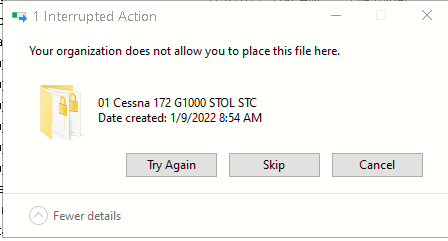
But now, if I try to take something out of the Community folder or move the entire folder or even delete an item in the Community folder, I get this message:
Does any know how I can fix this. As it stands now, I can’t move the Community folder, copy the folder or delete the folder. Which means only problems for the next MSFS Update.
I had the same issue. It turned out that my drives were not formatted properly. Also MSFS was being installed into both drives which caused confusion with the file permissions. I reformatted and reinstalled MSFS into the dedicated D drive and my issues are solved. Hope this helps.
I checked these out and now I can see another problem. In the security tab when I right click on the community folder and select Security, I get multiple names:
Account Uknown(a bunch of numbers)
SYSTEM
my name and email address
Administrators
In the check box area for Allow there are check marks but they are all greyed out and not clickable. There are no checkmarks in the Deny column.
So, all the comments in the other thread you showed won’t help me.
Anyone encountered this before? Do I have to uninstalll MSFS yet again? My internet speed is too slow and is painful to weight 12-14 or more hours to download/install and tie up my computer.
Google “unstoppable copier”. I posted this in the tips and tricks over at AVSIM and it copied my community folder to another drive as a backup with no problems.
Works fine with W10 and W11.
Right now all I can do is delete from the community folder. So, I guess I can delete it all and then go back and get the stuff again but this time save the zip files for future use.
It is possible to tell the sim that the community and One store folders have been put in a different location, by editing the UserCfg.opt file, located in the main sim files. Both folders must be moved, it can’t be just one of them.
You can then zip up the contents of the community and One store folders, and unzip them in the new location.
The existing files will stay on your C drive but they won’t be used for anything.
It will depend on where the UserCfg.opt file is, and whether it is protected like the community folder is.
It should be here:
c:\Users\UserName\AppData\Local\Packages\Microsoft.FlightSimulator_8wekyb3d8bbwe\LocalCache.
I will give this a look but it is getting a bit technical for me to understand. I don’t want to mess up the entire program making it unusable by doing something wrong.
Okay, I looked and the UserCfg.opt is where you said it should be. But, what is it? There is a little gold lock on it. The Community and Official files DO NOT have little gold locks on them.
Do you have a spot you want to move these folders to?
Make a new folder called packages in that spot, then copy the new address and paste it in place of the existing path.
See if you can the save the UserCfg.opt after that.
Give me a little time. I have another drive I would like to move it to. It is a 4 TB Hard Drive with plenty of room. Should I just move them or copy them first and move the copies?
I don’t think it will work. I just tried to copy them to the new location and I get a notification that says: “Your organization does not allow you to place this file here.” That happens for both the Community Folder and the Official Folder. Something has locked MSFS to the default location.