It’s sad, because it’s really gorgeous in VR, especially since I upgraded from the Oculus CV1, to the HP Reberv G2. But we are forced to note that it is unplayable for the moment.
We are all here to have fun flying, whatever our level, but by no means to become computer engineers.
Another victim here. Hardly ever had any CTDs since the beta. Now, I hit “Fly”, it loads to about 2/3 and poof, back to the desktop. This all seemed to start happening with the last major update. Haven’t changed any settings or hardware. Nothing overclocked. MSFS is the only thing doing this, so am not changing everything just for that. I did reinstall the sim and it seemed to cure it for about a week. i7-6700K, GTX 1060 6GB, 16GB RAM
I was telling myself that MSFS couldn’t stand being pushed into these limits by medium or large PC configurations.
I thought they wanted everyone to be able to play it, even with small setups.
But I see that everyone can be affected by these CTDs, whatever their PC configuration, small or large, whatever the Intel or AMD platform, whatever the Nvidia or AMD GPU, whether on a 2D screen. , or in virtual reality.
The fact that there are some that have no problem, the proof, I do not have with the GTX 1080 TI and the HP Reberv G2. I was able to do a 10 hour flight without CTD. Now a flight is not representative.
But the RX 6800 XT and the HP Reberv G2 are unplayable, because of the CTDs.
I never had one for 1 month with the RX 6800 XT and the Oculus CV1.
Even though some don’t have problems, that doesn’t mean there aren’t problems with MSFS.
And we must stop telling us that our Windows, or that our OCs, or our drivers are responsible.
We can play a whole collection of games with our PC configurations, without spending 95% of our time trying to find countermeasures.
Well, restoring my graphics settings, gets me through the loading screen, however, attempting to fly at 2-5 FPS, less than optimal. These latest updates/hot fixes, have made a virtual slide show on my Ryzen 7 5800, RTX 2070, 32g DDR 4 3200 RAM, well above minimum specs for this cough sim.
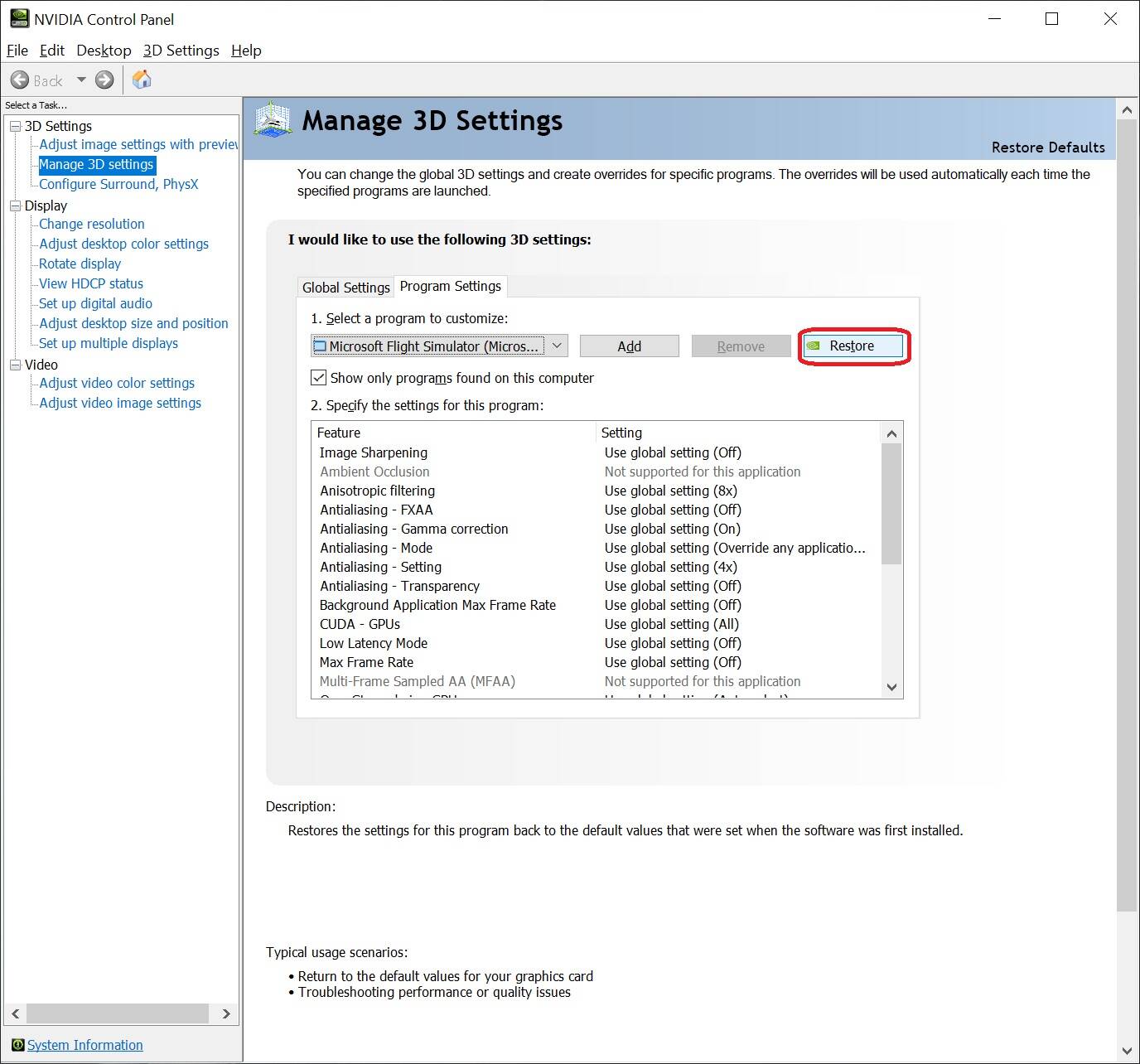
EDIT: Well that worked for a flight Not. Still not above 2-5 FPS when I can get into the game.
Curiously enough all of my recent problems began immediately after I upgraded from an ancient R9 290X to an 6800XT. With the older GPU I hadn’t had CTDs in several months (from November to March). I installed the 6800 literally a day before the early March patch came out, so can’t be 100% sure which of the two was the culprit (could be both). Even so I was able to fly for 2 weeks with absolutely no issues, just by setting Adrenalin Tuning to Manual with a max fan speed at 70-80% and a small increase in power limit (otherwise I’d get a CTD), but after some point the game began throwing CTD upon CTD no matter what I tried.
So I did more tests today and after 20+ consecutive CTDs immediately upon reaching the main menu, I decided to try and downgrade AMD chipset drivers to an earlier version (which I was using before the CTDs began). The chipset drivers package includes several components and most of their versions were the same, but one that was definitely different was AMD PCI (under System Devices of device manager) which with the older chipset package was 1.0.0.81 whereas the new one is 1.0.0.82.
Using the older package, I managed to start a C172 flight which was absolutely amazing given that I had dozens of main menu CTDs since yesterday. Again I had a huge stutter during takeoff (like a 3-4 second freeze where FPS must have dropped to less than 5 or so) and this is something that’s been happening since my issues began. After that the flight was very smooth at around 50-60fps.
Of course 10 minutes later I got the usual vcruntime crash without doing anything at all, I hadn’t even switched back to Windows in the meantime. Still better than crashing on main menu. I’m not implying that the older AMD PCI version is a potential solution for me, as I was already using the newest driver weeks before CTDs began (before I installed 6800). I may try with an even older version and see what happens.
At some point, when I’ll be super bored and with plenty of time, I may re-install my R9 290X to see how it’ll behave but in the meantime I’m doing research on Xplane (weather engine, mesh addons etc) and by reading through the various forums of that sim I’m amazed at the contemptuous comments of Xplane users towards MSFS. I hadn’t realized. At this point I tend to agree with them, MSFS is all about graphics and nothing else, it’s more of an MS World Simulator rather than Flight, and that’s if you don’t have CTDs. When stability and crashes come into play, then there’s no point to even argue.
I read you with interest, thinking that you had found THE solution, until I got there 
It’s the same for me, I bought the RX 6800 XT at the beginning of March, but I don’t remember if the CTDs started immediately, or some time later.
I went through the same situation, but the difference is that the CTDs remained even though they reinstalled the sim.
exactly, I always symbol with AI activated, but killing this feature to have the experience goes beyond the limits.
Had this as well.
Turned out that I have to uninstall the latest driver and went back to 461.92
Hey
Même problème avec une carte AMD 6 GB
changé pour une GTX 970 4GB et plus de problème même si le GPU tourne à 100%.
I am in the process of redoing the LFPG flight to FACT still with the HP Reberv G2, BUT with the RX 6800 XT.
So at worst, I still had CTDs at the end of the take-off runway, at best after a few minutes, I’m already at 5 heures flight time, and still no CTD …
What do you think I did ???
constant CTD’s i am not even doing anything, just sit at world map trying to check where to go .
4th time in a row today 
I didn’t have CTD’s prior to 1.14.6.0
only at launch but that was fixed in Patch #2
I’ve Tried everything turned off all AI Traffic, ATC changed to Windows offline, Graphics reduced settings, and I’m still getting CTD it’s a problem with the Sim has to be… people getting Crashes with Nvidia & AMD, Oculus & Reverb G2
My Setup
AMD Ryzen 5600x
RX 6800 XT
32GB Ram
1TB m.2 nvme
800Watt PSU
I’m out of ideas at this stage
It’s hard what I’m going to say, but the best thing to do is wait, don’t try to delve into modifying any software or hardware resources on your machine, just wait, as I’m not even doing it, it’s already true that the problem doesn’t belongs to the user.
this is the only error I found related to FS in the event viewer:
The FlightSimulator.exe program version 1.14.6.0 has stopped interacting with Windows and has been closed. To see if more information about the problem is available, check the problem history in the Security and Maintenance control panel.
Process ID: 251c
Start Time: 01d723f998a57f45
End Time: 4294967295
Application Path: \? \ Volume {f1cc20c0-215c-0d50-6ce2-66f16e0f254b} \ FlightSimulator.exe
Report ID: f882171a-20af-4d4d-9fe7-456153094e1b
Failed full package name: Microsoft.FlightSimulator_1.14.6.0_x64__8wekyb3d8bbwe
Application ID for the failed package: App
Failed type: Quiesce
I managed to do a 5 hour flight on a flight that was supposed to last 10 hours.
For that, (Google is my friend), I went back to version 1.12.13.0.
I had to leave, I just came back, and I found the display of the image frozen in the helmet, but no CTD.
Ctrl Alt Del being inactive, I had to force shutdown the PC with the shutdown button.
There is no error message or alert.
I’m not sure of anything, but the display may have stuck, when the G2 wanted to go to sleep. I made a change to the registry supposed to prevent going to sleep. I say supposed, because until now it had never worked. After a while, the headset went into standby, and the display switched to the screen.
In any case, I remember that by going back to the first version compatible with VR 1.12.13.0 I managed to fly for at least 5 hours, on the same flight, which with 1.14.5.0 or even 1.14.6.0 , never exceeded a few minutes.
You said it all
conducting an investigation to discover these two problems, the coincidence is that the event of these problems was reported on the day my CTD’s started, I don’t understand that part, if someone can help me, or even see if these errors are in their machines.
“SM bus controller”
“PCI memory controller”
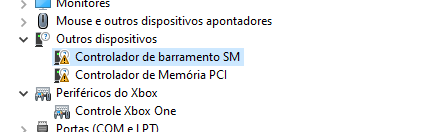
if anyone can help me how to repair these errors I will be grateful.
EDIT: I updated my motherboard chipset driver and this errors is gone, i will teste the sim, then i will post my report here.
EDIT 2: same problem, well … I leave this in the hands of Microsoft from now on, if it is the case I request a refund and go to FSX
New issue with CTD. Everything was working fine even after the most recent update and yesterday CTD at landing, then CTD at ‘ready to fly’, then CTD at airport selection, then CTD at game start!!!
gradual deterioration.
No change made in the system for the last month. No more addons, no hardware or software change. Except some updates for x-box which were there.
Something is rotten. If there has been no change in the system what so ever, I cannot understand why it is crashing!!
Tried to log out and log in from x-box. The game load time has increased almost twice!
Any suggestions are much appreciated!
UPDATE:
Did an app reset in Win 10. Reinstalled x-box. No change. CTD with airport select.
I have just relaunched the LFPG flight to FACT. But before I deleted the key in the registry that prevented the upgrading of the HP Reberv G2
Now that I have deleted this key from the registry, which is supposed to prevent the HP Reberv G2 from being upgraded. The G2 goes into standby, and the image changes to 2D on the screen. For the moment, the display is not blocked. We’ll see later
We will not see anything at all, the screen of the G2 has just frozen with the PC blocked
Driver Amd 21.2.2 or 21.3.2 same results. The best improvement is the return to 1.12.13.0 from MSFS.
Hi all.
Even after a clean Windows 10 and FS2020 install I was unable to launch the game. CTD always happened during the blue bar, right before the main menu appears. I can confirm that in my situation it is the joystick (MS Sidewinder Force Feedback 2). The game launches normally if I don’t plug it in.