It’s a good question. With soooo many variables involved I don’t know if that can be answered with any certainty or at all. Again, don’t have 2024 but to your point, in 4 years of playing 2020 I can honestly say I have had very few CTD, and I usually trace it back to something I changed or did. On the other hand there seems to be people with similar setups that appear to have very freq. CTD’s without any definitive cause 
1 Like
But it looks like that in your case the 9800x3d outclasses the 4070ti.
I have quiet similar frametimes on cpu and GPU with the combination of an 7800x3d and an 4080!
MY fps are really good most of the times. the only bigger hickups are really, if the VRAM is completly full. Traffic doesnt seem to really eat VRAM. Its more other stuff which we don´t know.
1 Like
Just another indication that there are huge optimization problems and inconsistencies. The most RAM I have seen used has been 23GB out of my 32GB and that was over New York… RAM has been the only component that’s been fine for me so far..
4K, Mostly Ultra
7800X3D/4070Ti
Have to keep remembering that even their official “Ideal Specs” recommendation was only 12GB VRAM. They did somethin wrong…
4 Likes
yes, also not being able to work it around as in 2020 (where this situation was bad) with dx11 is a condemnation to butcher the settings (with no clear expectations about solving the bug)
If that would be the case, the 4070Ti would be running at its limit, but its not.
So no, the sim itself, with its poor hardware utilisation is the bottleneck here.
80% GPU usage says, the GPU doesnt even get enough frames to run at its limit.
So, in the past 4 hours or so, the sim is now silky smooth for me and GPU utilisation is back where it should be. There are zero stutters when panning or anything, not even in the Inibuilds A330. Not touched a thing settings wise, in fact I am now able to use TAA.
How, why or who? I have no idea, but I’m making the most of it tonight while it lasts!
I have the same exact problem.
I have an RTX3080 ti and an i7 12700k
I have the same problem described here, although i’m not sure its VRAM related, but rather seems to the GPU going to “sleep” temporarily. Will go from perfectly normal 40-60fps to 5-8fps and notice in task manager that when this happens, GPU ultilization for MSFS 2024 goes to 0.
everyone having this problem, please check (while the problem is manifesting itself) if the sim is allocating memory on the shared video memory at that time
I’m having this same issue since day one, after the servers actually work. I think I got some type of broken install or whatever, but already tried to reinstall twice, nothing changes. Clean install no mods in Community. Initially I noticed it was happening something reducing fps close to 10 fps , even reducing specs to low, same thing. I have a 3070 , 8GB, but VRAM usage on the debug fps show below 7 most of the time. I dont think its a VRAM issue to me here, I have a lot of people saying it’s fine for them with 8GB. 32GB RAM also no getting close. To me it seems that the GPU is doing some type of background work , I first consider what is called Shader Compilation, that so many complaing. So usually after loading a plane for the first time when I get back it’s better, for a 2nd flight. The issue is that even with that there is ocasionally some type of loads using GPUs background task, or whatever. For me terrain loading is also really bad, I tried this with and without Raytracing shadows, which seems to impact perf, but this is not whats causing the issue. It is some type of background thing the SIM is doing using the GPU (at least according to debug when you see like >100 ms load to build a frame). CPU for me is ok, usually between 30-40ms worst case, which is ok most of the time for 30 fps. I will consider not using the SIM , it`s not playable. Luckly I now the quality they deliver and using it from GamePass.
I’ve experienced a similar FPS slowdown. When this happens, if I shut down FS2024, and re-boot it (and go to exactly the same aircraft, airport, weather / clouds etc) then it’s all fast and smooth again – even with the Inbuilds A330.
Do you have the same issue if you follow the OP’s steps to reproduce it?
•
Yes, transitioning from cockpit to external cam is frequently enough to make VRAM usage explode
Provide extra information to complete the original description of the issue:
•
If relevant, provide additional screenshots/video:
•
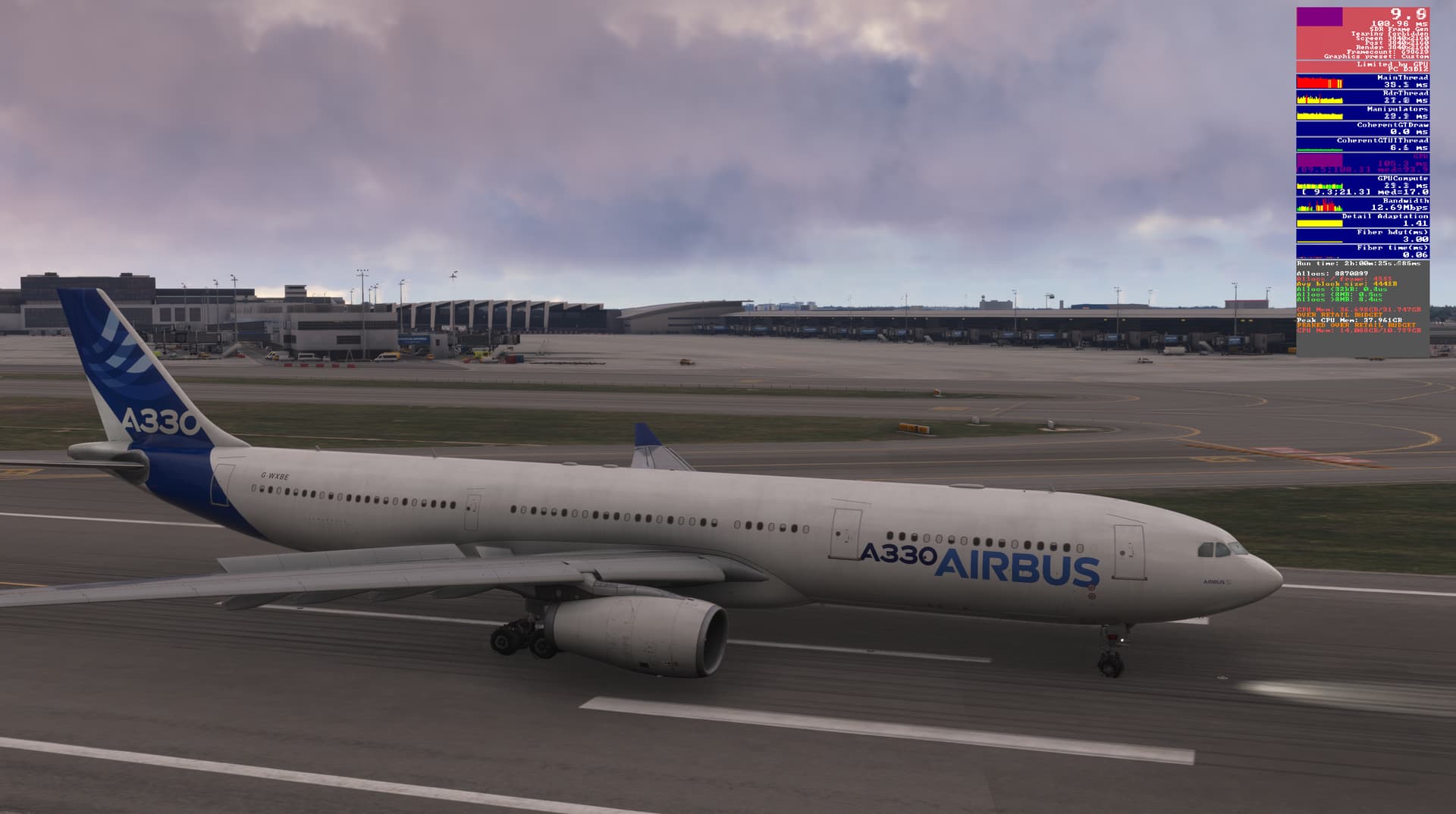
3 Likes
GPU utilization essentially goes to 0 when the frames drop, and can hear the fans on my GPU slow down since the gpu temps fall back down to unloaded temps.
When the game is functioning properly with 40-60fps, power draw is 95-105% and my GPU thread shows 10-17ms latency.

Here you see only 55% power being used and the GPU thread showing incredible latency. This is terrible. I am about to stop playing until there is confirmation its fixed.

2 Likes
same Here, insane how this is panning out to be something shared among many individuals…
hope it’s a matter of time and something on their end, as we are well above minimum specs and stuff.. 
Aha, I’m not alone it seems! Still going strong, just flown the Beluga from Chester, UK to Blagnac in France, about 2hrs, absolutely solid performance and graphics. My 3070 has done me extremely proud. Again, I have no clue what has happened, but it’s night and day performance. Here’s hoping I don’t load up tomorrow and find it’s gone back to the way it was lol.
Only thing I can remotely think I did even in the slightest, different, was to leave it on the menu screen for at least 2hrs, as it was my turn to cook dinner. Doubtful, but that’s the absolutely only thing I can think of.
guys, the answer is in all your screenshots, check the Gpu mem
whenever the allocated size is larger than the card’s dedicated memory, thats when the fps go down the drain
try it!
4 Likes
Thanks for the tip, what exactly do I need to do?
i don’t think there’s actually anything we CAN do
i was saying, if you want to zero-in on the problem, (just for peace of mind) check your Gpu mem usage
- load msfs
- activate fps counter, it will probably show good fps and a gpu mem usage below your card’s dedicated memory
- now load a flight into a complex airport
- you will start to see gpu mem start creeping up.. fps will hold… when gpu mem use becomes larger than your card’s memory.. that’s when the fps go down the drain, and they stay there
3 Likes
I will try it, thanks
Hey everyone,
I’ve been having performance issues with Microsoft Flight Simulator 2024 for a while now, and unfortunately, the recent hotfix didn’t improve the situation for me. I reached out to Microsoft Flight Simulator Support, and they suggested a couple of potential fixes. Since I’m not home this weekend, I haven’t had the chance to try them out yet, but I wanted to share them here in case they help anyone:
- Flush your DNS cache to clear old DNS records:
Open a command prompt as an administrator.
Type ipconfig /flushdns and press Enter.
You should see: Windows IP Configuration. Successfully flushed the DNS Resolver Cache.
Close the command prompt, restart your computer, and relaunch MSFS 2024 to see if the issue is resolved.
- If the problem persists, try deleting your cloud save. According to Support, this might help improve the situation. I’ll add the link to the instructions for this step below: https://flightsimulator.zendesk.com/hc/en-us/articles/17060350083612-How-to-delete-a-cloud-save-to-fix-some-loading-or-crashing-issues-Red-Avatar-crashing-on-the-identity-screen-spawning-inside-buildings
Let me know if any of this works for you—I’ll test it myself as soon as I’m back home.
1 Like