Isn’t that Vatsim file just to allow for fictitious virtual airline liveries to be added though and it being unnecessary for such a file to be made available for the RL aircraft and liveries?
What I noticed yesterday:
I was sitting at KLAX frum 19:00 UTC till 22:45 UTC, so overall almost 4 hours at noon local.
The Airport was populated nicely, but still pletny of gates available.
Within a few minutes the first flights were ready for departure and started pushback taxi and takeoff.
After about 10 minutes the first arrivals showed up and the Airport was nicely populated.
But after exactly 1 hour, the last arrival showed up.
For the remaining 3 hrs, not a single aircraft arrived, not a single entry in the terminal window announced approaching traffic either.
Iinstead it spawned parking aircraft that were sheduled to arrive.
Outgoing traffic was working nicely for the full 4 hrs.
So something is not working properly, but I cant tell if it is MSFS or FSLTL, as I am pretty sure that one of the biggest airport definitely has more than zero arrivels midday and the spawning of arrived flights at gates shows me that I am right.
Will check again on a different airport today, but maybe someone else already has observed similar behavier, where perfectly fine working injections stop showing arrivals after exactly 60 minutes, which might indicate that there is some sort of timeout somewhere.
Hmm - this is what I was thinking, looking at a flight i just tried to load today. That is shame as it would render sim time meaningless for AI purposes and limit the emersion factor having populated skies even out of your home TZ.
i think this is normally. take data base of history is will lagging, take more sources, or guys can create casual year pattern and will offline software like was in fsx/p3d. honestly for me no matter how they real i just like them fly around and graze in the fields. and have real world skins.. how real their plans… probably it can be fun but i was ok with default. and really love this one. as i play only real time/weather i never thinking about history weather/traffic…
i even use api key not because i need it, just because i can it lol
Importand detail I missed out - I was in Fenix A320
I’ve made a video as a tutorial / demonstration of how you can use GSX Pro with Simbrief for the Just Flight BAe146, and it also shows a bit of FSLTL being used art YPPH and how it runs with my system specs, if anyone’s interested.

That 80 is number I set in fsltl injector. In gen opt I set it to 0, like they instructed us in read me.
I assumed that that was what you meant. But it’s not a percentage. You could enter 150, for example.
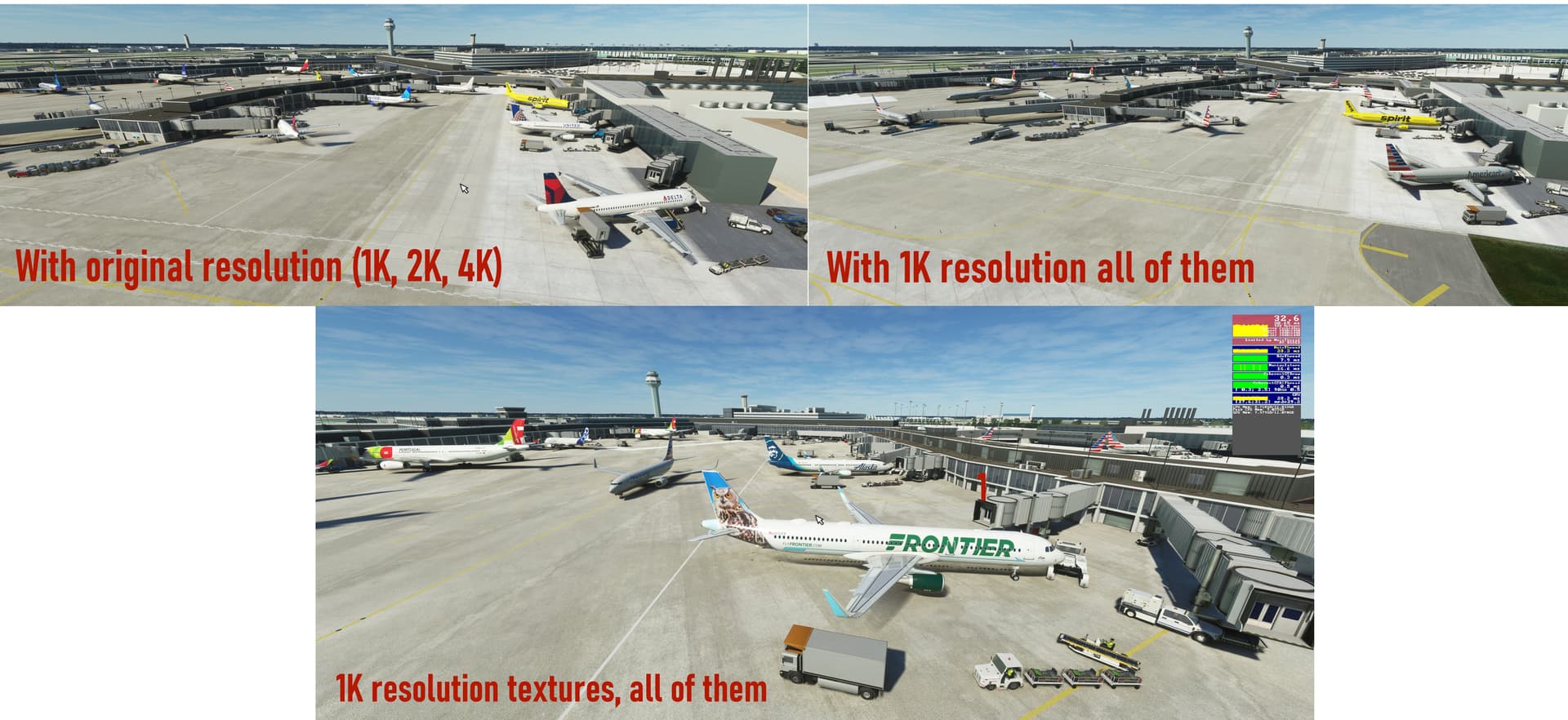
FSLTL PERFORMANCE TEST (11900K, 3080ti, 32gb ram), REDUCING ALL TEXTURES TO 1024x1024
KORD rush hour 3440x1440, ULTRA settings, DX12
75 IFR, 0 VFR, parked 5
With FSLTL+AIG+OWN COLLECTION full resolution (1K, 2K, 4K), total pack 40gb
o 140 aircraft, 72% Vram used (12gb)
o 40fps from corner full view
o 35fps close of terminal, animations in use
With FSLTL+AIG+OWN COLLECTION max 1K resolution, total pack 8gb
o 138 aircraft, 66% Vram used (12gb)
o 45fps from corner full view
o 39fps close of terminal, animations in use
o FPS +12,5%
o VRAM USAGE -9%
Image with both side to side, and closer look what 1K resolution looks like.
INSTRUCTIONS TO BATCH EDIT ALL THE .DDS FILES WITH ONE CLICK
with XnViewMP (one click wonder, takes about 20-60min to complete the task):
- Menu Tools->Batch conversion
- Input panel: Select Add Folder and choose FSLTL SimObjects directory
- Wait, until all the images has resoltion info. Then put those in order, remove all the 1K and 0.5K stuff. Do convert only for the 2K and 4K images.
- Action panel: Add action->Resize with Fit / 1024x1024 pixels / keep ratio / follow orientation / Reduce only options
- Output panel: Output to source folder, filename to {Filename}, replace if already exist, keep extension, preserve metadata Press Convert!
Remember to backup FSLTL first. Then you will fo that with you copy and it will resize to something like 2-3gb in total
I realise this might be the wrong place to ask, but I have read that the FSLTL add-on can use the AIG aircraft (presumably those in the aig-aitraffic-oci-beta/SimObjects/Airplanes folder), but I’m not sure how this happens.
Do you have to move the folder into the fsltl-traffic-base/Simobject/Airplanes folder or does the installation process simply look for other AI models and include them?
Thanks for any answers. I have hunted around and can’t see the answer and I have tried using the Discord channel and can’t seem to get access.
Just put all the folders in the community folder
AIG beta and the FSLTL file plus installer
Don’t launch AIG TC leave it alone , once in sim just go to FBW installer and start it from there
No need to touch AIG at all, in fact don’t
It will populate the sim with all the AI traffic and uses AIG liveries, planes if it can’t use its own
That’s all there is to it
let’s see if i understood
I must copy the complete AIG folder and paste it in the community folder where the FSLTL installation is located together with the injector and I must paste the FBW installer from the community folder and the magic is ready
because I have the AIG installation in another folder on another disk and it appears as a shortcut in the community folder, so I have to paste the AIG folder and delete the shortcut folder so that it can work… I’m really lost here
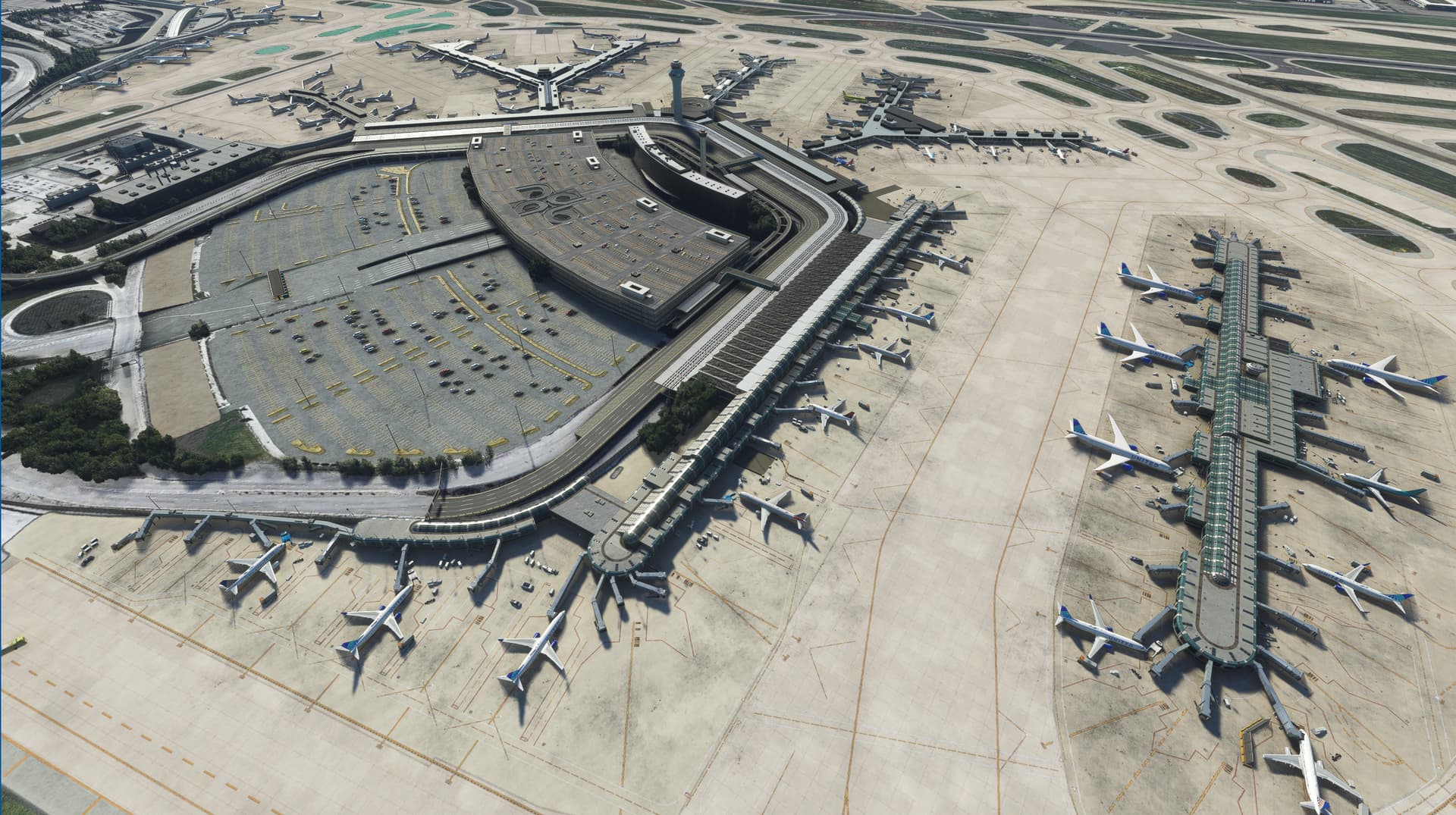
Here’s an unscientific report on FPS impact due to a couple of different traffic setting levels on the injector.
System: i7-10700, RX 6800XT, 32GB 3000 MT/s DDR4.
1440p, Ultra/High, VSYNC at 60FPS, TLOD 200
FSDT 3rd Party KORD
FBW A32NX at gate, EXT PWR on, listening to Clearance
LittleNavMap, Volanta, MobiFlight running in background
Prior to running the injector, sitting alone at KORD, drone camera around 1000ft looking down on the gates, I am capped at 60 FPS due to VSYNC.
IFR Aircraft - 85, VFR Aircraft - 10, Parked Aircraft - 4 (40%) → FPS = 37
IFR Aircraft - 60, VFR Aircraft - 10, Parked Aircraft - 2 (20%) → FPS = 47
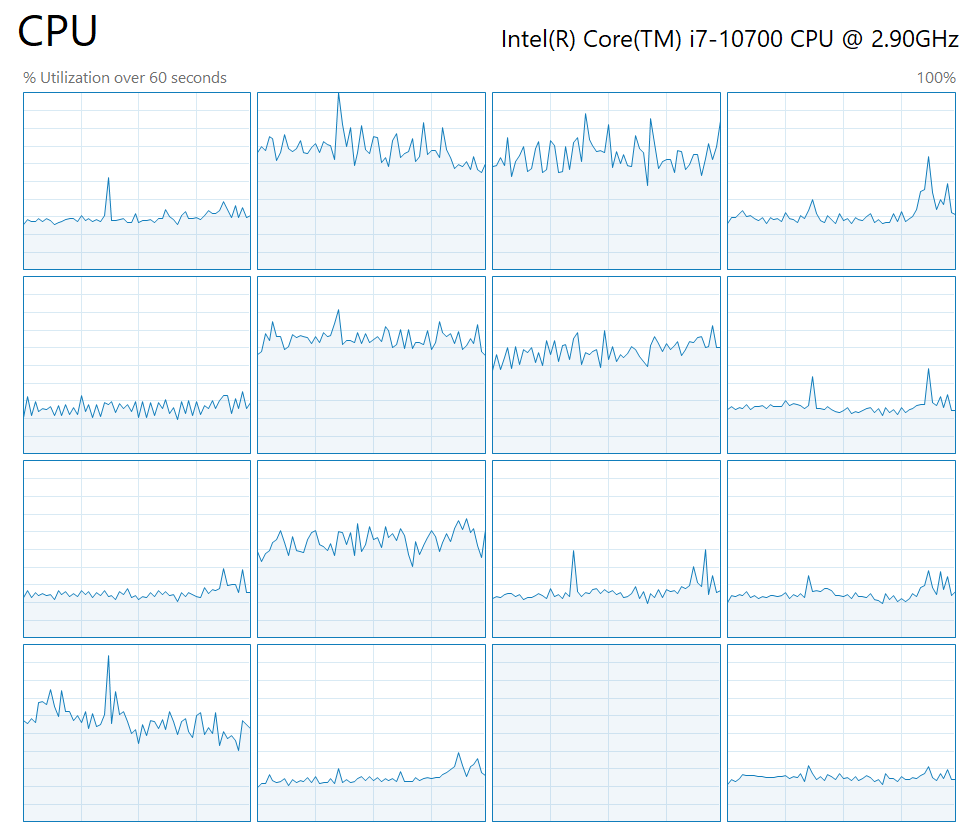
No surprise, fully main thread limited. One thread is maxed at 100%, others all have headroom.
Attached screenshots are from the IFR 85 / VFR10 / Parked=4 settings.
Do you have it on a different drive and use add on linker?
If it’s on a different drive and it’s linked to your community folder it should be ok
The FBW installer should be pointing to your community drive anyway , that’s if you already have the FBW A320 downloaded package for quick upgrades?
I’ve always used PSXT/RealTraffic for my traffic immersion but the lack of sounds killed it for the longest but I will say though that the time delay is almost spot on compared IRL
However I will say I’ve been using FSLTL for the last two days and I’m in absolute love, the sounds and the skies are just ALIVE, traffic is delayed but I feel the former just makes up for it.
I do have a question, has anyone come across taxiways that get jammed up overtime? I also noticed as well at times it doesn’t use certain active runways(could tell since I live next to the airport) so idk if it’s the airport mod I use or limitations but I use the KLAS FlyTampa mod for reference.
Post may seem a bit nit picky but just wanted to ask, overall I love this mod
That’s when you set the “despawn blocking aircraft” from default 240 secs to something lower. I was stuck at KBOS 04R behind an AA flight sitting at the hold short and refusing to take the runway. I was No.2 for departure. Everyone else was stacked up behind me all the way back to the incursion hotspot at 04L. I then set mine to 30 seconds.
I’ll give that a try thanks!
Hi C0rsten,
how did you manage not to get corrupt textures for some of the aircraft after resizing?
I did what you described above, and had strange looking textures for some aircraft, for instance Swiss A320.
Havent tested this so much. Only quick test and didnt see any errors in KORD airport.