Since C700 aircraft sold in those areas would still have an EIS with Imperial units, we have no plans to change this functionality at this time, as it represents what a pilot would see even in those areas.
No offense taken. The vast majority of my hours have been in all the bush flight aircraft, small prop planes, the P51, and 70-80% in the TBM. I don’t fly the airliners or business jets. I enjoy the wonder of flight and sight seeing so AP allows me to look around and visit places I’ll never get to or get to again. Jets are too fast and high to see the sights. I just want to enjoy flying.
In that time, I have had a few scattered issues with auto pilot but none with flight planning transferring from the world map/planner to the aircraft. The TBM and all the prop planes that have AP have all generally worked well from takeoff to final approach mode. Yesterday took away my enjoyment of the TBM.
I play with the program a little each day for a few weeks and then I let it sit idle for a while. Unlike many of the serious simulator enthusiasts, I don’t try to know all the acronyms, terminology, third party peripheral programs, functions of every setting, developments, etc.
1 Like
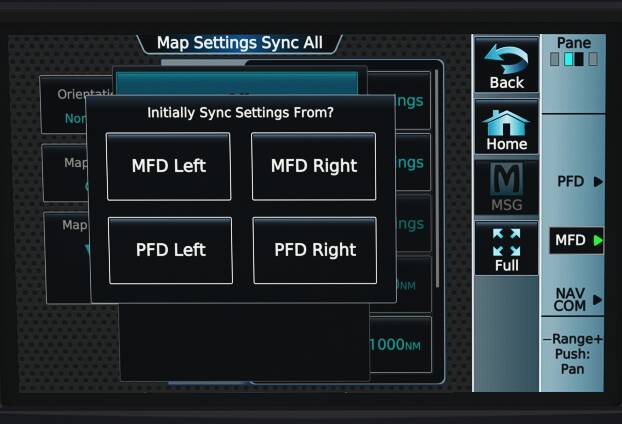
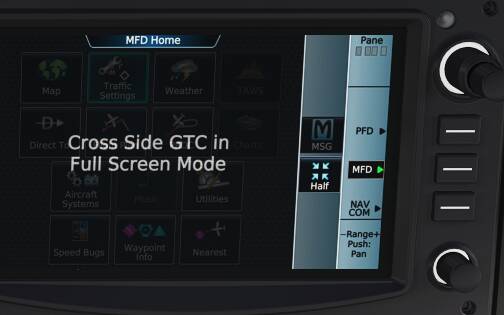
Can someone please explain how the g3000 map sync option works with the options being off/onside/all. Below are 2 photos of map settings sync all and Cross Side GTC.
Those are trained pilots and not simmers or casual gamers. A choice would be appropriate I think.
1 Like
Great. Where is it located? Would be helpful if when responding with what obviously is a VERY helpful tip, to put a link or URL to follow.
Hello,
your opinion and nothing against to this. Question is if I need create as example some drawing (lines, shapes, color blocks,…) and ask to Corel Draw team to do that procedures more basically and not as for Pros because I’m not Pro in this problematic. What solution you’ll select then if you still think that all shapes and options can be solved with more simple steps as you expect?
U have to set up from its control panel,seems u are just a gamer .The latest update has made the game much close to real one !
Makes no sense at all. What’s Corel Draw got to do with sim units. I’m not suggesting anything be dumbed down just an option made to make things more convenient for those that want it or that are less knowledgeable in such matters. It doesn’t detract from the operation of the unit for those that don’t use it. Win Win for everyone.
In the electrical system page of the Longitude the Generators are shown as being connected to the mission busses when the engines are not running from a cold & dark start. In this case the gen switch positions make no difference but the contactors should be open. Once engines are running the switches control the state of the gen contactors as expected. If engines are shutdown after the initial start the contactors are then shown correctly in their open states.
Ok,
no problem at all. I want just to say that do some compromises at aircraft systems and especially at avionics are no good steps. Really sry but I don’t understand to this questions, now is simply also clear that after many years all sim users now understand that simplification of avionics systems put not good habits and many confusions. If we can continue do steps and handling via real avionics documentations as real device offer, this is best experience and joy to work and to be familiar with real device functionality. I don’t see any profit here to do some low functionality avionics due not experienced users, sry.
On other side, you have basic functionality every time, I mean HDG, ALT and AP handling here, no problem set any of them to have my aircraft in hands and reach my destination easy without any of that special options.
Sry to general opinion here in Support Topic but I think that it is important because of new functionality with Update and probably with next Updates.
 Thank you for using the Bug section, using templates provided will greatly help the team reproducing the issue and ease the process of fixing it.
Are you using Developer Mode or made changes in it?
No
Have you disabled/removed all your mods and addons?
No…I don’t use any
Brief description of the issue:
Hello,
I installed the new MSFS release last night, and found several SERIOUS problems with the Daher TBM 930.
• The RANGE function on the navigation map does not work on the main screen, but it does work on the inset.
• More importantly, the AutoPilot navigation does not work at all in a couple of ways:
o First, when I input the flight plan on the World Map before flying, the flight plan installs on the MFD, you can see it in the flight plan, but several times it did not show up on the map (the pink line showing the course visually.) When I turned on AP, the aircraft flew in circles and never followed the flight plan.
o Twice, out of 6 times, the flight plan did show up on the navigation map and flight plan, but when I turned on the AP after reaching appropriate altitude, the navigation function did not work. The aircraft kept circling around the location where I turned on the AP, even though the pink line showed the course, and the flight plan showed the next waypoint.
o I tried every combination of LOC 1, LOC 2, and FMS on the Active NAV and Nav Source, with the Bearing 1 set on Nav1, Nav2 or FMS…none of them worked.
o The altitude function did work.
• Fortunately, this is not an issue with the Cessna Caravan nor the Airbus A320, two of my other favourites. (I will try other aircraft later.)
The Daher TBM 930 is my favourite aircraft, so this new disfunction is a major disappointment. Besides, even if it worked, I would appreciate if MS can provide the previous version of the Garmin system, as you do with the Cessna 172, so we can choose the one we prefer. This is a very serious bug on one of the most popular aircraft, so please fix this asap.
Thank you.
Provide Screenshot(s)/video(s) of the issue encountered:
Detailed steps to reproduce the issue encountered:
Just startup the TBM after opening MSFS, and enter the departure and arrival airports on the World View, and either the flightplan loads or doesn’t, but either way the AP navigation does not work
PC specs and/or peripheral set up if relevant:
i9 processor, 32GB RAM, Gigabyte 3070 GPU…all functions worked fine until last night’s update
Build Version # when you first started experiencing this issue:
the latest Feb 2023
 For anyone who wants to contribute on this issue, Click on the button below to use this template:
Do you have the same issue if you follow the OP’s steps to reproduce it?
Provide extra information to complete the original description of the issue:
If relevant, provide additional screenshots/video:
1 Like
Do you have the same issue if you follow the OP’s steps to reproduce it?
no
Provide extra information to complete the original description of the issue:
set DEP and ARR airport in World Map, click FLY and all is set inside TBM. Magenta track from DEP and ARR airport is correct on MFD and visible. Set FMC as source of NAV on PFD and set all AP settings as required → FD, HDG, VS with set of destination ALT. After liftoff click AP and expected option, in case of follow track to destination, set NAV and aircraft starts follow track without problem.
If relevant, provide additional screenshots/video:
2 posts were split to a new topic: TBM Take-off ITT warning
Wel I don’t know what the problem seems to be. Renamed my community folder so no addons would be activ. The result is it sometimes works and sometimes doesn’t, tried different airports each 4 times always with a different result. So it will have to do for now. Thanks for your suggestion.
Happy landings
Read the very first post of this thread and you have your answer.
If you google “working title discord” you will be taken to
which at the bottom has a “discord” link:
You gotta love google. So useful.
So far really enjoying the updates 
I’m curious about the generator logic on the TBM, toggling landing lights trips a generator warning which is resolved by switching between main/stby as required. On the electrical page the generator in question shows the bus as disconnected. Triggering the gen reset for the relevant one may help however since this came in a busy landing phase I’ve not fully got my head round the logic, anyone seeing this or am I not setting something up correctly beforehand?
Probably user error due to unfamiliarity with the new systems.
More details would allow us to identify where your mistake happened.
I planned a flight from CYTZ to KDET using the PERLO4 departure. There were gaps in the flight plan until I deleted some of the waypoints in the departure and the flight plan came together. It always helps to share your flight plan so others can troubleshoot the problem. Did you try the same plan with a different aircraft?