Developers are on holiday. We will not hear any news before the new year.
Probably not even during the first week of the new year.
Is there a way to find out on wich version msfs2024 is installed on xbox seriesX? will a patch be installed automatically? Are patches availible for xbox?
I dont understand this sim…one day it works great, all flights good, and the next day CTD after CTD using same aircraft…and it usually happens during decent or landing too..really annoying…i dont remember getting this many CTD’s on 2020…
Yes. From your Xbox dashboard highlight the MSFS 2024 tile and press Menu (button with three lines aka “hamburger”) on your Xbox controller. Select “Manage game and add-ons”. You will see the version number under the tile for MSFS 2024.
If you have The option set for automatic updates, then yes. Check by going to your Xbox “Settings > System > Updates > Keep my games & apps up to date” and tick the box if it isn’t already ticked.
Yes. They are released at the same time as PC updates are released. All platforms are kept in a synchronized version state, such that no one is able to be running a non-current version.
If MSFS hasn’t been updated automatically, then when you launch it, it will prompt you that it needs updating.
thank you for the quick and perfect support
Anyone else has got this issue?
I was able to play using my Velocity One yoke, but since the update the yoke just keeps resetting when I start the flight.
I thought it might be broken, but in FS 2020 everything still works.
Firmware update, reinstalled the game, unplugging the quadrant… NOTHING helps.
It was working fairly well until this patch and now I have spent 4 days troubleshooting to no avail.
Can somebody confirm they are seeing the same issues as I am not really sure what else to try, or should I just wait for next patch? 
To clarify, the yoke comes up, then basically goes all blank (all lights, screen etc, are turning off) and then it comes up again, and the cycle continues… ad infinitum.
Probably you already checked these? Any loose connections? And are you using the USB cables that came with? Also, if using a USB hub, is it a powered one? I had to try a few different combinations to get my V1F to work reliably with the other stuff I have plugged in. Just a thought.
Yeah all USB Hubs, ports etc… nothing helps and again FS 2020 works fine
Are you on an unpowered USB hub? Mine did this when I had too many things plugged in - the yoke wasn’t getting enough power.
Still don’t see any car and trucks traffic on the roads. Many CTD while going back to monitor from vr.
For what it’s worth, I’m experiencing the exact same issue, and I don’t think I have any asset packs installed either. I could only use the MSFS2024 version to get rid of them. Have you found a solution yet?
They will always be generic because MS isn’t going to pay for rights to use the liveries. This was explained in a dev video a while back.
Then you might have heard as Joerg explained that on launch we will have only a few major airlines but he keeps talking to airlines and will bring more and more of them to the sim.
Some airlines provide it for free, some airlines use it for online campaigns to advertise the airline by giving away free copies of MSFS20204. And others dont answer the request at all.
In the end, Microsoft has many ways to make dwals woth airlines without any real money being paid.
But airlines have to rake the time for it, then someone at Asobo or 3rd party has to do the paintjob.
We will never have a full coverage lile we get from external solutions, but there will be more liveries for the XBox users in the future.
Hi! Good to hear someone else has the problem too  .
I haven’t checked for a while. But LOWI was still packed with vehicles last I checked. Removed Community folder - still there.
This is on ms2024 btw.
Was considering buying the iniBuilds LOWI; but no point as of now…
Hi, I allways get the Message cant connect to Air Traffic. Annyone else?
Yep, it’s been around for some days.
Monitor this post to be updated when it will or should be fixed :

From my understanding, there are TWO “brightnness” controls.
The original one that was in 2020, that was a enum, with 4 values indicating morning, day, evening & Night.
Then in 2024, they introduced a variable, that indicates ambient light level in the cockpit. At that time, it appears that the enum day/night got messed up and reversed, so it inverted day when it was night, and night when it was day, this messing up the brightness of cockpit displays, that used this enum.
Currently, don’t even believe hat the Ambient cockpit variable is either documented in the SDK, or being used by many, if any of the new 2024 planes.
While the above may now be somewhat “out of date”, I believe it explains the Instrumenst being dark during the daytime,
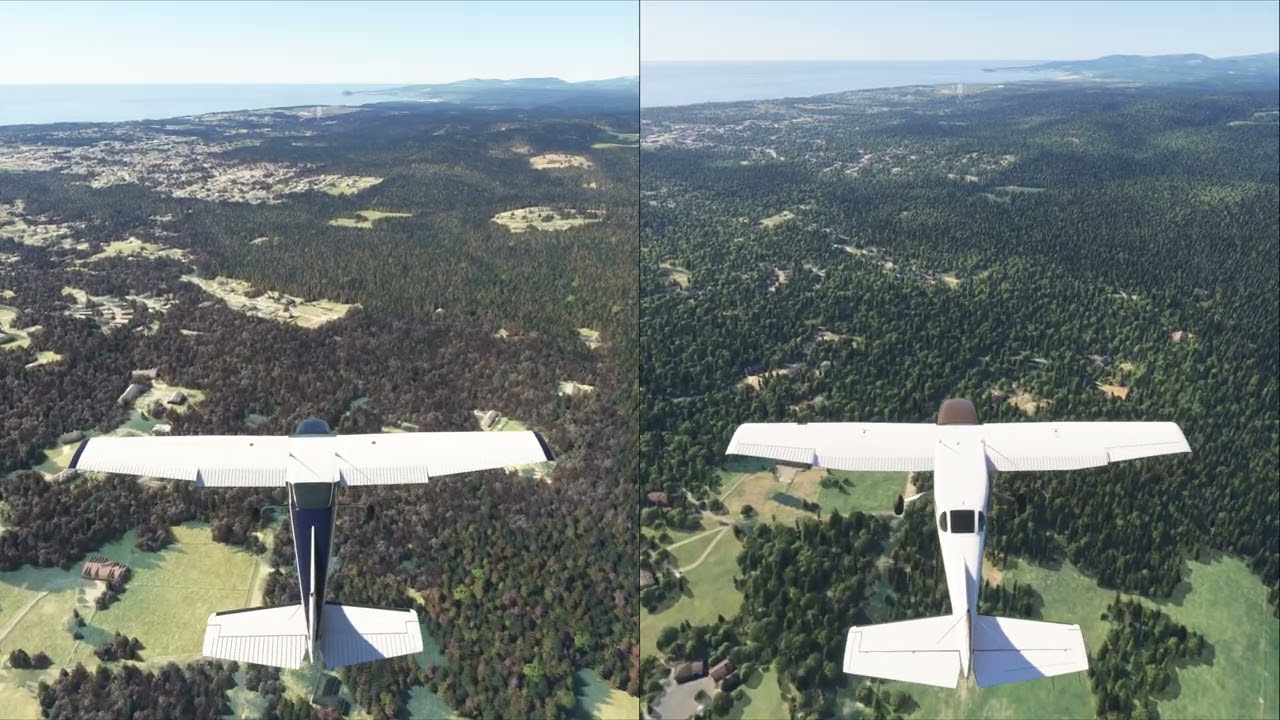
I made a comparison between 2020 and 2024 just for me in order to judge differences, but I want to share it. This is an ILS approach into KACV.
All traffic is off in both sims.
Trees and plants are at Medium in 2024.
Else all is Ultra.
Bijan Seasons in 2020.
This is a very subjective comparison as 2020 is in the configuration I use it and 2024 is vanilla.
Xbox here. Loaded up today. Keep getting errors of trouble accessing live air traffic.
Unrelated- but nothings changed/ improved. Still slow load times and blurry textures and missing 2020 content.