You turn this off in the MFD settings, it’s separate from the game’s in-world flight path visualization.
Found it thanks- Seems to be you have to turn off that setting in every aircraft variation of the G1000.
I’ve tried multiple key bindings to get it to feather, still no luck.
What I’ve also noticed it that if you shut the engine down from low idle- it will not feather, but if you shut it down from high idle it seems to feather, more trouble shooting required.
Can’t seem to find the CFG files, probably because it is all streamed now, my trick for 2020 with the king air, was edited the min feather rpm line in the CFG file, and boom-worked like a charm.
1 Like
Selection of some liveries on the Cargo version always provides CTD.
In general, the liveries of the Cargo and MedEvac variants get in each other’s way and are broken.
Please, consider voting this request for the beta range in turboprops.
It’s essential for the Caravan and other turboprops right now in FS24!
1 Like
Even with the fuel condition lever in low idle it gets out of control fast during taxi? Idle power with condition in low idle isn’t enough thrust to get the the real plane rolling and it’s barely enough to keep a ‘status quo’ pace during taxi most of the time.
1 Like
Maybe we could open a bug report about it. Without any doubt most of the turboprops are overpowered during taxi.
Although I think we should wait for the couple of promised updates before report more bugs.
I think it’s potentially the prop governor behavior- or at least it’s related. The props should be at a much finer blade angle and should be spinning much faster at low power settings. They should hit max RPM much earlier (requiring less torque) than they currently do.
It’s because 0% on your controller is Flight idle.
The do not let us set gorund idle as 0% right now
Whether or not ground idle is modeled properly has nothing to do with the issue of the prop governor schedule being completely bonkers. I’m on a trip right now so can’t check ingame but some diagnostic items of note would be ground idle fuel flow, ITT, and torque/rpm.
I think it’s part of it, because the beta range exist and it work fine in that range, the issue is that the beta range cannot be accessed directly through a controller like the honeycomb bravo because 0% on the controller stop at the gate between the Beta Range and the main range, which is flight idle.
If you use a keyboard instead, you can use the range (although it’s annoying), so the issue is not the absence of a beta range, but rather the fact that only one range is usable by a controller
What position exactly are you referring to when you say “flight idle”? There is no flight idle or ground idle position in the 208. There’s just idle, beta and reverse. Beta is not considered a ground idle. Ground idle I guess if you had to call it that would be condition lever to low, and power handle to idle. So if we want to get into it someone needs to hop in and observe/report back with the idle fuel flow and RPM at both low condition and high condition.
Flight idle is basically what the sim tooltip identified the “idle” position on the 208B throttle quadrant which is just above Beta range.
Ground idle is the position identified by the sim in Beta just before you get to reverse.
The way the sim act :
below “ground idle” = reverse
Between “Ground idle” and “Flight Idle” = Beta
Above “Flight Idle” = Forward Thrust
With gates between each other (no joke, to switch from Beta to Forward I had to use F4 so that it switch to the next range)
Try using the keyboard to control the throttle on the ground, you will see that the beta range exist and work
I guess what I was trying to say is that a “ground idle” is obtained by placing the condition lever in low, not by moving the power handle.
I agree,
My point is more that the beta range is there, present and working, but only accessible through a keyboard
I am curious though if someone is willing to post some numbers from the sim. I’m unable to access my sim PC until the weekend.
same for me, in VR i’ve 20 fps with c208 and with c172 move up 35 fps… 
When I am in 2D I can observe a strong performance degradation. the image starts to jerk as soon as I move the mouse and the image even freezes completely for several seconds
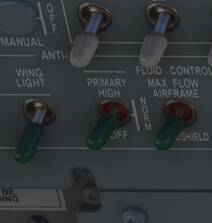
10/10 They finally fixed the Anti-Ice HORN!
1 Like
I don’t know that I ever experienced a working beta range on the 208. I configured my controls (Honeycomb Alpha and Bravo) through Spad.next last night for the 208 and it gave me the full lever range from max power through full reverse using a standard throttle axis assignment. Dropping into the beta range during a test flight last night was an exciting experience - rapid loss of airspeed and lift! I guess I need to better understand what the beta range is for.
The oscillations on autopilot are a positive sign, in my opinion. It may mean that the airplane aerodynamics has now become too realistic for the 1$ auto-flight system to stay ahead of.
1 Like