Great program, simple and effective.
Recommend it.
No problems installing or running on win 10.
Thanks for the heads up!
My only issue I’ve found so far is that if I try to do multiple missions in a row without exiting back to the world map, I can’t seem to complete the 2nd task because it never locates the parking area. It would be nice to jump from task to task without reloading (because I assume when you’re in the world map and select a parking spot, that’s something the app can detect?). But other than that it’s nice to have a light economy/mission addon and it works very well.
Oh wow, that’s the step I missed.
I can’t resize the app window in order to see the bottom part. Max the window do not solve the issue.
My screen resolution is 1360x768
NeoFly 1.3 is up!
I am going to dive in now. You might want to keep it in a separate folder if you are interested in continuing an existing career.
Here is the ReadMe:
See the getting started at neofly.net
Comme to the Discord for help : NeoFlyInstall:
Unzip the folder where you wan’t.Run:
Launch neofly.exeYou start as a freelancer bush pilot that works for NeoFly
You own just a Cessna.
Make a gerat career !Beta version 1.3 is now available:
New Features:
- Live Emergencies: Ability to find real world events near your location and generate a mission based on it.
- Aircraft Hangar is now available.
- Aircraft Market is now available.
- Improved Qualification system: Qualifications are not payed licenses anymore, it is a checkride mission to complete.
- Aircraft Management (Purchases, resells, repairs). The way you fly will impact the plane’s condition, you may experience surprises if you dont take care of your plane.
- Realism is not longer mandatory, but less XP will be rewarded.
Bug Fixes:
- No more issues with the parking detection at arrival!
- Improved airport detection to be more precise.
- Corrected vertical speed values.
- Added “No Parking break” button for planes missing this feature (Ie. Cub).
- Various minor bug fixes.
- HEY! No more parking bug!!!
User Interface:
- Added sliders.
- Ability to visualize destintion mission on map
- Added information on plane usage
- Ability to sort missions by type or level
- Added tab “Hangar”
I am looking forward to using this addon, however I am unable to get it to connect. I meet all the parameters - parked - engine off & whatnot -I try to connect in Neofly and it waits a bit — Then the message “unable to connect… Please start MSFS” .. etc …
I used 7 Zip to unpack – everything seems to there – I am not sure what I am missing – trying to a simple mail run from KLVS – I watched a few vids and followed everything they did – still not connecting
any suggestions?
Amazing that it is free.
I have the same problem, is your MSFS install in the default location or in another folder/drive?
I installed mine to my D: drive, I wonder if that might be the problem?
Extracted it to a separate drive - but same drive as MSFS installed on …I checked the weights , still no luck
I had FS on C and tried installing this to D, wouldn’t work at all, as soon as I put this on C it worked straight away. Maybe both need to be on the same drive?
I think the issue might be if MSFS is installed in a non default location.
I don’t think so. I have my FS installed on a dedicated gaming SSD (logical E:) and NeoFly is working fine. It is in a separate folder from FS (it doesn’t need to be in “Community”). Perhaps SimConnect is the issue? IDK if there is a test for it other than trying another add-on that requires it.
I tried a few drive locations and still no connection. I do use VFR MAP addon which runs great. As far as Simconnect, I don’t know anything about it. I just followed the instructions for Neo and unfortanely nothing I do is connecting it. Got the correct aircraft and mission – doing it all in sequence - used other yourtube vids for reference – seems like only a few people having this issue – could anything be revealed in the event viewer, or a log file? - sorry I don’t have a discord login account
I have lots of other apps using SimConnect without a problem, I did notice that NeoFly has its own SimConnect.dll in the NeoFly folder, so it doesn’t look like it’s using the default Simconnect.
thanks – I saw that as well (shrug)-- could it be a steam issue? such a bummer because it looks like a lot of fun
No, as mine is a MS Store version. I was thinking of emailing the developer, but haven’t gotten around to it yet.
seems VERY similar to onair
1 Like
Let me know if you do - I would like to know the fix - I fought the good fight but no joy. I am sure it will get addressed.
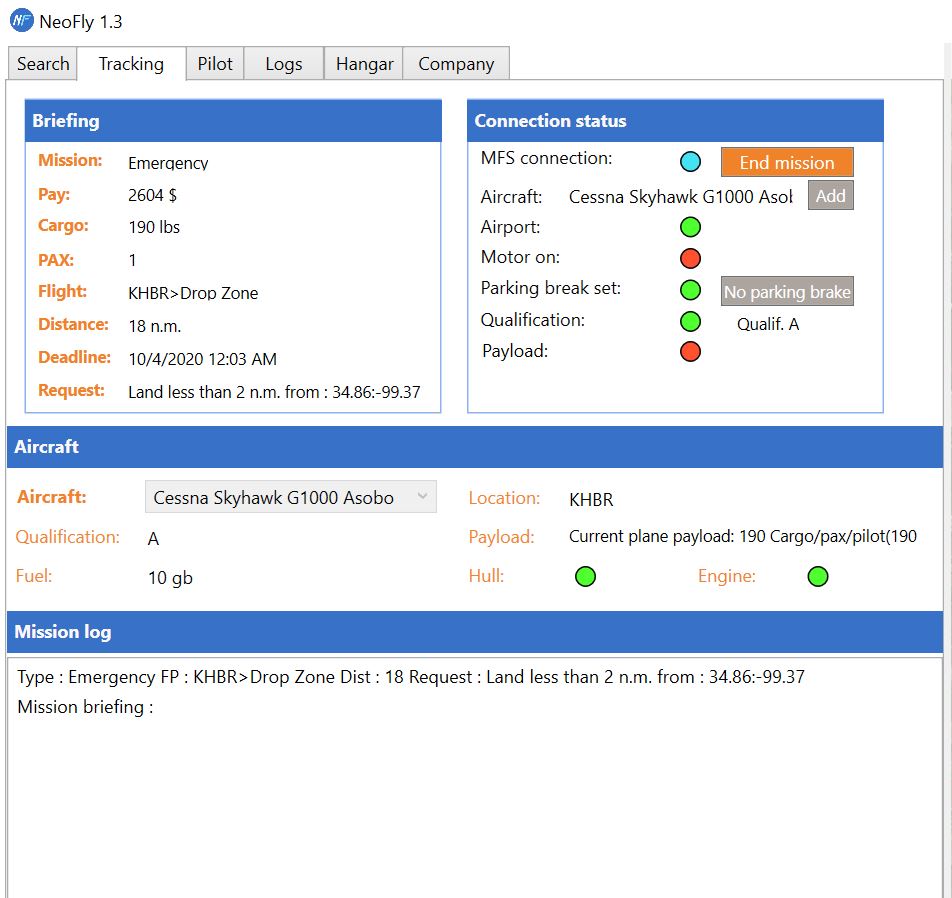
i start MFS2020, then choose the airport and start from a ramp, open neofly and choose the mission, i set my weight and cargo to the required 190lbs but no matter what i do it always shows cargo weight red. what am i doing wrong? including pictures of the mission i chose and i set my weight ingame as pilot and cargo combined weight as 190lbs
Did you get it going? May i ask what program you were using to extract?