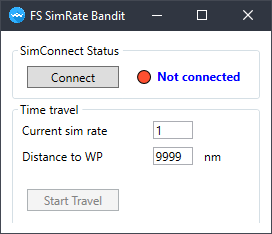
I use FsSimRateBandit it has Visual + audio sound simrate 1,2,3 etc
5 Likes
Playing by ear.
This is a truly essential feature.
2 Likes
Hello people
Since playing flight sim alot and doing long adventures and journeys, with little time in real life to do them, I use the great sim rate speed tool sometimes when not being amazed at the scenery.
One problem though, once you start using sim rate, its pretty difficult to understand what speed your at, “is this normal, x2 or half speed im playing in” I ask myself when 35,000 feet with only clouds in sight.
It would be great once you’ve entered into warp speed to have a little icon on the top corner to say what sim rate your currently at, so you can easily go back to real world speed, and not try land at 2x speed which is pretty difficult, as I know.
Cheers for reading and hopefully it could be a pretty quick feature to be implemented.
1 Like
Please please add this. It honestly sould be such a simple addition.
1 Like
I want to add my vote for this. As someone pointed out earlier, it was a readily accessible feature in the FSX menu. I don’t know why a couple of these convenience features couldn’t simply be added to the current menu. I sped up FSX for long distance flights when I was in the upper flight levels because I simply don’t have time in my life to sit through hours being steered by an FMC. This is a feature where the entertainment bang-for-the-buck should take precedence over as-real-as-it-gets.
This or/and button for simulation time reset. I would hope a reset button and added it to Simulation rate reset button.
1 Like
Yes ok; That exactly what I search to know.
Hello Asobo, can you add sim rate indicator when sim rate is not real time.
Sometimes on long flight I have no time to wait hours to arive to destination but also doesn’t want to use “teleport” option because during flight I want to take a look of scenery and make some screenshots.
But now when I incrase sim rate I have no clue at what rate I am. Indicator could be visible only when sim rate is incrased like it was in FSX.
3 Likes
i totally agree
I can’t believe we have to look at a cockpit clock to see how fast the sim is going. If the rate is not 1x, show it continuously on the screen. This is not rocket science.
3 Likes
Looks like it is more than rocket science.
That, and they should change the one that is called {Sim Rate} to “Sim Rate Reset”, then you have everything, Increase decrease, & Reset and a display for when it is above or below 1X How hard can that be? These are simple tasks to do, it’s not like they have to do something special to make the sim run at its normal rate again is it??
5 Likes
Indeed… And more ridiculous even, those functionalities were present,
among a bunch of other things, in FSX 14 YEARS AGO!
2 Likes
If I can permit to myself to intervene in the discussion, I should like ask where is this button to modifie the time of simulation ?
Wondering why till date the developer still have not looking into this sim rate indicator?
It is really really very confusing without it.
Is there a way to make known to the developer? Really hope this can be added soon.
Hi there normal sim rate would be 1 I guess thanks
Didn’t read the whole thread, but…
Some people never increase the Sim rate. And others use it all the time.
So, just make the Sim Rate Display available as an optional setting. Let users decide if they want it displayed or not.
I rarely use it, but it would be nice to hotkey the option on when making a change to verify the current rate and then hot Chi it off again to keep the screen cluttered.
1 Like
I use “fsSimRate Bandit”. It announces the simrate when it’s changed and shows it as well.
Go to Flightsim.to and download "ambitiouspilots-shiftzstats.
It will remind you of FSX…
Happy flying!
3 Likes