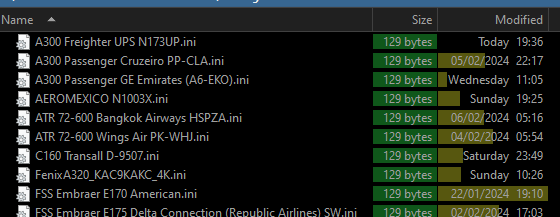
Tnx! Found it. I deleted the whole Realturb entry. Seems to work too.
Can at least start it manually 
Yeah, the A300 doesn’t seem to like it. I’ll try some GA A/C to see how they feel.
Tnx again.
Tnx! Found it. I deleted the whole Realturb entry. Seems to work too.
Can at least start it manually
Yeah, the A300 doesn’t seem to like it. I’ll try some GA A/C to see how they feel.
Tnx again.
There’s a new update released today with added functionality to the tray icon. I haven’t tried it yet but that sounds nice and might be the answer for using it with the A300…
Anyone able to save the state for different A/C?
Thought the point was it would load in what I have selected for an A/C: Like the A300 I’ve set to 60,60 and sound off - save aircraft config (or what it is called).
Each time I re-load back to the sims the values are back to 100,100,1(sound on).
At least make the awfull sound default to 0 .
It works for me. The problem is it saves the settings for a particular livery you’re using when saving the profile. I wish it applied the settings for the whole aircraft, no matter what livery.
Ok. Doesn’t work for me. Been using same FedEx livery (just have one) for the A300. Goes back to 100,100,1 all the time…
That folder is empty. I’ll try a reinstall. Tnx!
Edit-Yeah…seems like he’s using OneDrive to store the .ini files.
So if you don’t install it on OneDrive it wont be saved(ie must use default installation directory).
I used a local HDD for installation. This should be clearly stated somewhere imho
Tnx.
There’s a new version available on SimMarket, adding in-cloud turbulence. I can’t wait to try that.
I’m definitely going to check it out.
Looks like no 10-day trial, which is a bit disappointing.
But for $13.07 it’s worth a shot - especially considering the good reviews.
Yes I’m excited for this update with the cloud turbulence added. Can’t wait to try it out.
Have you tried the new in-cloud turbulence yet? What do you think about it?
“In-Cloud turbulence is another feature, which analyzes cloud density when flying into clouds, to provide dynamic turbulence effects. In this way, a certain cloud density is required for the effects to be present in the first place, allowing also for dynamic effects strength, again based on the cloud density.”
During yesterday’s live dev stream, it was admitted that the default MSFS in-cloud turbulence is reliant on cloud density and Seb acknowledged that live weather is drawing clouds too transparently.
With that in mind, RealTurb’s in-cloud turbulence is unlikely to occur when using live weather—certainly, I haven’t experienced it so far when using live weather.
I’m going to try with a weather preset and turn up the aerosol density to see if that triggers the effect.
It’s probably working a different way than Asobo’s turbulence because I tested some in-cloud flying yesterday and RealTurb really adds some shaking in the clouds. As far as I know CAT aren’t natively simulated by Asobo and yet RealTurb does. And there are addon aircraft with simulated weather radar (ok, it’s rather a “cloud radar”), so I guess it’s possible for third party software to detect clouds.
Tried the in-cloud turbulence in the Fenix.
I liked it. Small bumbs and some shaking. Nice to sit in the cabin and watch those wings flex/shake(not the most flexible wings in the A320 though) a bit.
GJ to the developer who listened to community regarding a settings tab as well!
This is dissapointing, I was about to purchase and download until I saw this. I always fly with live weather and I’m mostly interested in the cloud turbulence. (CBs should be dangerous!).
Also, how does this program fare with smaller GA aircraft? Hondajet, TBM850 or even smaller, the Comanche?
Can’t find in the documentation which MSFS turbulence setting to use to get the most of RealTurb.
MSFS setting seems to still have an impact even with RealTurb running.
If you read further in the thread you would realize that in-cloud turbulence works fine with RealTurb. No idea why you wouldn’t buy a product because of someone’s assumption and ignoring two posts with positive experience.
I’m so sorry. I should have read more. I never meant to go on one assumption it was just dissapointing to read his post. I should not have made that post. Thank you.
No worries. I just confirm that RealTurb’s CAT and in-cloud turbulence work very well but you need some fine-tuning in the program’s settings, especially if your primary focus is GA (it remembers your turbulence “strength” settings for each aircraft you fly).
But you might also consider waiting for the announced Active Sky FS which should bring the same features plus something extra…
mine seems to have installed as I can see it in the add remove programs - but where is it actually installing the files? (can’t see anything in the documents folder? - also should something be running in the tray when MSFS is running? (how can I tell if its running!)