+1 for me as well
Just re-downloaded 2020 didn’t remember this being a thing resized my 2020 UI to look crisp on my screen got sad couldn’t do it in 2024
So yes +1 from me as well
YES PLEASE, bring back the interface scaling option from MSFS2020! I’m on Xbox and the 32" 4K screen makes the cursor approx. 1cm big! In the map view almost half of the screen area is covered by panels. While flying the size of panels is annoyingly large.
1 Like
Oh mate it just scales with the tv I’m on a 55 and mouse be huge
1 Like
That mouse pointer scaling is hilarious…and also really sad at the same time.
How could they not see that when testing and think it’s not an issue?
1 Like
I know right the Xbox cursor if I’m using that is like twice the size of the mouse too
1 Like
Pic please. I need to see the big mouse pointer! It’s an aussie thing, after all😂
1 Like

Pretty handy if you have a massive living room!
Not so much when on a Sim rig tho
1 Like
It’s beautiful. So angular! Much pointy.
Please address this long-standing issue. It has been reported multiple times on the forum since launch, but it still hasn’t been resolved. On 43" monitors with 4K resolution, the interface causes several problems:
- It obstructs the overhead panel.
- Menus auto-close unexpectedly.
- It’s often impossible to select items.
This seems to stem from using the same UI design for both Xbox and PC, and the removal of the scaling options that were available in MSFS2020 has made things worse. MSFS2024 feels like a significant downgrade in this regard. Please bring back proper scaling support or provide a dedicated PC UI. This issue is seriously affecting usability.
6 Likes
What exactly is this?
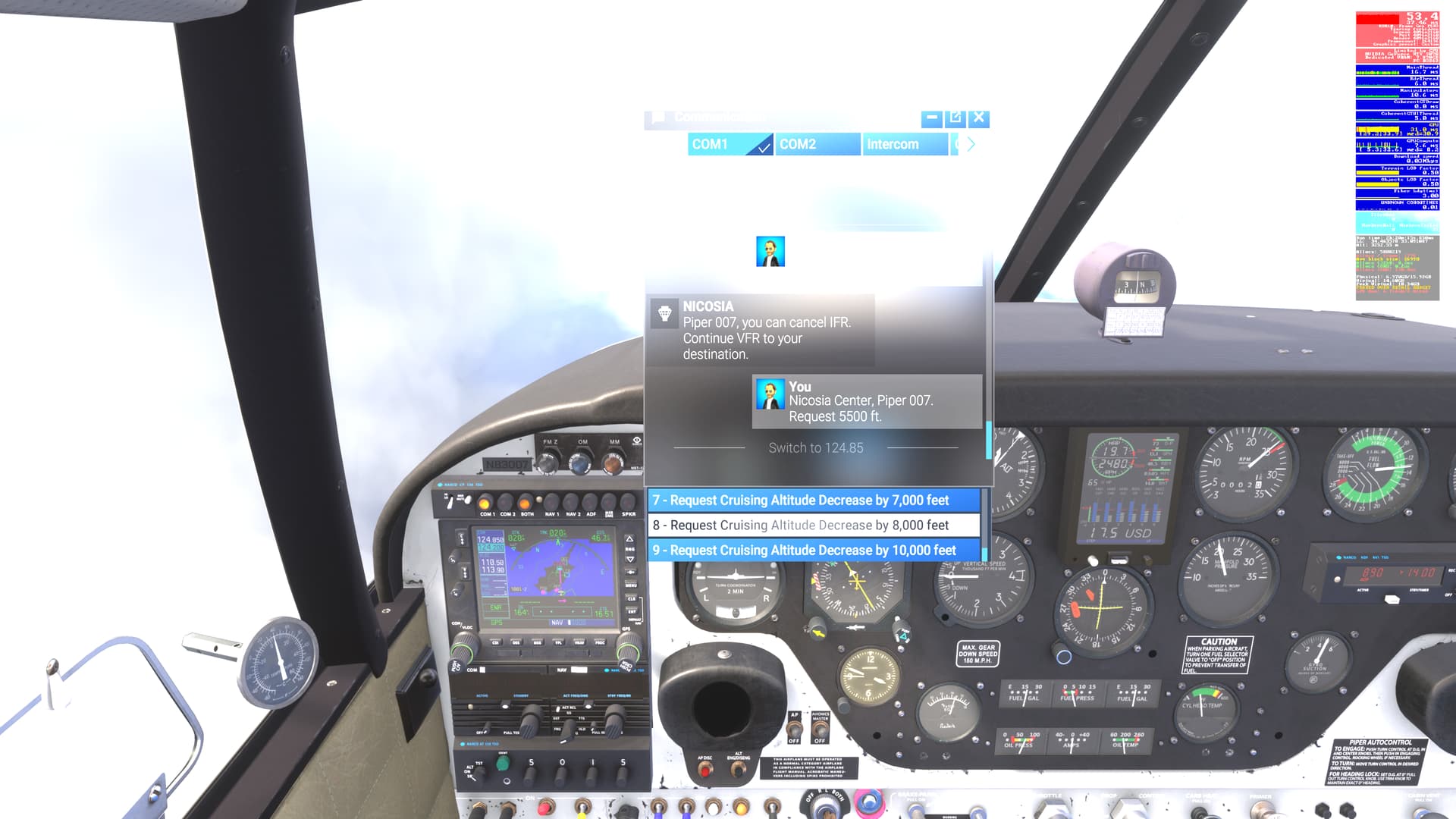
Yes please, I have a 55" TV and I sit 3 feet from it. There needs to be an interface scale option like in 2020! This is ridiculous. The ingame menus are HUGE! It looks ugly and options are sometimes truncated. There is so much space wasted using these huge fonts.
There’s also the issue of showing way too big atc history so that there is not enough space for the options. We should be able to resize the divider. Why do we have to scroll the options just showing 3 rows? Give us more lines!
4 Likes
This issue hasn’t even been logged as feedback or a bug — it’s simply being ignored.
Multiple posts have already been made about it:
- Wishlist: A UI scale option appropriate for a PC high resolution display
- Any UI scaling settings in MSFS2024
- Implement scaling of various glass panel ui elements
- Fix the UI - unnecessary eye-candy, arcade-feel, form over function, annoying - MSFS 2024
Is it possible to have this officially logged and tracked?
10 Likes
This is sorely needed. No idea why they removed it. Seems such an oversight.