Is someone else using a different livery as the standard white one with the working title? I tried to change yesterday the livery but I got a warning message that it was not compatible…
Wow! Thanks!
And if you are really into the WT CJ4 I’d highly recommend the WT Discord channel, you’ll find a treasure trove of information, tips, and help there
same problem but will all aircraft all frequencys play KSNS atis (for me it was caused by the working title GX mod
Read the original post.
Ok folks. After watching a multitude of YouTube videos and reading the Working Title guide to the CJ4, I come asking cap in hand for help.
Why am I unable to start this plane from cold and dark? The documentation states:
Starting the engines in the CJ4 is a very simple task. Once the BATTERY is on, it requires no other configuration other than simply pressing the L or R ENGINE STARTER button and then without delay, pressing the L or R ENGINE RUN/STOP switch. Once the ENGINE STARTER button has been pressed, the STOP indication under the button guard will disappear and once pressed, will switch to RUN indicating that the start process has been initiated.
Monitor the MFD for the following indications:
- STARTER indication on the MFD.
- N2 will begin to rise followed slowly by N1
- At 12% N2, IGN will be displayed next to the ITT indicator.
- After the ignition sequence begins, N1 and ITT will continue to rise before stabilizing at approx. 25% N1, 600°C ITT and the IGN indication will extinguish.
I’ve seen this done in videos. I’ve done it myself multiple times. The engines refuse to ignite. Ever. I’ve walked away rom the computer to do other stuff, came back 10 mins later, and nothing. The N2 is at about 25%, N1 at 4.8 as per this image:
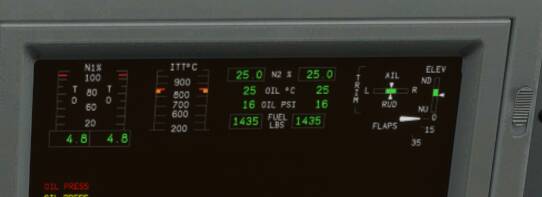
To be clear, I’ve never flown this plane until SU5. I tried a while back (starting on the runway already started), but due to performance issues, I was never able to break 10 fps in it, so never tried it again until now. Now, I’m able to get 30-ish fps and want to try it.
Ctl+E will start it up every time. But I can’t start it cold and dark myself.
What could I be doing wrong? Is this an SU5 issue I’m not aware of?
I have heard of issues like this when there was an axis mapped to the mixture control. The CJ4 has a FADEC that controls fuel flow but a mapped mixture control that is in the idle cutoff position will stop fuel flow and screw up the FADEC. That would explain why CTRL-E works. It will automatically set the mixture to full rich.
The run button will sometimes show “Run” by default and the engine won’t start until you click the button to clear its display and press it again to show run again. This has happened to me in the past and now I automatically press it multiple times to clear it and show run as part of my start routine. Maybe this will help you.
Problem solved with help from the WT Discord.
I already knew about mixture being an issue. I fly the TBM and DA62. I already know to unbind those things from a layout for any plane that doesn’t use it. You so much as look at the mixture setting too hard and it will shut down the engines.
Turns out I had a fuel pump bound to one of the switches on my throttle. Oddly, the fuel pump actually works with the mod. When I enable it, it will say FUEL BOOST PUMP in the CAS. dga is the one that suggested looking for other fuel-related bindings. Turns out that was it.
I appreciate the suggestions nonetheless guys. Thank you.
Do you have any add-ons in your Community folder? If yes, please remove and retest before posting.
N/A
Are you using Developer Mode or made changes in it?
NO
Brief description of the issue:
WT CJ4 Cannot display selected Navigraph Chart
Provide Screenshot(s)/video(s) of the issue encountered:
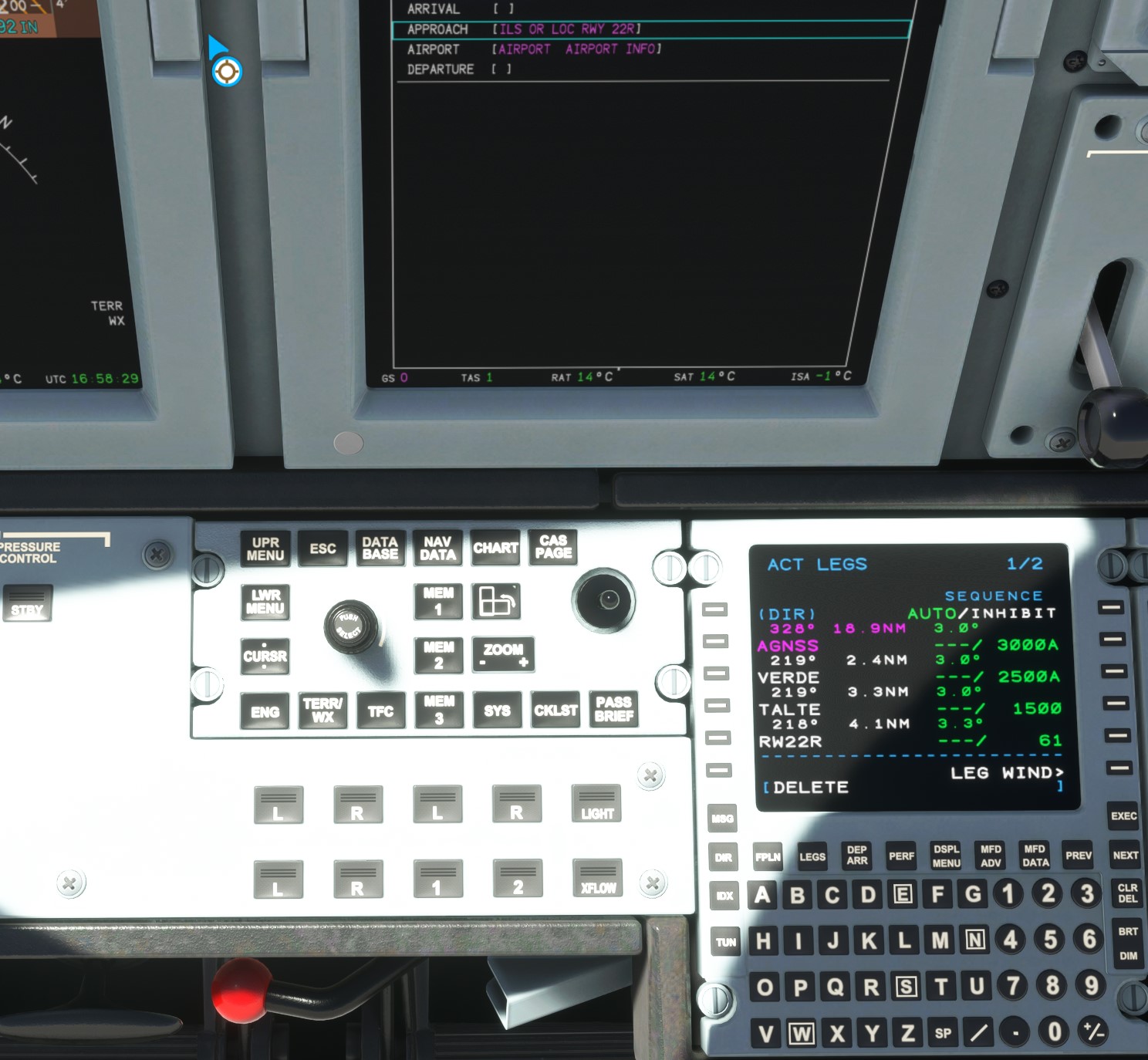
Detail steps to reproduce the issue encountered:
“DATA” button does not work. “Menu ADV” does work.
PC specs for those who want to assist (if not entered in your profile)
Build Version # when you first started experiencing this issue:
WT CJ4 Ver 12.6
Are you on the Steam or Microsoft Store version?
MS Store
Did you submit this to Zendesk? If so, what is your ticket #?NO
Can’t see from you pic…is the airport name entered in the charts section?
Well,
you have to press the Chart button
and then press the Lower Menu
Load the flight plan via IDX, Next, etc.
Rotate the Menu ADV dial to select the chart you want to display on the MFD
Click the Menu ADV dial top button which now says something different
to have the selected Chart display on the MFD
The selected Chart wiil now display on the MFD.
It has for hundreds of times with SU4
Moved to Working Title CJ4 Discussion Thread as Bugs & Issues is for stock sim problems only.
That is okay with me.
But the, Topic Title should not be for Ver 9.1 since this is Ver 12.6.
It should not have a Ver level indicated in the Topic Title.
Usually the Working Title team updates this thread as they increment the latest version, as well as providing updated Change Summaries. They may not have had time as NXi is the current priority. Nonetheless, this is the Master Thread for WT CJ4.
Okay. I accept that.
But, I don’t think any reader with v12.6 is going to respond to the post.
Or, any new reader to WT Cj4.
I agree to disagree.
Have you tried asking on their Discord channel? They have a dedicated CJ4 channel.
Yes.
need 10 chars
Yes you are right, But with SU5 the mouse button operations has changed. LMB wouldn’t work for select the charts. You have to use another mouse button (side) the push / pull which is programmed in the control panel.
Check out the WT Discord channel for details.