Thanks. I will.
Hi folks, still getting up to speed on this awesome mod. Question - I successfully completed my first IFR flight last night. All was well except two issues -
Throughout the entire flight, while on NAV mode, the jet was banked approx 5 degrees to the right. Fuel was balanced, I tried trimming, no luck. Any idea what the issue is?
Also, while on an RNAV approach, the jet never picked up the localiser, it stayed to the left of the runway and I had to hand fly the landing. Should the approach mode not pick up the ILS automatically?
Yeah, I started with the WT CJ4 tonight and have this exact same banking issue. The AP does not seem to able to catch the planned route, the plane is bankin the whole time but does not actually turn anywhere.
Hi Guys,
I have the problem in the Cj4 when i am in the cruze flight that the air sounds like a deep human breath. That sounds like a deep in and out human breath. Do you have the same issue? I use the Mod of working titles.
regards Legendsy
Do you have any other Mods installed? I would try removing all the others except for Working Title CJ4, and make sure you have the latest version.
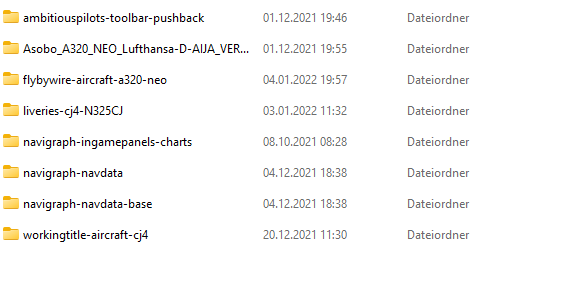
I haven’t heard this sound effect before, and I’ve been flying the CJ4 a lot recently. I don’t see anything too suspect in your Community Mods, but I suggest removing everything temporarily except Navigraph folders and the WT CJ4 and see what happens.
ok i will try this. thanks for your answere
I thinks that are my Headphone because of i got the same issue without any mods and in xplane. So i will buy new ones
Maybe first check that there isn’t a setting that allows you to hear what the built-in mic picks up.
Perhaps disable the built-in mic, as a test, to see if you still pick up your breathing.
Thanks for the Information. I tested to disable the microphone completly. And the Sound issue seems to be gone. i dont use the mic usually.
You could therefore just leave it disabled or you could look for that option i mentioned.
Which headset do you have?
i have the Astro A50. i have checked first that the built in sound is disabled in the software from astro. but the issue was still there. first when i disabnled the mic in the windows systemcontrol menu. Then was the issue gone.
From the A50 manual, " Microphone: The A50 fixed microphone operates when in the
down/forward position. To activate the microphone’s mute
feature, simply swing the microphone arm up to the vertical
(12 o’clock) position, where the microphone will click into place."
Using the mute feature might save you having to reconfigure the headset in windows???
Alternatively, on the ‘Listen’ tab of your microphone settings in Windows, try clearing the ‘Listen to this device’ checkbox, if it is set.
That should stop the sounds “heard” by your mic being sent to the headphones.
The mic is and was always in the upper position(12 o’clock) But i have solve it i think. i set all Frequencies in the Astro Controll page to 0 Mhz and the issue seems to be gone. I think trought the amplification of the Frequencis these triggered the issue.
hello, with the mod installed, can I create and load a flight plan from the main menu? or do I need to be on the plane to create-import(simbrief) a flight plan from the FMC? Like CRJ
Just go to MCDU, IDX → NEXT → ROUTE MENU → FPLN RECALL (GAME).
To quote the official documentation from WT (ref. Working Title CJ4 User Guide v0.12.13 - Google Docs):
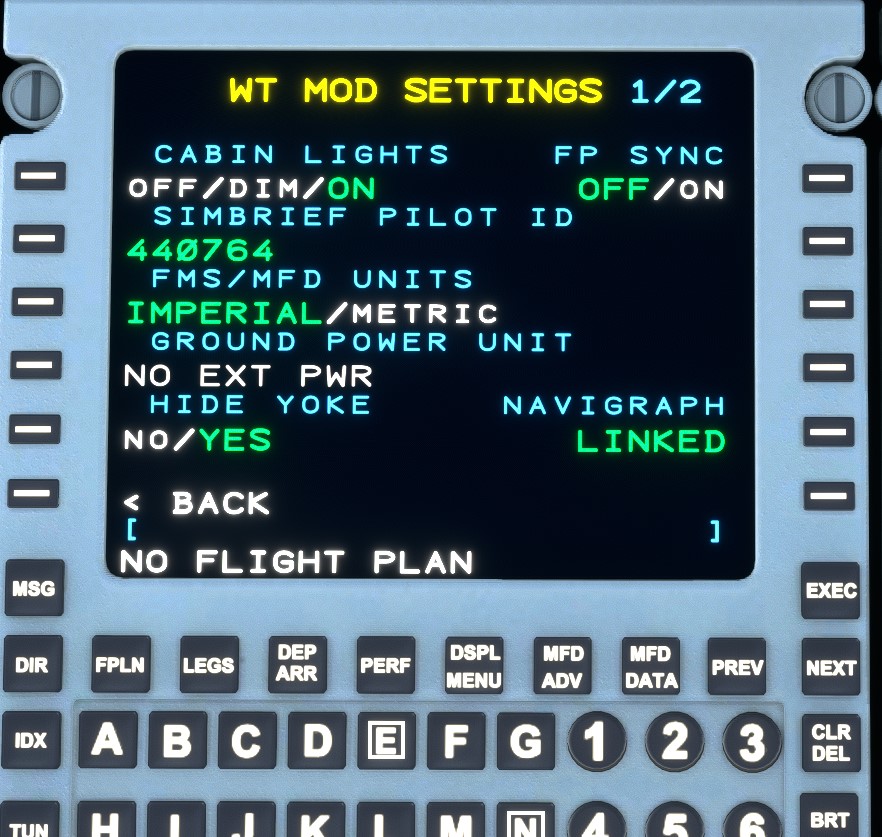
Also if you go to IDX page in the MCDU, then NEXT, then MOD SET, you’ll see the following option:
- FP SYNC - Synchronizes to the MSFS flight plan from your FMS flight plan when toggled ON for use with in-game ATC. The MSFS planner is fragile so this may lead to undesirable consequences.
But there are known issues:
Flight Plan Synchronization Between the Game and FMS
- You can still “file” your flight plan to ATC by entering it in the world map of MSFS and it will remain visible to ATC/VFR.
- To load the plan into the FMS you can either enter it manually or use the FPLN RECALL (GAME/SB) option in IDX → PAGE2 → ROUTE MENU
- Due to the increased accuracy and capabilities of the FMC managed flight plan, you may find that the sync to the game does not always work as expected or does not reflect the FMC flight plan.
Personally I’ve logged hundreds of hours in the WT CJ4 and I’ve never used the ingame flight planner. I always prefer to go with SimBrief or even Little Navmap (where I obviously have to insert all legs manually).
For @AccusingChalk65 :
Note that you need to have created the Flight Plan in Simbrief before doing this step.
Note also that I have been using the FS2020 Flight Planner (World Map) for years and have never had FP Sync set to “On”.
Anyone know if WT plans anymore updates to the CJ4? I know they’re focusing on the NXi mostly, and it’s been a while since the latest CJ4 release.