Since yeterday I have not been able to get the update. When I start the game I am not prompted for any updates and the game just starts and runs as usual. I’m currently running version 1.21.13.0. I logged out of my X Box account and logged back in. Same thing. In the game if I sign out of my account in the upper right and then attempt to sign back in I get a box that says “We couldn’t sign you into X Box Live. Try again later.” However, if I exit the game and go into the Microsft Store and click on my X Box app I am signed in. If I restart the game I am also signed in and the game runs as usual. I never had any previous issues with getting the updates. Any Ideas would be appreciated. One other question - is “X Box” and “X Box Live” the same thing? Thanks. UPDATE - I uninstalled the game and attempted to reinstall but I immediately get an error message at 0% progress and it won’t start the install. Very frustrating as I really never had any issues previously with the game.
Yep Xbox live is just the name of the online Xbox services for PC and Xbox.
Daft question, you say you go to the store to click on the Xbox app… does the Xbox app no show up in the list of installed programs in your start menu?
Also, are all of the store apps up to date? If you go into the store and click on the 3 dots in the top right hand side and check for updates and make sure everything is up to date… it needs gaming services to be up to date which is in here.
The X Box app does show up and is installed and I am logged into it. All of the store apps are up to date. I uninstalled the game and tried to reinstall but I immediately get an error message at 0% progress and it won’t start the install.
Having the same issue: I literally can’t find the update. I am still running 1.21.13.
- Installed EVERY option update using the in-game the Content Manager
- No update pushed in-game.
- No updates shown in MS Store (“Premium Deluxe Edition” has a button which says “Install from Xbox App”
- No updates shown in XBOX App
- All Windows 10 updates installed. All drivers updated. Gaming Services is (I think) up to date.
ANITIX87 - I uninstalled the game and when I attempted to reinstall I get an error message at 0% saying there is a problem and it won’t start the new install. Not happy about this.
Start > settings > apps
Click gaming services > advanced options.
Terminate > repair > reset
Restart PC
Start > settings > apps
Click Xbox Live > advanced options.
Terminate > reset
Restart PC
Unfortunately, this did not work for me. Neither did uninstalling and re-installing the XBOX App.
Didn’t work for me either, but thankls anyway
Rob
What about xbox insider hub app and msfs?
You mean Repair/Reset MSFS itself from the Settings menu?
Nope.
Are you participating in beta? (in the past)
No, I wasn’t in the Beta.
Come to think of it I had signed up for the Beta a while back and then tried to opt out but some reason I couldn’t. I don’t recall where it was where I initially signed up. Would that have anything to do with it?
I uninstalled the game and when I try to reinstall via the XBox app I am getting the error message 0x80070424 and it won’t start the download. I don’t know what else to try.
Probably smth is wrong with windows services.
Try
Click start > options > privacy > diagnostics & feedback
enable - optional diagnostic data
After that go to update and security > troubleshoot > additional troubleshooters
Click Windows update > run the troubleshooter and be patient 
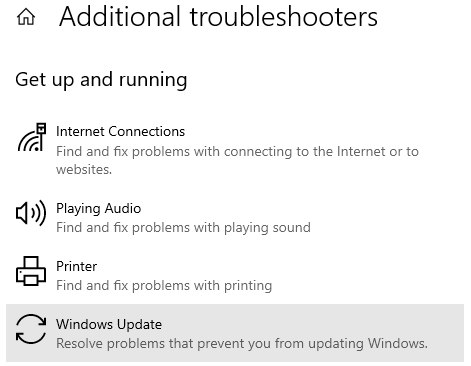
Next step - scroll down and click windows store apps > run the troubleshooter
Restart PC
If doesn’t help
try
In windows seacrh bar type CMD
Right-click command prompt and select run as administrator
Copy the command below and paste into CMD. One by one and press Enter.
(right-click to paste into cmd)
net stop wuauserv
net stop cryptSvc
net stop bits
net stop msiserver
Ren C:\Windows\SoftwareDistribution SoftwareDistribution.old
Ren C:\Windows\System32\catroot2 Catroot2.old
net start wuauserv
net start cryptSvc
net start bits
net start msiserver
Restart PC and install MSFS.
Tried all of those and still get that same error message posted above.
Ok - dont waste your time mate
https://www.itpro.com/operating-systems/microsoft-windows/358036/how-to-reinstall-windows-10-without-losing-data
I’m trying everything you posted for my awful issues. . .
Doing everything I can before pulling the trigger on a Win reload. Thanks for all the pointers!
All is well again. I uninstalled Gaming Services using Windows PowerShell and reinstalled it and that fixed everything. Thanks all for your assistance. Much appreciated.
- In the Windows search bar, type Windows PowerShell
- In the menu, select “Run as administrator”
- In the Administrator: Windows PowerShell screen, type the following command and press Enter:
get-appxpackage Microsoft.GamingServices | remove-AppxPackage -allusers
- In the same window, type the following command and press Enter:
start ms-windows-store://pdp/?productid=9MWPM2CQNLHN
- Click Get to install Gaming Services (select Yes if you receive the User Account Control (UAC) prompt)
- Restart your device