I haven’t noticed any performance loss
But then again I have it locked at 30. So it’s possible there is, but I’m just not seeing it.
I don’t know which setting in my bios I configured, and there were quite a few, that I adjusted while also deleting unwanted files in my C folder which went from 130 GB remaining back up to 450 GB available in my 2TB SSD. Then I enabled performance in my Samsung SSD app. It’s like I have a brand new sim and or PC. Much more smooth. Have everything on default ultra, 300 TLOD 200 OLOD and batc at low settings. Tv is Sony 55” 4K. I was actually able to land butter at KLAX and down the center line which means 0 stutters at landing. Still get the panning stutters not as bad but you did say there’s some regression in this build. So hoping for new build to see if it improves
1 Like
Yes, BIOS settings are very important - we remind simmers about that from time to time. If you’d like to add anything about BIOS or share the settings that worked for you, feel free to join the topic linked below.
https://forums.flightsimulator.com/t/optimizing-bios-for-msfs-2020-2024-tips-advice-and-discussion/
You’ll find a few enthusiasts there who like digging into this kind of stuff.
1 Like
I have a Movement problems in the cockpit.
In this beta
Is it reported?
Hi again Cuckoo, I know that I’ve been in your position a few times with FS2024! See TenPatrol’s post has the correct link to report your issue -
If you do feel inclined to fill in a report click on “New Topic” - this is what the devs need much more than the posts in here, but they do look in here also
With your in-game settings I imagine you won’t really be pushing-the-envelope so to speak, so my honest advice would be to simply go back to SU 4 & just enjoy your flying again until the SU 5 goes public in a couple of months or so?! - quite a few bods actually do this as they find the Beta version isn’t for them
Personally I got fed up with the night time artifacts around the cockpit windows that the 9070 XT suffered from, & enrolled in the Beta ..but it’s not all plain-sailing in SU 5, as there just are unusual/hard to define glitches coming up most of the time..
For instance my Control profiles are being set back to default each time I start the sim, but I’ve got used to that & have to remember to re-set them before each session to “My new profile..” (still the odd toggle setting on my X56 throttle needs to be reset ..but hey ho - it’s a very complex sim!!
Hope this helps - it’s more of an over-view really 
1 Like
Have a look at this thread, might be of help - Cockpit camera drift



I am still only seeing the beta version of 5 March in the steam client, is this normal? I rolled back to normal and back to beta and it is still only the 5 March version …
Switch to windowed mode. Than the version number is shown in the title bar.
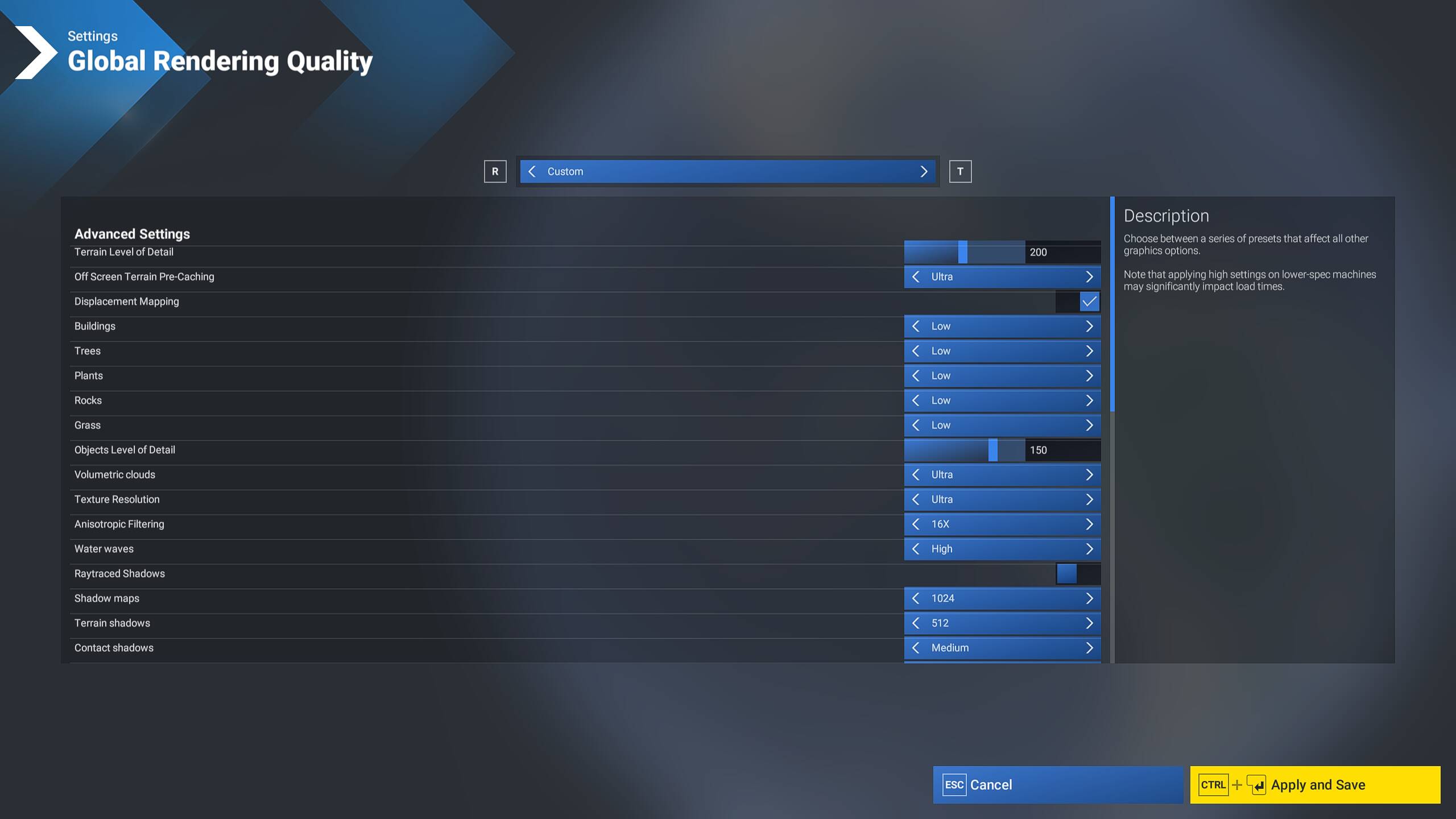
You have Max Frame Rate of 80, then 4x Frame Generation, seeking 320 FPS…?
I would suggest trying Max Frame Rate of 30 and 2x Frame Gen seeking 60 FPS as a test… If smooth, that might allow you to increase graphics settings.
Also I suggest try reducing Off Screen Terrain Pre-Caching by 1 or 2 steps, I think that setting is not doing what it claims to do, and may have negative effect if your VRAM is full.
2 Likes
I will try it. The reason the the settings were so low is it seems that no matter how I set them I get the same frame rates. So I was trying to run that down.
When there is an issue / confusion with that, I recommend checking a few things:
- Check Windows > Display > Advanced > Refresh Rate
- Check NVIDIA Control Panel > Monitor Resolution > Refresh Rate, and also check if using Fixed or GSync / VRR?
- In MSFS temporarily Disable Frame Generation and Frame Cap, just to see what the card is producing natively in your chosen aircraft / location / graphics settings.
- Then consider the frame cap and frame gen. In general I think if you can get a stable 60 FPS (with or without FG), that leaves processing room for increasing graphics settings, rather than just more FPS, I think.
2 Likes
I’ve done some testing on this and the setting does appear to be working. You can easily verify this by enabling the FPS counter in Dev tools and keep an eye on the Rolling Cache read speed while panning. Set the Off Screen pre-caching to Ultra. Sit in the cockpit and pan from 90 degrees left to 90 degrees right. Keep going back and forth while keeping an eye on the Rolling Cache read speed. You shoud see readings from 0 to maybe 50 Mbps.
Now change the pre-caching from Ultra to Low and repeat the same test. You will now see speeds well into the 100’s of Mbps. In my test it actual hit 1.4 Gbps read.
Clearly, it’s caching much less details when set to low requiring more reads from the Rolling Cache. It does free up Vram, but at a cost of more RC reads.
This is a good reason why its important to have your Rolling cache on a very fast drive and have its location excluded from AV scanning.
2 Likes
So does that mean it “pre-loads” from cache on disk to memory (assuming VRAM)? My question would be, does it negatively affect performance by trying to use too much VRAM if/when VRAM is getting full and there’s not much room left?
1 Like
I think that’s exactly it, at least in my case. I see more stutters when set to High/Ultra than when set to low. But more stuttering while panning at low. It’s a trade-off and up to the user/system which way the want to go. My vram is 1-2 GBs less when going from Ultra to Low.
Yes, and when I open HWInfo and watch the amount of data sloshing around between RAM, VRAM, and Virtual Memory, it’s 10s of GB/s, so the stutters are somewhere in managing those data transfer surges.
2 Likes
I really hope we see some updates for the A310 in this beta and SU
5 Likes
Hello @NikitaSaxon,
The most recent beta build is 1.7.10.0 which released on March 9, and the previous beta build prior to that one was 1.7.9.0 which released on March 3. There is no March 5 version. Can you post what build number you are currently running? It should be 1.7.10.0 if you have the latest SU5 beta build.
Thanks,
MSFS Team
2 Likes
