The first company to bring an affordable consumer/enthusiast level headset to market that has the resolution of the G2 with the field of view of the Index will hit gold I think. Clearly someone is going to do it. I guess it’ll probably be Valve themselves when they release a follow up to the Index.
What makes Quest 2 so special besides the price?
It does have a very decent spec for the price. Plus for those that want to play other games besides flight sim it works as a stand alone headset. Which is a great feature as of itself.
My of us would opt for the G2 if was actually easy to come by but for the time being its not going easily bought off the shelf sadly.
If the resolution of Reverb was stretched to the max Index fov, it would lead to a less sharp image. So you would need even higher res panels and therefore even more hardware power. The Lcd screens of Reverb are smaller and it’s not easy to get higher fov out of them.
Yeah all thats true but you can see the direction the hardware is heading, and it’ll probably get there in the next couple of years.
But there is also a lot of negative with the G2 so far. I bought both Q2 and G2. Unfortunately the G2 has backorder due so who knows when i will get mines. The Quest 2 I should be receiving it this week . I’ve seen reviews from actual Beta tester for the G2 and its great but has a few negative also. I don’t regret my purchase for the G2 ,but the quest 2 can also be pretty amazing base on the reviews i’ve seen so far for this sim.
Quest 2 is much easier to come by for sure. I was holding out for a G2 but I’m glad I decided jump right in with the Quest 2 so I can enjoy VR in the sim now and not in a few months time.
Yeah by the sounds of things the G2 isn’t the perfect headset for everyone and it definitely has its faults. I’d love to try one though just to see how big a difference there is with the Quest 2. As far as FS2020 is concerned it does sound like its a noticeably better headset.
I bought the G2 with hopes that Asobo will improve VR in the future

Okay cool I am going to try that out. Currently I am trying to fix my sound. Previously, my headset would switch automatically from the computer speakers to the quest 2 headset when I enabled VR in game but it’s no longer doing that :(. Worried I might have to reinstall the software to get this to work again.
Your question reminds me of the first time I tried VR. That was with XPlane 11, and the Zibo 737. I was blown away. My jaw dropped so hard on the floor it had to be excavated by 7 excavators daisy-chained to each other XD. Being a hard-core TrackIR user, I couldn’t imagine anything that could be better, and in my myopic mind, coupled with the ■■■■■■ videos posted on YT, that looked so ugly and fish-eyed (in those days), I couldn’t imagine this ever beating trackIR.
Then I tried it on… Everything was life-sized, the cockpit was so big, and I could swear I was in a real aircraft. First thing I noticed was that unlike trackIR, where you moved your head and the screen also moved, in VR the cockpit is solidly in place, and it’s just you moving, and the movement is 1:1. You look behind you and everything that should be behind you in the cockpit is where it would be in real life. If you get up from your seat, then you’ll see the cockpit as though you were standing up inside a cockpit. You could stand by the entry door, and see the two pilot seats as low as they would be if you were in the cockpit standing behind the seats!
Then I made another observation. With a flat monitor, everything is shrunk. Take a look at the threshold bars on the runway, they look so short, and it also appears like you’re going much slower than IRL, but done your VR headset and you see those bars in their correct length, which is in most cases as long or even longer than the length of the aircraft depending on which aircraft it is. Also, the speed is correct. When you cross the threshold at 120 knots, you know you’re going 120 knots, and not “walking”.
Look out of the side window at 30,000 feet and you’ll see how far below you the ground is. You’ll know that you’re indeed very high. Also clouds that are at 10,000 feet appear very far below you, not just under, like it looks on a flat monitor screen. Come to Innsbruck and OMG! You’ll see that although the airport is a relatively small airport, it’s actually bigger than it appears and the runway is actually about a mile+ long.
Then I went to the outside view and the plane is just so HUUUUGe, and it’s just a 737-800! If you walk underneath it you have to look up to see the passenger door. Everything is real life size more or less.
@FlightSim340 I’d like to hear of your experience when you finally use VR. Do tell if my description was on point or exaggerated 
I should receive the Q2 this week hopefully. I’m very excited to try VR for the first time. I’ve seen users mention that it almost feels like you can touch the cockpit button and switches. I remember when first tried Track IR I had a similar feel when taking off on a C172. I know VR is on a whole different level compare to track ir. In the past, I always judge VR by some youtube videos that often look kind of jerky the way the camera moves as the user moves his head in a different direction. A friend of mine told me that’s not how you see things in VR it’s just how it’s recorded. So that’s when my curiosity started to build up. Then watching some folks who never tried VR in the past so amazed by it. An also people like yourself sharing your experience just got me to press the Buy Now button when it comes to VR. And not only for MFS but for other games also. That’s another reason I said yes for the Q2. Another concern that was clear up by my friend was resolution. I am use to 4k on 55’UHD TV, so clarity was one of my big concern. Then my good old friend Jim told me you do need all that resolution when your eyes see all the details very close to you. Sure you need good clarity of your VC display to be able to see the gauges more clearly.But when looking at your surrounding you don’t need 4k resolution to be captivated by all the details in VR.
[I’ve posted the following in another discussion but I believe it is relevant here instead]
The Index is a great headset overall and is working fine with FS2020 as long as you take care of some low level details. This should get you started: My 2070 SUPER VR settings and suggestions (Index - SteamVR)
Besides, even if the Index has a 1440x1600 panel “only” (compared to 2160x2160 of the G2), I’ve been also trying pushing the Index far beyond my test system video card and I must admit at 200% SteamVR SS*, it was nearly allowing me reading EFIS screens as easily as with the G2. The advantage with the G2 is that I can do it without much SS and with my current test system hardware. With a 2080TI you really should explore pushing the Index in this direction, it is stellar. (it is starting to be close to the G2 at 150% - yes you can do the math and see it is close to G2 but the reason has more to do with Nyquist in my opinion that just pure resolution, hence 150%).
There are key differences between the Index and the G2 beyond panel resolution which makes it hard to choose one. I personally prefer the Index offering as a whole, because it is really a solid piece of headset compared to the G2 (plastic, straps, etc..), it is more immersive thanks to the wider FOV, it has eye relief adjustment which helps depending on your vision, it has lots of controls (luma, RGB, refresh rates etc…). Also in flying a lot lately with the G2 and the Index, I realize what is probably better with the Index is not just the FOV but the vertical FOV, especially with aircraft. I find it more immersive because you are literally viewing from toes to head in one go. Tracking is unsurpassed in precision, stability and reactivity (lighthouse vs inside-out - it really is so evident when having the 2 to compare). And once you try the Knuckles and see how this feels natural using them…
The ideal headset to me would be the Index with the G2 panels and the Pimax Artisan horizontal FOV. It will have a pixel density between the Index and the G2 and all what makes the Index probably the bet overall headset for VR on the market today still.
To the question will I return my G2: I’m seriously weighting the idea, but for now I can finally run the G2 at 90fps/30hz with Reproj. and this make it a compelling advantage still. Very hard to decide although I don’t need to return it either in any case, but something is bugging me not keeping it in the long run and I don’t know whether it is because the Index is so good overall, or because the G2 has so many limitations compared to.
*I don’t remember if I was using FS2020 or SteamVR SS for this one, I’ll let you try out!
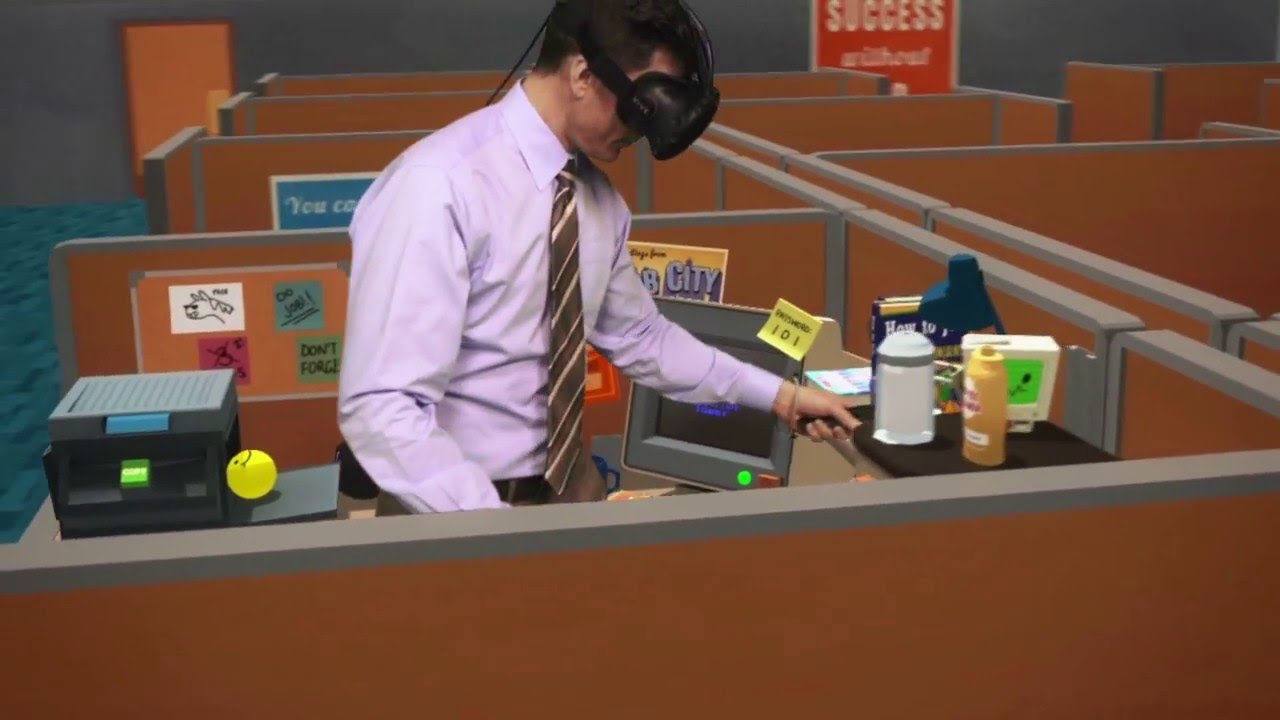
To get an impression what VR is like, don´t watch these 2d captured videos of one headset screen only, better watch some of these mixed reality (do not confuse with windows mixed reality) videos, they produce with a green screen setup like this one:
Finally, the quest 2 has arrived today. Now, where do I begin? I’m still waiting on my G2 but won’t expect it any time soon.
Probably searching the forum with “quest2” as a keyword, eventually open a new discussion so that this one stays on topic?
Connect the Q2 to your pc with the 1080ti via the link cable. Get to the Oculus Dash, if your there Great step 1 sorted. Which version of msfs2020 have you got? If it’s direct from MS I can’t help but if it’s Steam then there are a few interesting things you can do. I’ll wait to hear back.
Maybe check this page:
And watch this video:
Hi i got MS Store version .